
pengenalan
This manual provides detailed instructions for the operation and maintenance of your Casio DBC-611-1DF Men's Silver Tone 25 Memory Calculator Databank Watch. Please read this manual thoroughly to ensure proper use and to fully utilize all features of your watch.

Depan view of the Casio DBC-611-1DF Databank Watch, displaying the digital time and calculator keypad.
Persediaan
Menetapkan Masa dan Tarikh
- Dalam Mod Penjagaan Masa, tekan butang SESUAIKAN button (top left) until the seconds start to flash. This indicates the setting mode.
- Tekan ke MODE button (bottom left) to cycle through the settings: seconds, hour, minutes, year, month, day.
- Use the numeric keypad (calculator buttons) to input the correct values for each setting. For example, to set the hour, press the corresponding number on the keypad.
- Untuk bertukar antara format 12 jam dan 24 jam, tekan butang PM button (bottom left of keypad) while the hour setting is flashing.
- Setelah semua tetapan dilaraskan, tekan butang SESUAIKAN butang sekali lagi untuk keluar dari mod tetapan.
Melaraskan Band
The watch features an adjustable metal band. To adjust the length, locate the clasp and use a small flathead tool to lift the locking tab. Slide the clasp along the band to the desired position, then press the tab down firmly to secure it. Ensure the clasp is securely fastened before wearing.
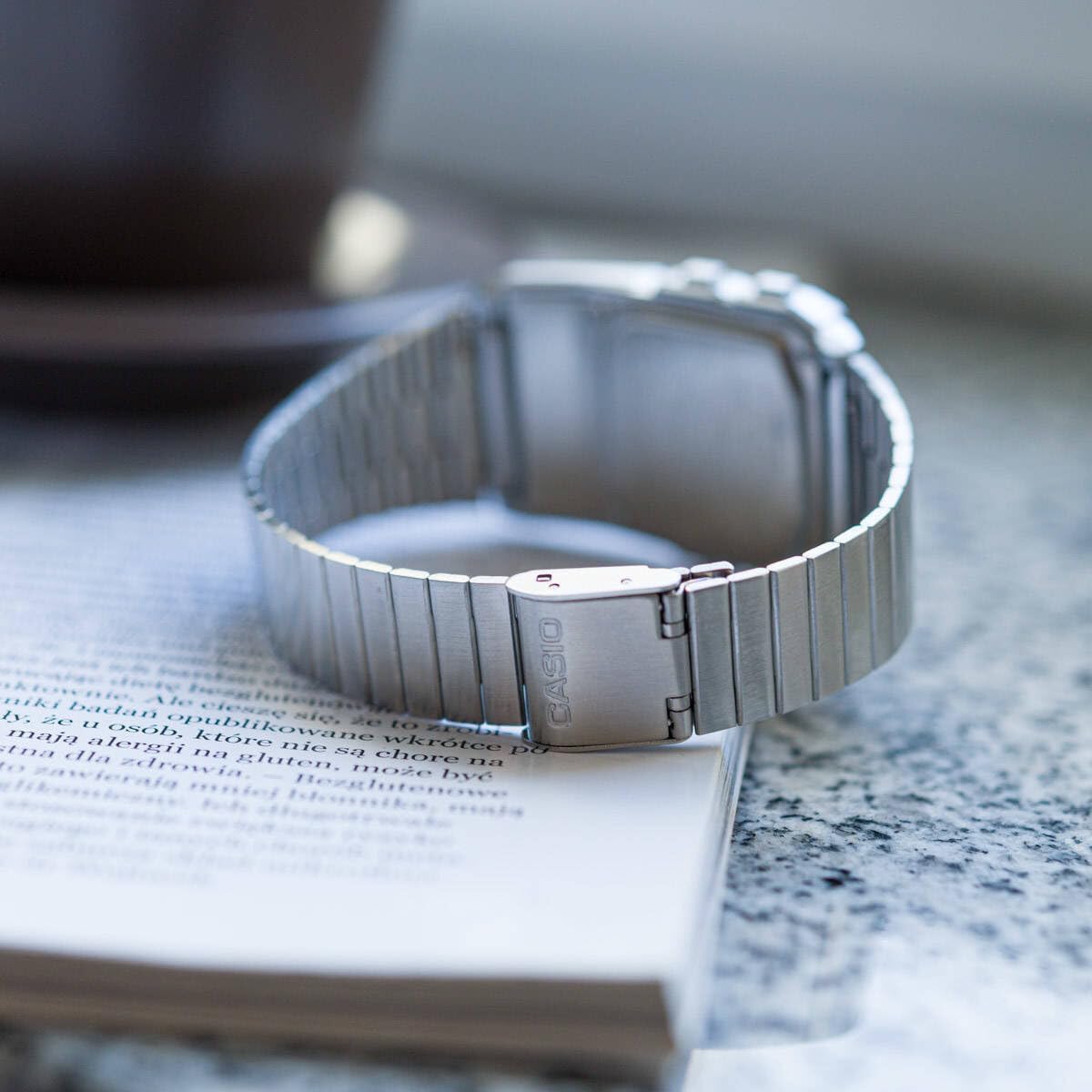
belakang view of the watch, showing the adjustable metal clasp for band sizing.
Arahan Operasi
Navigasi Mod
Tekan ke MODE button (bottom left) to cycle through the different modes:
- Mod Penjagaan Masa: Memaparkan masa, tarikh dan hari semasa dalam minggu.
- Telememo Mode: Stores up to 25 sets of name and telephone number data.
- Calculator Mode: Performs basic arithmetic calculations.
- Mod Jam Randik: Measures elapsed time, split times, and 1st-2nd place times.
- Mod Dwi Masa: Displays the current time in a different time zone.
- Mod Penggera: Sets up to 5 daily alarms and an hourlisyarat masa y.
Menggunakan Kalkulator
In Calculator Mode, use the numeric keypad to input numbers and perform operations. The display supports 8 digits. Press the AC button (top right of keypad) to clear the current entry.
Telememo Function
To enter or recall data in Telememo Mode:
- Navigate to Telememo Mode.
- Tekan ke SESUAIKAN button to enter data input mode.
- Use the numeric keypad to enter numbers. Use the RUANG button for spaces.
- Tekan SESUAIKAN untuk menyimpan kemasukan.
- Gunakan TEL/FWD dan PULANGAN/MASA buttons to scroll through stored entries.
Fungsi Jam randik
Dalam Mod Jam Rangup:
- Tekan MULA/BERHENTI (bottom right of keypad) to start and stop the stopwatch.
- Tekan LAP / RESET (bottom left of keypad) to record lap times or reset the stopwatch when stopped.
Penggera dan Hourly Isyarat Masa
Dalam Mod Penggera:
- Gunakan MODE button to select one of the 5 alarms or the hourlisyarat masa y.
- Tekan SESUAIKAN to set the alarm time. Use the numeric keypad to input the hour and minutes.
- Tekan ALM ON/OFF (top left of keypad) to toggle the selected alarm on or off.
- Tekan SIG ON/OFF (middle right of keypad) to toggle the hourlisyarat masa y hidup atau mati.
Auto LED Light
The watch features an Auto LED light. This function automatically illuminates the display when the watch is tilted towards your face in a dark environment. To activate or deactivate this feature, refer to the detailed instructions in the full module manual (Module No. 437, 438, 3208).

bersudut view of the Casio Databank Watch, highlighting the display and keypad.
Penyelenggaraan
Penjagaan Am
- Bersihkan jam tangan secara berkala menggunakan kain lembut dan kering.
- Elakkan daripada mendedahkan jam tangan kepada suhu yang melampau, cahaya matahari langsung untuk tempoh yang lama atau medan magnet yang kuat.
- While the watch is water-resistant, avoid direct contact with water to prolong its lifespan, especially for the calculator buttons.
Penggantian Bateri
The watch uses 1 CR123A battery. Battery life is approximately 5 years. When the display becomes dim or functions become erratic, it is time to replace the battery. Battery replacement should ideally be performed by a qualified technician to ensure water resistance is maintained.
Menyelesaikan masalah
- Paparan kosong atau malap: Check the battery. If recently replaced, ensure it is installed correctly.
- Butang tidak bertindak balas: Ensure the watch is not in a locked mode (if applicable, refer to full manual). If the issue persists, a reset may be required (consult a technician).
- Masa tidak tepat: Re-set the time and date as per the "Setting the Time and Date" section.
Spesifikasi
| Jenama | Casio |
| Nombor Model | DBC-611-1DF |
| Dimensi Produk | 2.44 x 4.09 x 3.62 inci |
| Berat Barang | 1.69 auns |
| Jenis Bateri | 1 CR123A (termasuk) |
| Ciri Khas | 25 pages of Telememo, 1/100-second stopwatch, Dual time, 5 alarms, Auto LED light |
| Tahan Air | Water Resistant (general daily use, not for swimming or diving) |
| Tarikh Mula-mula Tersedia | 22 Mac 2012 |
Video Produk Rasmi
Tayangan video produk rasmicasing the features and design of the Casio Databank Watch.
Waranti dan Sokongan
Untuk maklumat jaminan dan sokongan pelanggan, sila rujuk kad jaminan yang disertakan dengan produk anda atau lawati laman web rasmi Casio. website. The module number for this watch is 437, 438, or 3208, which can be used to find specific support documents online.
For additional assistance, you may contact Casio customer service directly.