1. Pengenalan
The Planet Audio PHP32 Infrared Wireless Headphones are designed to provide a high-quality audio experience for users of compatible Planet Audio monitors with infrared audio transmission. These dual-channel stereo headphones offer wireless convenience, making them ideal for in-car entertainment systems.
1.1 Kandungan Pakej
Pastikan semua item ada dalam pakej anda:
- Dual-channel IR Wireless Headphones (1 unit)
- AAA Batteries (2 units, pre-installed or included separately)
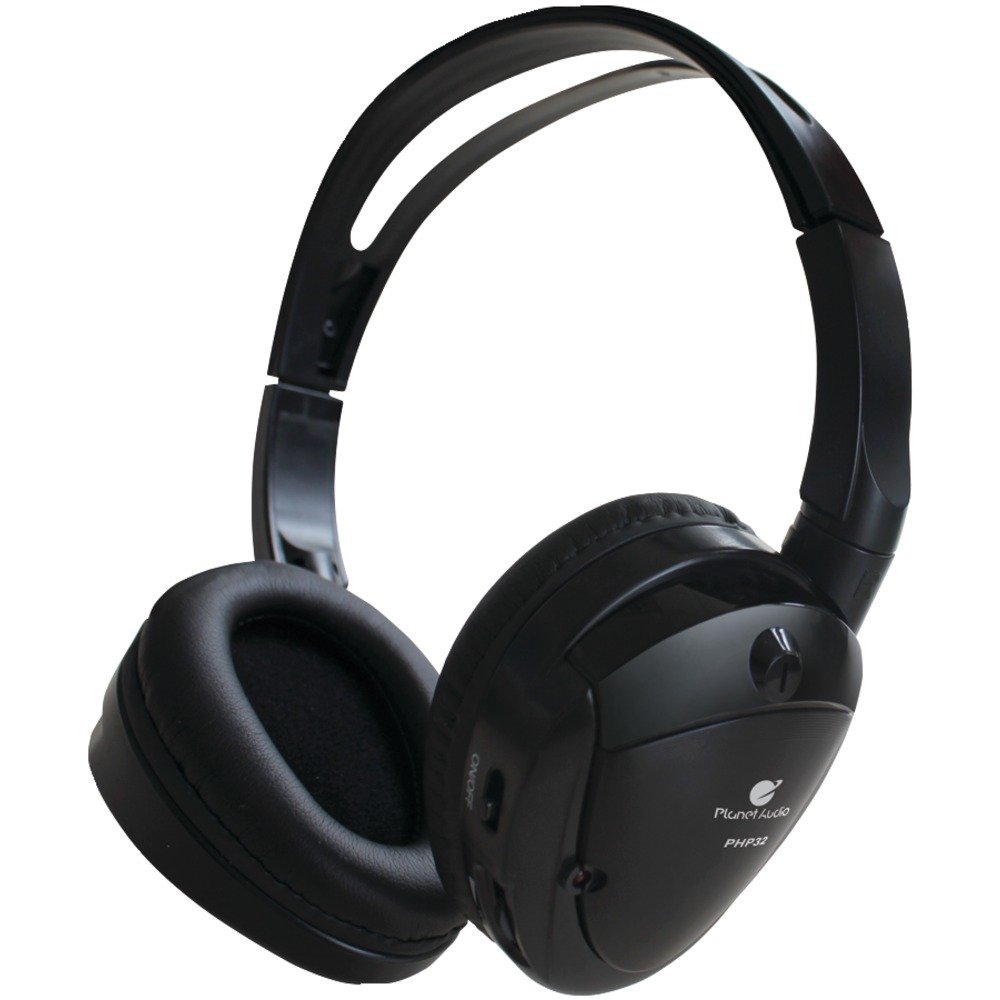
Image: Planet Audio PHP32 Infrared Wireless Headphones. This image displays the foldable design of the headphones, highlighting the earcups and adjustable headband.
2. Maklumat Keselamatan Penting
Please read all safety instructions carefully before using this product. Failure to follow these instructions may result in injury or damage to the headphones.
- Do not expose headphones to extreme temperatures, moisture, or direct sunlight.
- Elakkan daripada menjatuhkan atau meletakkan fon kepala kepada kesan yang kuat.
- Jauhkan daripada kanak-kanak kecil.
- Jangan cuba membuka atau mengubah suai fon kepala. Ini akan membatalkan jaminan.
- Dengar pada tahap kelantangan sederhana untuk mengelakkan kerosakan pendengaran.
Amaran Cadangan 65 California: Produk ini mengandungi bahan kimia yang diketahui oleh Negeri California untuk menyebabkan kanser dan kecacatan kelahiran atau bahaya pembiakan lain.
3. Panduan Persediaan
3.1 Pemasangan Bateri
The PHP32 headphones require 2 AAA batteries for operation. These are typically included with your purchase.
- Locate the battery compartment cover on one of the earcups.
- Gelongsor atau buka klip penutup perlahan-lahan untuk membuka petak.
- Masukkan 2 bateri AAA, pastikan kekutuban (+ dan -) yang betul seperti yang ditunjukkan di dalam petak.
- Tutup penutup petak bateri dengan selamat.
Note: If the headphones are not used for an extended period, remove the batteries to prevent leakage.
3.2 Connecting to an Infrared Source
The PHP32 headphones are designed to receive audio signals from compatible infrared (IR) transmitters, typically found in Planet Audio car monitors or DVD players.
- Ensure your Planet Audio monitor or IR audio source is powered on and transmitting an audio signal.
- Turn on your PHP32 headphones using the power switch (refer to Section 4.1).
- Position yourself within the line of sight of the IR transmitter. Infrared signals require a clear path between the transmitter and the headphones.
- The headphones should automatically detect and connect to the IR signal. If not, try adjusting your position or checking the channel selection (refer to Section 4.2).
4. Arahan Operasi
4.1 Menghidupkan/Mematikan
- To power on the headphones, slide the KUASA switch to the 'ON' position. An indicator light may illuminate.
- Untuk mematikan kuasa, luncurkan KUASA switch to the 'OFF' position. The indicator light will turn off.
4.2 Pemilihan Saluran
The PHP32 headphones support dual-channel operation (Channel A and Channel B). This allows multiple users to listen to different audio sources simultaneously if your IR transmitter supports it.
- Cari PEMILIH SALURAN switch on the headphones.
- Slide the switch to 'A' or 'B' to select the desired audio channel.
- Match the selected channel on the headphones to the output channel of your IR audio source.
4.3 Kawalan Kelantangan
Laraskan kelantangan pendengaran menggunakan JILID dial or buttons located on the earcup.
- Rotate the dial or press the '+' button to increase volume.
- Rotate the dial or press the '-' button to decrease volume.
4.4 Memakai Fon Kepala
Adjust the headband to ensure a comfortable and secure fit. The earcups are designed to fit over the ears for optimal sound isolation and comfort.
5. Penjagaan dan Penyelenggaraan
5.1 Pembersihan
- Lap fon kepala dengan kain lembut dan kering.
- Jangan gunakan pembersih yang melelas, pelarut atau bahan kimia yang keras.
- Elakkan mendapatkan kelembapan ke dalam mana-mana bukaan.
5.2 Penyimpanan
- Simpan fon kepala di tempat yang sejuk dan kering jauh dari cahaya matahari langsung dan suhu yang melampau.
- The foldable design allows for compact storage when not in use.
- Tanggalkan bateri jika disimpan untuk tempoh yang lama.
6. Penyelesaian masalah
If you encounter issues with your PHP32 headphones, refer to the following table for common problems and solutions.
| Masalah | Kemungkinan Punca | Penyelesaian |
|---|---|---|
| Tiada bunyi | Fon kepala tidak dihidupkan Bateri rendah atau mati Saluran yang salah dipilih Out of range or obstructed IR signal Audio source not transmitting | Pastikan suis kuasa HIDUP Gantikan bateri Select correct channel (A or B) Move closer to IR transmitter; ensure clear line of sight Verify audio source is on and playing |
| Kualiti bunyi kurang baik / Statik | Isyarat IR lemah Gangguan Bateri lemah | Move closer to IR transmitter Ensure no objects are blocking the signal path Gantikan bateri |
| Fon kepala tidak dihidupkan | Bateri mati atau tidak dipasang dengan betul | Replace batteries with new ones; check polarity |
7. Spesifikasi Produk
Below are the technical specifications for the Planet Audio PHP32 Infrared Wireless Headphones:
| Ciri | Spesifikasi |
|---|---|
| Nama Model | Dual-Channel IR Wireless Headphones |
| Teknologi Ketersambungan | Wireless, Infrared |
| Teknologi Komunikasi Tanpa Wayar | Inframerah |
| Komponen yang Disertakan | Dual-channel IR Wireless Headphones |
| Julat Umur (Perihalan) | Dewasa |
| Peranti Serasi | Monitors, DVD Players with IR audio transmission |
| Ciri Kabel | Tanpa Kabel |
| Gaya | Dual Channel Stereo Headphones |
| Bilangan Item | 1 |
| Hayat Bateri | Lebih kurang 3 Jam (mungkin berbeza mengikut penggunaan) |
| Bentuk alat dengar | Atas Telinga |
| Ciri Khas | Noise Cancellation (passive) |
| Pengeluar | Audio Planet |
| Dimensi Produk | 7.51 x 7.01 x 1.89 inci |
| Berat Barang | 3.2 auns |
| Nombor Model Item | PHP32 |
| Bateri | 2 bateri AAA diperlukan (termasuk) |
| warna | Hitam |
| Penempatan Telinga | Atas Telinga |
| Faktor Bentuk | Di Telinga / Di Atas Telinga |
| Kawalan Bunyi | None (passive noise isolation from over-ear design) |
8. Waranti dan Sokongan
Planet Audio products are designed for reliability and performance. For specific warranty information regarding your PHP32 headphones, please refer to the warranty card included with your purchase or visit the official Planet Audio webtapak.
For technical support, troubleshooting assistance beyond this manual, or to inquire about replacement parts, please contact Planet Audio customer service through their official webtapak: planetaudio.com