
1. Pengenalan
This manual provides essential information for the safe and efficient operation of your SANYO PLC-XK2200 XGA Ultra-Portable Multimedia Projector. Please read this manual thoroughly before using the projector and retain it for future reference.
The SANYO PLC-XK2200 is designed to deliver clear and bright images with 2200 lumens and a 2000:1 contrast ratio, suitable for various presentation environments.
2. Maklumat Keselamatan
- Sumber Kuasa: Use only the specified power supply. Ensure the power cord is securely connected.
- Pengudaraan: Do not block ventilation openings. Ensure adequate space around the projector for proper airflow to prevent overheating.
- Lamp Amaran: Projektor lamp operates at high temperatures and pressures. Allow the projector to cool down before moving or performing maintenance. Do not look directly into the lens when the lamp sedang aktif.
- Pendedahan Cecair: Do not expose the projector to rain, moisture, or liquids.
- Servis: Rujuk semua servis kepada kakitangan servis yang berkelayakan. Jangan cuba membuka atau membaiki projektor sendiri.
3. Produk Lebihview
3.1 Kawalan Panel Atas
The top panel provides access to essential controls for power, menu navigation, focus, and zoom adjustments.

Imej: Atas view of the SANYO PLC-XK2200 projector. Visible controls include the focus and zoom rings, the power button, and buttons for menu navigation (Menu, Select, Volume, Auto Setup, Lamp Tetapkan semula).
3.2 Sambungan Panel Belakang
The rear panel houses various input and output ports for connecting external devices.

Imej: Belakang view of the SANYO PLC-XK2200 projector. Ports visible include Control Port, Computer In 1 (S-Video In/Component In), Computer In 2 (Monitor Out), Video In, Audio In/Out, and a network port.
3.3 Side and Bottom Views
Bahagian view shows the power input and ventilation, while the bottom view reveals mounting points and product labels.
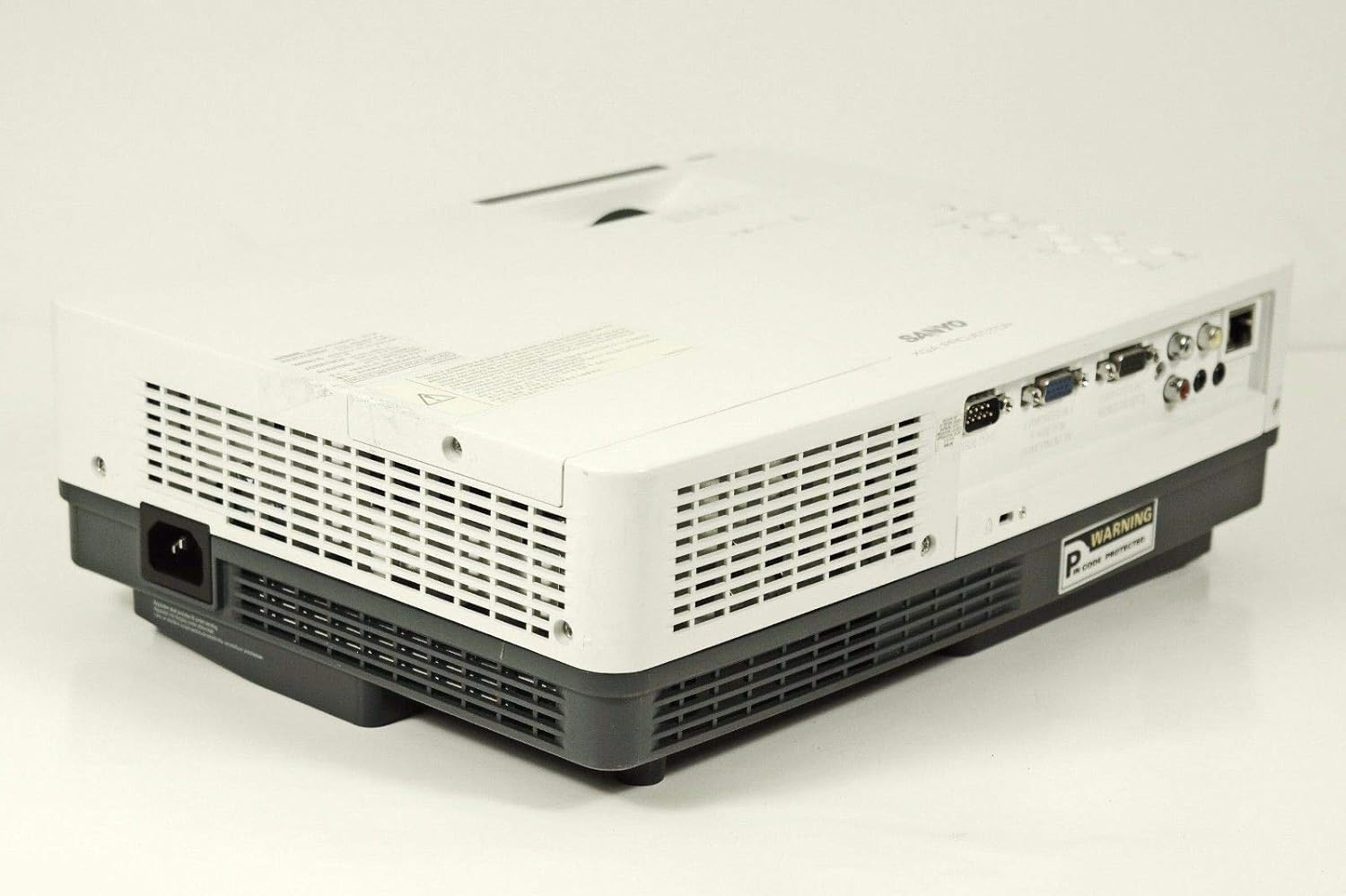
Imej: Sisi view of the SANYO PLC-XK2200 projector, highlighting the power input socket and exhaust vents.

Imej: Bawah view of the SANYO PLC-XK2200 projector, displaying screw holes for mounting, ventilation grilles, and the product information label.
4. Persediaan
4.1 Penempatan Projektor
Place the projector on a stable, flat surface or mount it securely. Ensure there is sufficient space around the projector for ventilation. Avoid placing it in direct sunlight or near heat sources.
4.2 Kuasa Penyambung
- Connect the power cord to the AC inlet on the projector.
- Palamkan hujung kord kuasa yang lain ke dalam salur keluar elektrik yang dibumikan.
- The power indicator light will illuminate, typically in amber, indicating standby mode.
4.3 Menyambungkan Sumber Input
Connect your video source (e.g., computer, DVD player) to the appropriate input port on the projector's rear panel. The PLC-XK2200 supports various inputs including VGA (Computer In 1/2), S-Video, and Composite Video.
- Komputer: Use a VGA cable to connect your computer's video output to the COMPUTER IN 1 or COMPUTER IN 2 port.
- Peranti Video: For S-Video, connect to the S-VIDEO IN port. For composite video, connect to the VIDEO IN port using an RCA cable.
- Audio: Connect audio cables from your source device to the AUDIO IN ports if you wish to use the projector's internal speaker or audio output.
5. Arahan Operasi
5.1 Menghidupkan/Mematikan
- Untuk Menghidupkan: Press the POWER button on the projector's top panel or remote control. The power indicator will turn green, and the lamp akan menerangi.
- Untuk Mematikan: Press the POWER button twice. The projector will enter cooling mode, and the power indicator will flash amber. Once cooled, it will return to standby mode (solid amber).
5.2 Melaraskan Imej
- Fokus: Rotate the FOCUS ring on the lens until the image is sharp and clear.
- Zum: Rotate the ZOOM ring on the lens to adjust the image size.
- Pembetulan Keystone: Use the AUTO SETUP button or navigate through the menu to adjust vertical keystone distortion, which corrects trapezoidal images.
5.3 Pemilihan Input
Press the INPUT button on the projector or remote control to cycle through available input sources (e.g., Computer 1, Computer 2, Video, S-Video).
5.4 Menu Navigasi
Press the MENU button to access the on-screen display (OSD) menu. Use the arrow buttons to navigate and the SELECT button to confirm choices. Press MENU again to exit.
6. Penyelenggaraan
6.1 Membersihkan Projektor
- Luaran: Use a soft, dry cloth to clean the projector's casing. For stubborn dirt, dampen the cloth with a mild detergent solution.
- Kanta: Gently wipe the lens with a lens cleaning cloth or lens paper. Avoid harsh chemicals or abrasive materials.
- Penapis Udara: Regularly clean the air filter to maintain proper ventilation and prevent overheating. Refer to the filter cover for removal instructions.
6.2 Lamp Penggantian
Lamp mempunyai jangka hayat yang terhad. Apabila lamp indicator illuminates or the image becomes dim, the lamp may need replacement. Always allow the projector to cool completely before attempting lamp replacement. Consult a qualified technician for lamp replacement if you are unsure.
Amaran: High pressure lamp. Risk of explosion if improperly handled. Refer to the service manual for detailed lamp prosedur penggantian.
7. Penyelesaian masalah
| Masalah | Kemungkinan Punca | Penyelesaian |
|---|---|---|
| Tiada imej dipaparkan | Incorrect input selected; loose cable connection; projector in standby. | Press INPUT to select correct source; check cable connections; press POWER button to turn on. |
| Imej kabur | Fokus tidak dilaraskan; projektor terlalu dekat/jauh dari skrin. | Adjust the FOCUS ring; reposition the projector or use the ZOOM ring. |
| Imej adalah trapezoid | Projektor tidak berserenjang dengan skrin. | Use Auto Vertical Keystone correction or manually adjust. |
| Projektor terlalu panas dan mati | Blocked ventilation; dirty air filter. | Ensure clear airflow around vents; clean or replace air filter. |
8. Spesifikasi

Imej: Sisi view of the SANYO PLC-XK2200 projector, displaying the model number label (MODEL NO. PLC-XK2200).
- Nama Model: PLC-XK2200
- Jenama: SANYO
- Teknologi Paparan: LCD
- Kecerahan: 2200 Lumen
- Nisbah Kontras: 2000:1
- Resolusi Asli: XGA (1024 x 768)
- Nisbah Aspek: 4:3 (Asli)
- Faktor Bentuk: Mudah alih
- Jenis Pemasangan: Pemasangan Atas Meja
- Terminal Input: VGA (x2), S-Video, Composite Video, Audio In (RCA)
- Terminal Keluaran: VGA (Monitor Out), Audio Out (RCA)
- Port kawalan: RS-232C
- UPC: 086483079498
9. Waranti dan Sokongan
For warranty information, please refer to the warranty card included with your product or contact your local SANYO dealer. Technical support may be available through authorized service centers.
No official product videos were provided in the input data for this manual.