
1. Pengenalan
Thank you for choosing the Ultrak Heat Index Solar Powered Stopwatch, Model 830. This device is designed for precise timing and environmental monitoring, offering features such as temperature, humidity, heat index, and dew point calculations. It is ideal for athletes, coaches, and outdoor enthusiasts who require accurate data in various conditions. This manual provides detailed instructions to help you maximize the functionality and lifespan of your stopwatch.
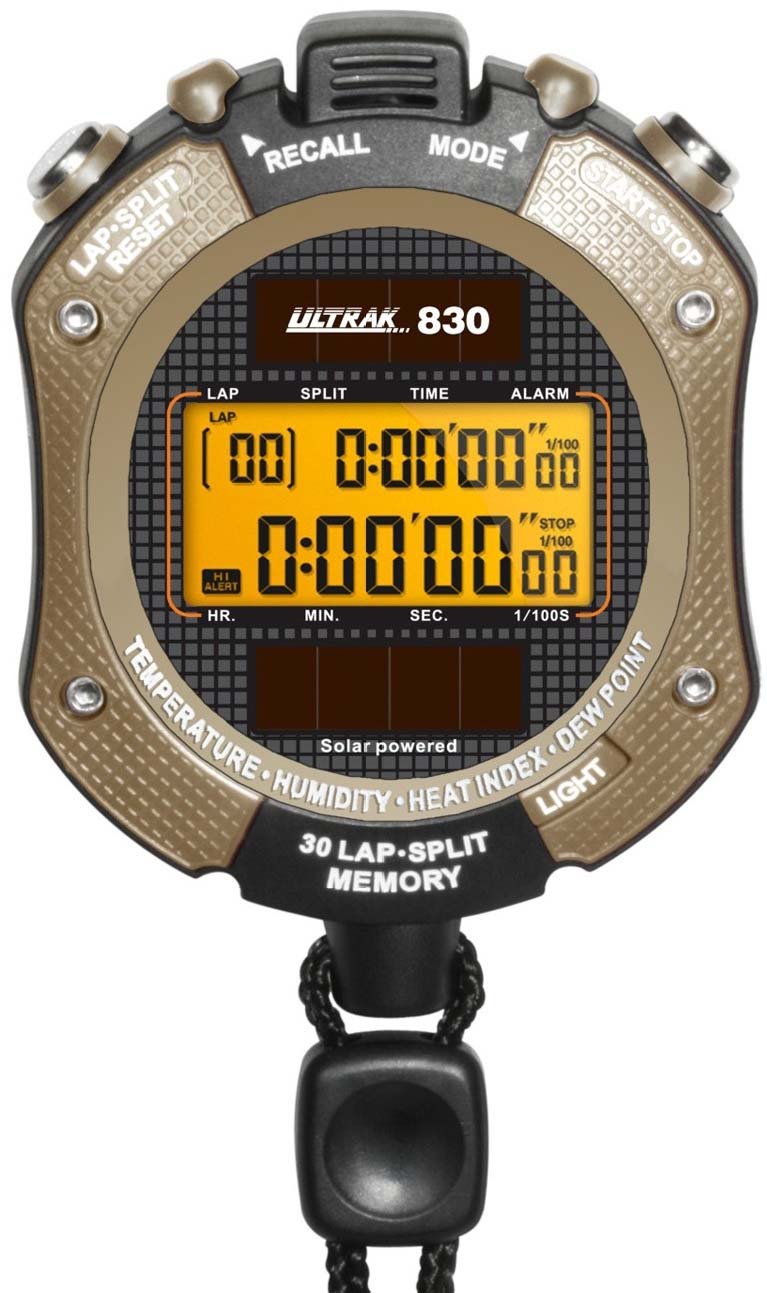
Rajah 1: Depan view of the Ultrak Heat Index Solar Powered Stopwatch, displaying its digital screen and control buttons.
2. Ciri-ciri Utama
- Accurate calculation of temperature, humidity, heat index, and dew point.
- 30 dual split recallable memory for tracking multiple laps or splits.
- Measures time up to 10 hours with 1/100 second resolution.
- Presettable countdown timer with an auto-repeat function.
- Displays time, calendar, and features an alarm function.
- LED backlight for visibility in low-light conditions.
- Solar-powered with a back-up lithium battery for continuous operation.
- Water-resistant design for use in various environments.
3. Persediaan dan Penggunaan Awal
3.1 Menghidupkan
The Ultrak 830 is solar-powered. Ensure the solar panel on the front of the stopwatch is exposed to light for initial power-up. A built-in lithium battery provides backup power.
3.2 Menetapkan Masa dan Tarikh
- In Time mode, press and hold the MODE butang sehingga paparan berkelip.
- Gunakan MULA/BERHENTI button to adjust the flashing digit (hours, minutes, seconds, year, month, day).
- Tekan ke LAP / RESET butang untuk beralih ke tetapan seterusnya.
- Setelah semua tetapan betul, tekan butang MODE butang untuk keluar dari mod tetapan.
3.3 Activating Backlight
Tekan ke CAHAYA button (usually located on the side or top) to illuminate the display for a few seconds in low-light conditions.
4. Arahan Operasi
4.1 Fungsi Jam randik
- From Time mode, press the MODE button repeatedly until "STOPWATCH" or a similar indicator appears.
- Tekan MULA/BERHENTI untuk memulakan masa.
- Tekan LAP / RESET to record a lap/split time while the stopwatch continues running. The display will momentarily show the lap time.
- Tekan MULA/BERHENTI sekali lagi untuk menjeda jam randik.
- Tekan LAP / RESET while paused to reset the stopwatch to zero.
4.2 Mengingati Ingatan
The stopwatch can store up to 30 dual split times. After stopping the stopwatch, press the MEMORI button (or a designated button, refer to on-device labels) to scroll through recorded lap and split times.
4.3 Pemasa Undur
- Navigate to the "TIMER" mode using the MODE butang.
- Tekan dan tahan LAP / RESET untuk memasuki mod tetapan.
- guna MULA/BERHENTI to adjust the hours, minutes, and seconds. Use LAP / RESET untuk bergerak antara digit.
- Tekan MODE untuk mengesahkan tetapan.
- Tekan MULA/BERHENTI untuk memulakan kira detik. Penggera akan berbunyi apabila pemasa mencapai sifar.
- To activate auto-repeat, ensure this option is enabled in the timer setting mode (if available).
4.4 Heat Index and Environmental Readings
In the dedicated "HEAT INDEX" or "ENVIRONMENT" mode (accessed via the MODE button), the stopwatch will display current temperature, humidity, heat index, and dew point. Allow a few moments for the sensors to stabilize and provide accurate readings, especially after moving to a new environment.
4.5 Fungsi Penggera
- Go to "ALARM" mode using the MODE butang.
- Tekan dan tahan LAP / RESET untuk memasuki mod tetapan penggera.
- Laraskan masa penggera menggunakan MULA/BERHENTI and move between digits with LAP / RESET.
- Tekan MODE untuk mengesahkan.
- Toggle the alarm ON/OFF using MULA/BERHENTI semasa dalam mod Penggera (bukan mod tetapan).
5. Penyelenggaraan
- Pembersihan: Lap jam randik dengan kain lembut,amp kain. Jangan gunakan bahan kimia yang keras atau pembersih yang kasar.
- Storan: Store in a cool, dry place away from direct sunlight when not in use for extended periods.
- Tahan Air: The stopwatch is water-resistant, but not waterproof. Avoid submerging it in water or exposing it to high-pressure water jets.
- Bateri: The solar panel charges the internal battery. Ensure regular exposure to light to maintain optimal battery life. No user-replaceable battery is required under normal operation.
6. Penyelesaian masalah
| Masalah | Kemungkinan Punca | Penyelesaian |
|---|---|---|
| Paparan kosong atau malap. | Insufficient light exposure for solar charging. | Expose the solar panel to bright light for several hours. |
| Masa/tarikh yang salah. | Time/date not set correctly or reset after power loss. | Refer to Section 3.2 "Setting Time and Date" to adjust. |
| Stopwatch not responding. | Gangguan perisian sementara. | Attempt a soft reset by pressing all buttons simultaneously for a few seconds (if applicable, consult specific model instructions if available). If not, allow battery to fully drain and recharge. |
| Inaccurate environmental readings. | Sensor obstruction or not enough time for stabilization. | Ensure sensors are clean and unobstructed. Allow 5-10 minutes for readings to stabilize after moving to a new environment. |
7. Spesifikasi
- model: Ultrak 830
- Timing Resolution: 1/100 saat
- Maximum Timing Capacity: 10 jam
- Ingatan: 30 dual split recallable memory
- Penderia Alam Sekitar: Temperature, Humidity, Heat Index, Dew Point
- Sumber Kuasa: Solar powered with lithium backup battery
- paparan: Digital with LED backlight
- Tahan Air: Yes (splash resistant, not submersible)
- GTIN (UPC): 743223008308
8. Waranti dan Sokongan
Ultrak products are manufactured to high-quality standards. For specific warranty information, please refer to the warranty card included with your purchase or visit the official Ultrak webtapak.
For technical support, troubleshooting assistance beyond this manual, or to inquire about replacement parts, please contact Ultrak customer service through their official webtapak atau maklumat hubungan yang diberikan bersama pembungkusan produk anda.