
BERNIAT BAIK DR-60-24
Mean Well DR-60-24 DIN-Rail Power Supply User Manual
Model: DR-60-24
1. Pengenalan
This manual provides essential information for the safe and efficient operation of your Mean Well DR-60-24 DIN-Rail Power Supply. The DR-60-24 is a 24 Volt, 2.5 Amp, 60 Watt power supply designed for DIN-Rail mounting. It features an input voltage range of 85 to 264 VAC and is suitable for various industrial applications.
Please read this manual thoroughly before installation and operation, and retain it for future reference.
2. Maklumat Keselamatan
AMARAN: Risk of electric shock. Do not open the unit. Refer all servicing to qualified personnel.
- Peranti ini direka untuk kegunaan dalaman sahaja.
- Install the unit in a protected environment only, free from excessive moisture, dust, and extreme temperatures.
- Pastikan pembumian yang betul untuk mengelakkan bahaya elektrik.
- Putuskan sambungan kuasa sebelum melakukan sebarang pemasangan, penyelenggaraan atau penyelesaian masalah.
- Jangan melebihi vol input yang ditentukantage and output current ratings.
- Ensure adequate ventilation around the power supply to prevent overheating.
3. Produk Lebihview
The Mean Well DR-60-24 is a compact DIN-Rail mountable power supply. It provides a stable 24V DC output from an AC input. Key features include:
- Universal AC input range (85-264 VAC)
- Kecekapan tinggi
- Protections: Short circuit, overload, over voltage
- DIN-Rail mountable
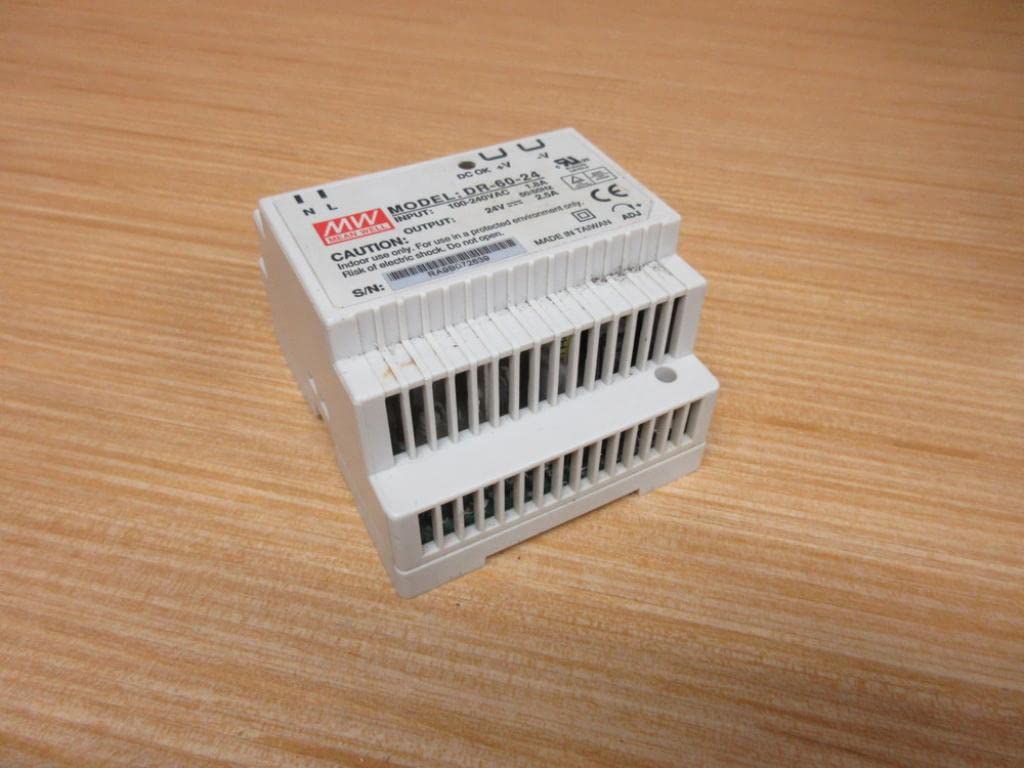
Rajah 3.1: Depan view of the Mean Well DR-60-24 power supply, showing the input/output terminals and model label.
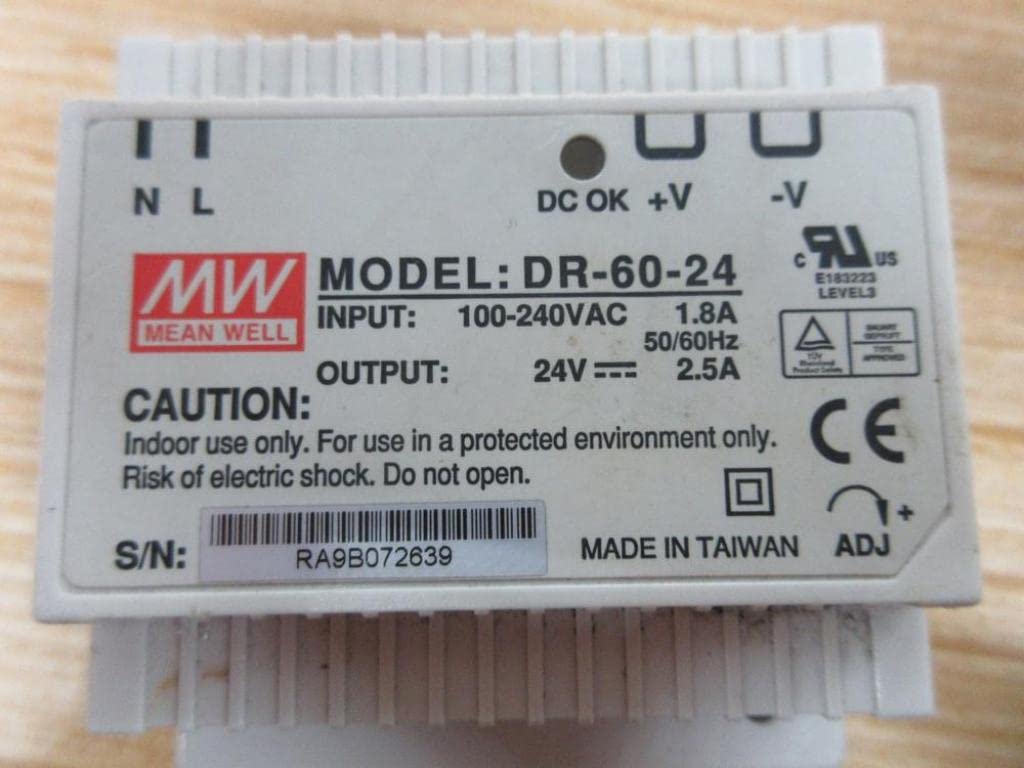
Rajah 3.2: Jarak dekat view of the top label on the DR-60-24, detailing input (100-240VAC, 1.8A) and output (24V, 2.5A) specifications, along with safety warnings and serial number.
4. Persediaan dan Pemasangan
4.1 Pemasangan
The DR-60-24 is designed for mounting on a standard DIN-Rail (TS-35/7.5 or TS-35/15). Ensure the mounting surface is stable and capable of supporting the unit's weight.
- Align the power supply with the DIN-Rail.
- Push the unit onto the rail until it clicks securely into place.
- Verify that the unit is firmly attached and does not wobble.

Rajah 4.1: Atas view of the DR-60-24, showing the terminal block layout and overall compact design suitable for DIN-Rail mounting.
4.2 Sambungan Pendawaian
Sebelum membuat sebarang sambungan, pastikan bekalan kuasa utama MATI.
| Terminal | Penerangan |
|---|---|
| N | Input Neutral AC |
| L | Input Talian AC |
| ⌂ | Tanah (Bumi) |
| +V | DC Output Positive |
| -V | DC Output Negative |
Connect the AC input wires to the 'N' and 'L' terminals. Connect the ground wire to the ground terminal. Connect your load to the '+V' and '-V' terminals, ensuring correct polarity. Use appropriate wire gauges for the current requirements.
5. Arahan Operasi
Once properly installed and wired, the DR-60-24 power supply operates automatically upon receiving AC input power.
- Hidupkan kuasa: Apply AC power to the input terminals. The "DC OK" indicator LED (if present, typically green) should illuminate, indicating stable DC output.
- Keluaran Voltage Pelarasan: The DR-60-24 may have a small potentiometer (labeled "ADJ" or similar) for fine-tuning the output voltage. Use a small screwdriver to adjust if necessary, staying within the specified voltagjulat e.
- Perlindungan Lebihan: If the output current exceeds the rated value (2.5A), the unit's overload protection will activate, potentially shutting down the output or limiting current. Remove the overload condition, and the unit should recover automatically.
6. Penyelenggaraan
The Mean Well DR-60-24 power supply is designed for long-term, reliable operation with minimal maintenance.
- Pembersihan: Periodically clean the exterior of the unit with a soft, dry cloth. Do not use liquid cleaners or solvents. Ensure power is disconnected before cleaning.
- Pengudaraan: Ensure that the ventilation openings are not obstructed by dust or debris. Proper airflow is crucial for heat dissipation.
- Sambungan: Periksa semua sambungan pendawaian secara berkala untuk memastikan ia selamat dan bebas daripada kakisan.
No user-serviceable parts are inside. Do not attempt to open or repair the unit.
7. Penyelesaian masalah
| Masalah | Kemungkinan Punca | Penyelesaian |
|---|---|---|
| Tiada keluaran voltagLED e / "DC OK" padam | Tiada kuasa input AC Input fuse blown Overload/Short circuit on output | Check AC power source and connections. Consult qualified electrician for fuse replacement. Disconnect load, check for short circuit, then reconnect. |
| Keluaran voltage too low or unstable | Keadaan beban berlebihan Sambungan longgar Unit rosak | Kurangkan beban. Periksa dan ketatkan semua sambungan pendawaian. Hubungi sokongan pelanggan jika masalah berterusan. |
| Unit ini panas apabila disentuh | Pengudaraan yang tidak mencukupi Suhu persekitaran terlalu tinggi Lebihan beban | Pastikan aliran udara yang betul di sekeliling unit. Beroperasi dalam julat suhu yang ditetapkan. Kurangkan beban. |
If you encounter issues not listed here or if the problem persists after attempting the solutions, please contact Mean Well customer support or a qualified technician.
8. Spesifikasi
| Parameter | Nilai |
|---|---|
| Nombor Model | DR-60-24 |
| Input Voltage Julat | 85 hingga 264 VAC |
| Keluaran Voltage | 24 VDC |
| Arus Keluaran | 2.5 Amp |
| Kuasa Keluaran | 60 Watt |
| Dimensi (L x W x H) | 3.1" x 3.7" x 2.2" (approx. 78.7mm x 94mm x 55.9mm) |
| Dimensi Produk | 2.2 x 3.07 x 3.66 inci; 10.07 auns |
| Pengeluar | Maksud Baik |
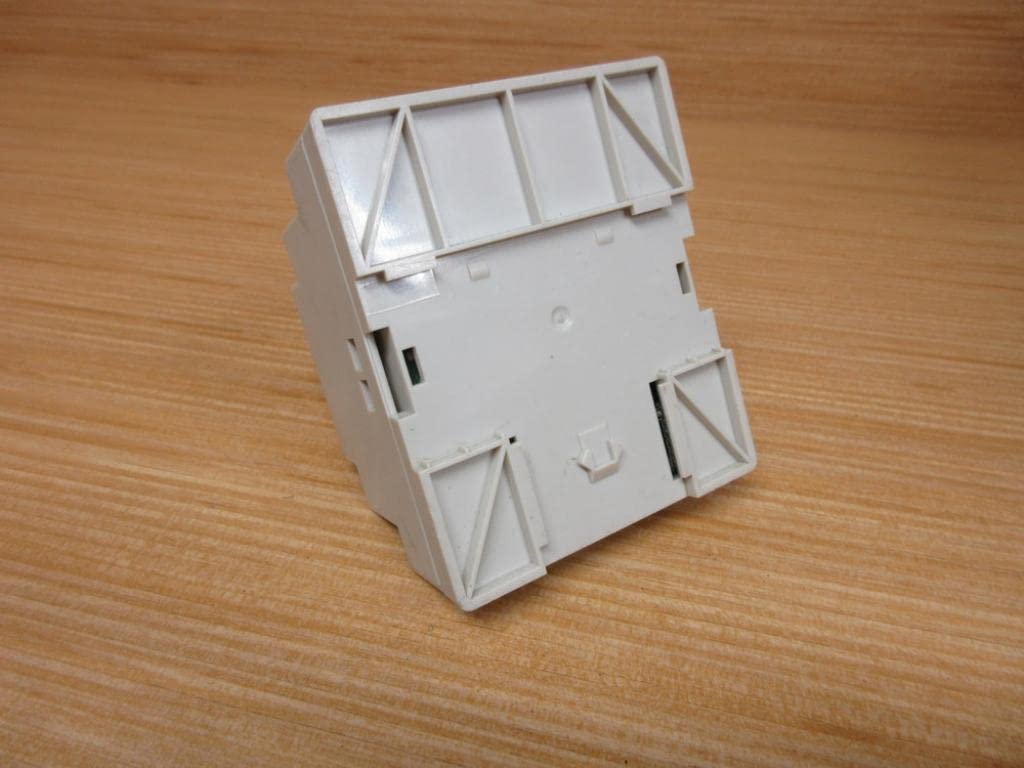
Rajah 8.1: Bawah view of the DR-60-24, showing the DIN-Rail mounting mechanism and structural details.
9. Waranti dan Sokongan
For warranty information and technical support, please refer to the official Mean Well website or contact your authorized distributor. Keep your purchase receipt as proof of purchase.
Untuk bantuan lanjut, sila layari Mean Well official webtapak.
Ask a question about this manual
Ask about setup, troubleshooting, compatibility, parts, safety, or missing instructions. Manuals+ will review the question and use this page’s manual context to help answer it.