
InFokus IN126
Manual Pengguna Projektor DLP InFocus IN126
Model: IN126 | Brand: InFocus
1. Produk Lebihview
The InFocus IN126 is a DLP projector designed for various projection needs, offering high brightness and a clear image. This manual provides essential information for the proper setup, operation, and maintenance of your projector.
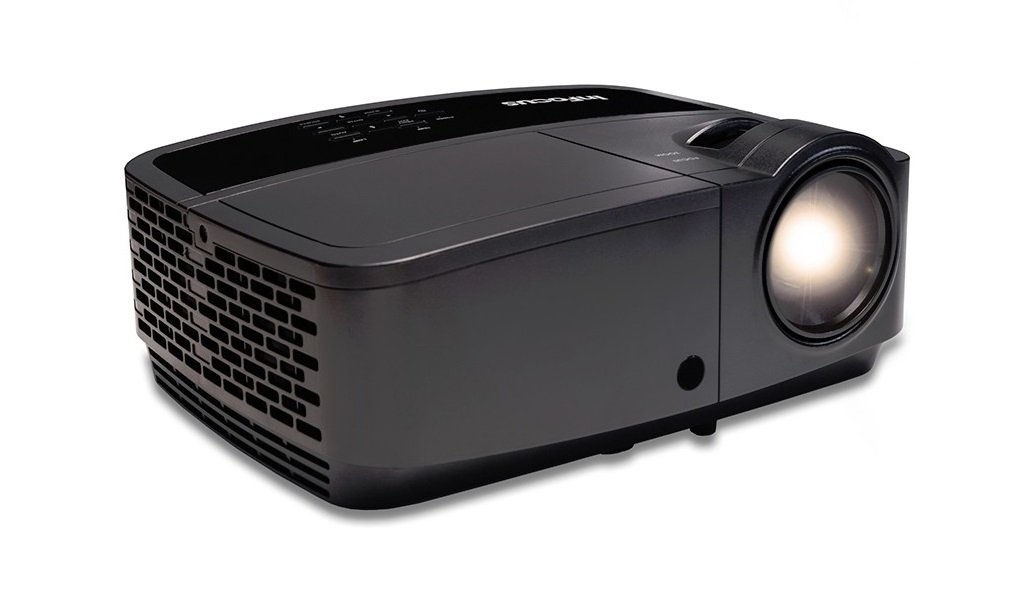
Imej 1.1: Depan view of the InFocus IN126 DLP Projector.
Ciri-ciri Utama:
- High brightness of up to 3200 lumens for clear images in various lighting conditions.
- High 3000:1 contrast ratio for sharp detail.
- Compact and portable design, weighing approximately 4.8 lbs. (2.17 kg).
- 3D-Ready capability for immersive viewdalam pengalaman.
- HDMI connectivity for versatile input options.
2. Persediaan dan Pemasangan
2.1 Membongkar
Carefully remove the projector and all accessories from the packaging. Verify that all components are present according to the packing list.
2.2 Penempatan Projektor
Place the projector on a stable, flat surface or mount it securely. Ensure adequate ventilation around the projector to prevent overheating. Position the projector at an appropriate distance from the screen to achieve the desired image size.
2.3 Menyambung Peranti
Connect your video source (e.g., laptop, gaming console) to the projector using an HDMI cable. Ensure the cable is securely plugged into both the source device and the projector's HDMI input port.

Image 2.1: An InFocus projector set up for a business presentation, demonstrating typical usage.
2.4 Menghidupkan/Mematikan
- Untuk Menghidupkan: Connect the power cord to the projector and a power outlet. Press the power button on the projector or remote control. The power indicator light will illuminate.
- Untuk Mematikan: Press the power button twice. The projector will enter a cooling cycle before completely shutting down. Do not unplug the projector during the cooling cycle.
2.5 Pelarasan Imej
- Fokus: Putarkan gelang fokus pada kanta sehingga imej tajam dan jelas.
- Pembetulan Keystone: Use the keystone adjustment feature (usually found in the projector's menu or via dedicated buttons) to correct trapezoidal image distortion if the projector is not perfectly perpendicular to the screen.
3. Mengendalikan Projektor
3.1 Pemilihan Sumber Input
Press the 'Source' or 'Input' button on the remote control or projector control panel to cycle through available input sources (e.g., HDMI, VGA). Select the input corresponding to your connected device.
3.2 Menu Navigasi
Use the arrow buttons on the remote or control panel to navigate the on-screen display (OSD) menu. Press 'Enter' or 'OK' to confirm selections and 'Menu' or 'Exit' to go back or close the menu.
3.3 Pelarasan Gambar
Within the OSD menu, you can adjust various picture settings:
- Kecerahan: Laraskan kecerahan atau kegelapan keseluruhan imej.
- Kontras: Controls the difference between the lightest and darkest parts of the image.
- warna: Melaraskan keamatan warna.
- Nisbah Aspek: Memilih format paparan (cth, 4:3, 16:9).
3.4 Tetapan Audio
If your projector has built-in speakers or is connected to an external audio system, you can adjust the volume and other audio settings through the OSD menu.
3.5 Operasi 3D
The IN126 projector is 3D-Ready. To view 3D content, you will need compatible 3D glasses, a 3D-enabled source device, and 3D content. Refer to your 3D glasses and source device manuals for specific instructions on enabling 3D mode.
4. Penyelenggaraan
4.1 Membersihkan Lensa
Gunakan kain lembut dan tidak berbulu yang direka khas untuk kanta optik untuk mengelap kanta projektor dengan lembut. Elakkan menggunakan pembersih yang kasar atau daya yang berlebihan, yang boleh menggaru kanta.
4.2 Cleaning the Projector Casing
Wipe the projector's exterior casing dengan lembut, damp kain. Jangan gunakan bahan kimia atau pelarut yang keras.
4.3 Penyelenggaraan Penapis Udara
Regularly check and clean the air filter to ensure proper airflow and prevent overheating. Refer to the full product manual for instructions on locating and cleaning or replacing the air filter.
4.4 Lamp Penggantian
Projektor lamp has an estimated operating life of up to 20,000 hours. When the lamp reaches the end of its life, a warning message may appear, or the image brightness may significantly decrease. Refer to the full product manual for detailed instructions on safe lamp replacement. Always use genuine InFocus replacement lamps.
5. Penyelesaian masalah
This section addresses common issues you might encounter with your InFocus IN126 projector.
5.1 Tiada Imej pada Skrin
- Pastikan projektor dihidupkan dan lampu penunjuk kuasa menyala kukuh.
- Check all cable connections (HDMI, power) are secure.
- Verify the correct input source is selected on the projector.
- Confirm the source device (laptop, etc.) is powered on and outputting a signal.
5.2 Image is Distorted or Blurry
- Laraskan cincin fokus pada lensa.
- Use keystone correction to fix trapezoidal distortion.
- Ensure the projector is placed on a stable surface and is not vibrating.
- Check the resolution settings of your source device; ensure it is compatible with the projector's native resolution (1280 x 720).
5.3 Tiada Bunyi
- Tingkatkan kelantangan pada kedua-dua projektor dan peranti sumber.
- Jika menggunakan pembesar suara luaran, pastikan ia disambungkan dengan betul dan dihidupkan.
- Check audio settings in the projector's OSD menu.
5.4 Projector Overheating
- Ensure there is sufficient space around the projector for ventilation.
- Clean the air filter to remove any dust buildup.
- Jangan sekat bukaan pengudaraan.
6. Spesifikasi
The following table outlines the key technical specifications for the InFocus IN126 DLP Projector:
| Ciri | Spesifikasi |
|---|---|
| Jenama | InFokus |
| Nama Model | IN126 DLP |
| Jenis Paparan | DLP |
| Resolusi Asli | 1280 x 720 |
| Resolusi Paparan Maksimum | 1920 x 1080 |
| Kecerahan | 3200 lumens (ANSI) |
| Nisbah Kontras | 3000:1 |
| Hayat Operasi Sumber Cahaya | 20000 Jam |
| Lamp Wattage | 230 Watt |
| Teknologi Ketersambungan | HDMI |
| Ciri Khas | 3D-Sedia |
| Faktor Bentuk | Mudah alih |
| Jenis Pemasangan | Pemasangan Atas Meja |
| Berat Barang | 4.85 paun (2.2 kg) |
| Pensijilan Ujian Luaran | UL, c-UL, FCC, CE |
7. Maklumat Waranti
The InFocus IN126 DLP Projector comes with a limited manufacturer's warranty. For specific details regarding warranty coverage, duration, and terms, please refer to the warranty card included with your product or visit the official InFocus webtapak. Simpan bukti pembelian anda untuk tuntutan waranti.
8. Sokongan Pelanggan
For further assistance, technical support, or to inquire about replacement parts, please visit the official InFocus support website or contact their customer service department. Contact information can typically be found on the InFocus website or in the documentation included with your projector.
Ask a question about this manual
Ask about setup, troubleshooting, compatibility, parts, safety, or missing instructions. Manuals+ will review the question and use this page’s manual context to help answer it.