
pengenalan
This manual provides essential information for the safe and efficient use of your Profoon PDX-6600 DECT phone. Please read these instructions carefully before operating the device and retain them for future reference. The Profoon PDX-6600 is a DECT cordless telephone designed for home or office use, featuring caller ID and a 20-entry phonebook.
Maklumat Keselamatan
- Use only the power adapter and telephone line cord supplied with the unit.
- Jangan dedahkan telefon kepada air atau kelembapan.
- Avoid placing the base unit near heat sources or direct sunlight.
- Jangan cuba membuka atau membaiki peranti sendiri. Rujuk semua servis kepada kakitangan yang berkelayakan.
- Keep the handset and base unit away from strong electromagnetic fields.
Kandungan Pakej
Pastikan semua item ada dalam pakej:
- Profoon PDX-6600 Handset
- Profoon PDX-6600 Base Unit
- Penyesuai Kuasa untuk Unit Pangkalan
- Tali Talian Telefon
- Rechargeable Batteries (typically 2x AAA NiMH)
- Manual Pengguna (dokumen ini)
Persediaan
1. Membongkar dan Meletakkan
Carefully remove all components from the packaging. Place the base unit on a flat, stable surface, away from other electronic devices that might cause interference. Ensure it is within reach of a power outlet and a telephone wall jack.
2. Pemasangan Bateri
- Buka penutup petak bateri di belakang telefon bimbit.
- Masukkan bateri boleh dicas semula yang dibekalkan, dengan memerhatikan kekutuban yang betul (+ dan -).
- Tutup penutup petak bateri dengan selamat.
3. Menyambung Unit Pangkalan
- Connect one end of the telephone line cord to the 'LINE' port on the base unit.
- Sambungkan hujung satu lagi kord talian telefon ke bicu dinding telefon anda.
- Plug the small end of the power adapter into the 'POWER' port on the base unit.
- Pasangkan hujung besar penyesuai kuasa ke soket kuasa dinding.
Place the handset on the base unit to charge the batteries. Allow at least 15-20 hours for the initial charge.
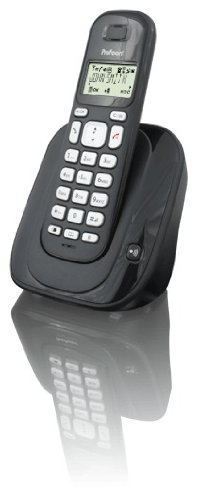
Image: The Profoon PDX-6600 DECT phone, showing the handset resting on its base unit. The phone is black with a clear display and keypad.
Arahan Operasi
Membuat Panggilan
- Tekan ke CAKAP button (usually a green phone icon).
- Dail nombor telefon yang dikehendaki menggunakan pad kekunci.
- Tekan ke TAMAT button (usually a red phone icon) to hang up.
Menerima Panggilan
Apabila telefon berdering, tekan butang CAKAP button to answer the call. Press the TAMAT butang untuk menamatkan panggilan.
Melaraskan Kelantangan
Semasa panggilan, gunakan UP dan TURUN butang navigasi pada telefon bimbit untuk melaraskan kelantangan cuping telinga.
Buku telefon
Your PDX-6600 can store up to 20 entries in its phonebook.
- To add an entry: Press MENU, navigate to 'Phonebook', select 'Add New', enter the name and number, then save.
- To dial from phonebook: Press the BUKU TELEFON button (or navigate via MENU), select the desired entry, then press CAKAP.
ID pemanggil
If you subscribe to Caller ID service from your telephone provider, the caller's number (and name, if available) will be displayed on the handset screen before you answer the call. You can review past calls in the Caller ID log (usually accessible via a dedicated button or MENU pilihan).
Penyelenggaraan
Pembersihan
Lap telefon bimbit dan unit asas dengan lembut, damp kain. Jangan gunakan pembersih atau pelarut yang kasar. Pastikan peranti telah dicabut daripada plag sebelum membersihkan.
Penjagaan Bateri
- Sentiasa gunakan bateri boleh dicas semula yang dinyatakan.
- Jika telefon tidak akan digunakan untuk tempoh yang lama, tanggalkan bateri untuk mengelakkan kebocoran.
- Buang bateri lama secara bertanggungjawab mengikut peraturan tempatan.
Menyelesaikan masalah
| Masalah | Penyelesaian |
|---|---|
| Tiada nada dail | Periksa sama ada kord talian telefon disambungkan dengan kukuh pada unit asas dan bicu dinding. Pastikan penyesuai kuasa dipasang. |
| Telefon bimbit tidak dicas | Pastikan telefon bimbit diletakkan dengan betul pada unit asas. Periksa sama ada penyesuai kuasa disambungkan. Sahkan bateri dimasukkan dengan betul. |
| Kualiti panggilan lemah / Statik | Move the handset closer to the base unit. Avoid placing the base unit near other electronic devices (Wi-Fi routers, microwaves). |
| Caller ID not working | Confirm that you have subscribed to Caller ID service from your telephone provider. |
Spesifikasi
- model: Profoon PDX-6600
- Jenis: Telefon Tanpa Kabel DECT
- ID Pemanggil: ya
- Kapasiti Buku Telefon: 20 penyertaan
- warna: Hitam
- Number of Handsets Included: 1
- Jenama: Profoon
- ASIN: B0056424QI
- Tarikh Pertama Tersedia: 20 Disember 2009
Waranti dan Sokongan
For warranty information and technical support, please refer to the documentation provided at the time of purchase or visit the official Profoon webtapak. Simpan bukti pembelian anda untuk tuntutan waranti.