
1. Pengenalan
This manual provides comprehensive instructions for the setup, operation, and maintenance of your RadioShack CTR-121 Desktop Cassette Recorder. Please read this manual thoroughly before using the device to ensure proper function and longevity.
Key features of the CTR-121 include voice-activated (VOX) recording, auto-level recording, auto stop mechanism, and various input/output jacks for enhanced functionality.
2. Maklumat Keselamatan
Patuhi langkah berjaga-jaga keselamatan berikut untuk mengelakkan kerosakan pada unit dan memastikan keselamatan pengguna:
- Jangan dedahkan unit kepada hujan atau lembapan.
- Elakkan meletakkan unit berhampiran sumber haba atau di bawah cahaya matahari langsung.
- Gunakan hanya penyesuai kuasa yang ditentukan.
- Jangan buka casing; merujuk semua perkhidmatan kepada kakitangan yang berkelayakan.
- Jauhkan daripada kanak-kanak.
3. Kandungan Pakej
Sahkan bahawa semua item terdapat dalam pakej:
- RadioShack CTR-121 Desktop Cassette Recorder
- Kord Kuasa AC
- Panduan Pengguna (dokumen ini)
- Arahan Keselamatan
4. Produk Lebihview
Familiarize yourself with the various parts of your CTR-121 recorder.

Rajah 1: Depan view of the RadioShack CTR-121 Desktop Cassette Recorder, showing the speaker, cassette compartment, and control buttons.
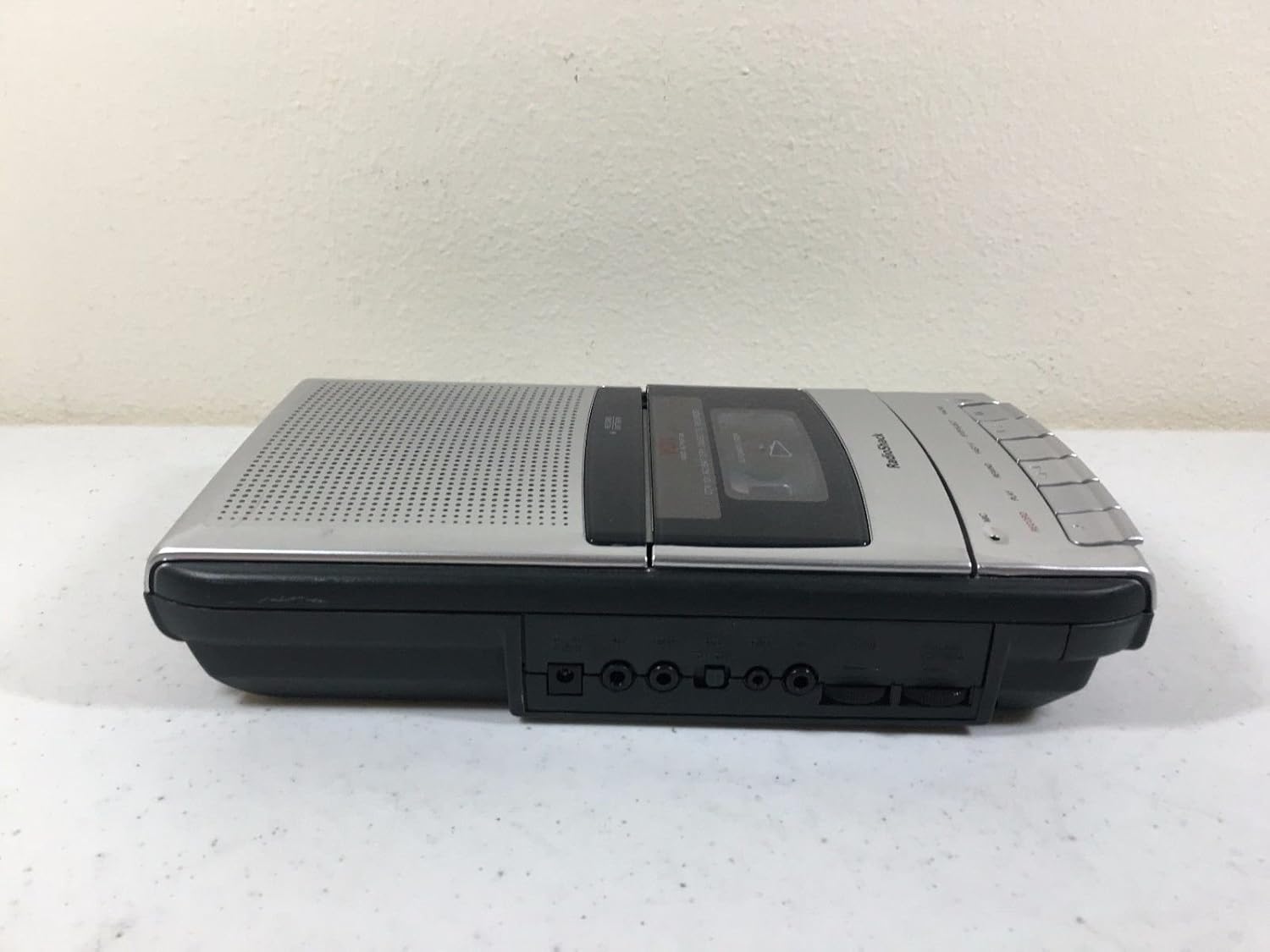
Rajah 2: Sebelah kiri view of the recorder, illustrating the microphone, earphone, and remote control jacks.

Rajah 3: Sebelah kanan view of the recorder, showing the DC power input jack.
The front panel includes controls for Record, Play, Rewind, Fast-F (Fast Forward), Stop/Eject, and Pause. A built-in microphone is located on the front, along with a speaker grille.
5. Persediaan
5.1 Mengkuasakan Unit
The CTR-121 can be powered by either AC power or batteries.
Kuasa AC:
- Ensure the recorder is turned off.
- Connect the supplied AC power cord to the DC IN jack on the right side of the unit (refer to Figure 3).
- Plug the other end of the power cord into a standard AC wall outlet.
Kuasa Bateri:
(Note: Battery compartment details are not provided in the product data, so this section will be generic.)
- Open the battery compartment cover, usually located on the bottom or rear of the unit.
- Insert the required number of C-size batteries (not included), observing the correct polarity (+/-) as indicated inside the compartment.
- Tutup penutup petak bateri dengan selamat.
5.2 Menyambung Aksesori
The CTR-121 features several jacks for external devices (refer to Figure 2):
- Bicu MIC: Connect an external microphone for improved recording quality or hands-free operation.
- Bicu FON TELINGA: Connect headphones or an earphone for private listening.
- REMOTE Jack: Connect a compatible remote control for convenient operation (remote control sold separately).
6. Arahan Operasi
6.1 Memuatkan Pita Kaset
- Tekan ke BERHENTI/EJECT butang untuk membuka pintu petak kaset.
- Insert a standard audio cassette tape with the open edge facing upwards and the full reel on the left.
- Tutup pintu petak kaset dengan perlahan sehingga ia berbunyi klik tertutup.
6.2 Rakaman
Rakaman Biasa:
- Masukkan pita kaset kosong atau boleh rakam.
- Tekan ke REKOD butang. The BERMAIN button will also engage automatically.
- The recording indicator light will illuminate.
- Speak into the built-in microphone or ensure an external microphone is connected and active.
- Untuk berhenti merakam, tekan BERHENTI/EJECT butang.
Voice-Activated (VOX) Recording:
The VOX feature allows the recorder to start recording automatically when sound is detected and pause when silence occurs, conserving tape.
- Ensure the VOX switch (if present, location not specified in data) is set to the ON position.
- Tekan ke REKOD button. The recorder will enter standby mode.
- Recording will begin when sound is detected and pause during periods of silence.
- To stop VOX recording, press the BERHENTI/EJECT butang.
Auto Level Recording:
The CTR-121 features an automatic level control (ALC) system that adjusts the recording volume to an optimal level, preventing distortion from overly loud sounds and ensuring softer sounds are audible.
6.3 Main semula
- Insert a recorded cassette tape.
- Tekan ke BERMAIN butang.
- Adjust the volume control (if present, location not specified in data) to your desired listening level.
- Untuk menghentikan main balik, tekan BERHENTI/EJECT butang.
6.4 Fast Forward and Rewind
- To fast forward the tape, press the FAST-F butang.
- To rewind the tape, press the REWIND butang.
- Tekan BERHENTI/EJECT to stop fast forwarding or rewinding.
6.5 Fungsi Jeda
Semasa rakaman atau main semula, tekan butang JEDA button to temporarily stop the tape movement. Press it again to resume.
6.6 Kawalan Nada
The CTR-121 includes a tone control feature (if present, location not specified in data) to adjust the audio output's treble and bass frequencies, allowing for a customized listening experience.
7. Penyelenggaraan
7.1 Membersihkan Kepala Pita
Regular cleaning of the tape heads, capstan, and pinch roller is essential for optimal sound quality and to prevent tape damage. Clean these components after every 10-12 hours of use or if sound quality deteriorates.
- Buka petak kaset.
- Using a cotton swab lightly moistened with isopropyl alcohol or a specialized head cleaning fluid, gently wipe the tape heads, capstan, and pinch roller.
- Biarkan komponen kering sepenuhnya sebelum memasukkan pita pelekat.
7.2 Penjagaan Am
- Keep the unit free from dust and dirt. Use a soft, dry cloth for cleaning the exterior.
- Jangan gunakan pembersih atau pelarut yang melelas.
- When not in use for extended periods, remove batteries to prevent leakage.
8. Penyelesaian masalah
| Masalah | Kemungkinan Punca | Penyelesaian |
|---|---|---|
| Unit tidak dihidupkan. | No AC power; dead batteries; incorrect battery polarity. | Check AC cord connection and outlet; replace batteries; ensure correct battery polarity. |
| Tiada bunyi semasa main balik. | Volume too low; headphones connected; dirty tape heads; faulty tape. | Increase volume; disconnect headphones; clean tape heads; try another tape. |
| Kualiti rakaman yang lemah. | Dirty tape heads; microphone too far; faulty tape. | Clean tape heads; speak closer to microphone; try a new tape. |
| Pita tidak bergerak. | Tape jammed; auto stop engaged; unit not powered. | Open compartment and re-seat tape; ensure power is on. |
9. Spesifikasi
| Nombor Model | CTR-121 |
| Jenama | RadioShack |
| Dimensi Pakej | 12.8 x 7 x 2.9 inci |
| Berat Barang | 2.25 paun (kira-kira 1.02 kg) |
| Pengeluar | Radio Shack |
| Peranti Serasi | Personal Computer (via USB, if applicable) |
| Antara Muka Perkakasan | USB (for data transfer, if applicable) |
| Faktor Bentuk Mikrofon | Terbina Dalam |
| Format | MP3 Audio (for digital output, if applicable) |
| Jack Fon Kepala | 3.5 milimeter |
| Kapasiti Penyimpanan Memori | 2.2 GB (for digital storage, if applicable) |
| UPC | 040293153236 |
Note: Specifications are subject to change without notice. The "Compatible Devices", "Hardware Interface", "Format", and "Memory Storage Capacity" listed may refer to digital conversion capabilities or compatibility with modern systems, as the primary function is analog cassette recording.
10. Waranti dan Sokongan
For warranty information, please refer to the warranty card included with your product or contact RadioShack customer support. Keep your purchase receipt as proof of purchase.
For technical support or service inquiries, please visit the official RadioShack website or contact their customer service department using the information provided in your product packaging or on their webtapak.