
ATERA 022601
Manual Pengguna Pembawa Basikal Atera Strada DL 3
Model: 022601
Brand: ATERA
1. Produk Lebihview
The Atera Strada DL 3 is a lightweight and robust car towbar bike carrier designed for transporting up to three bicycles, including e-bikes. It features a modern design constructed from steel and aluminium, ensuring comfortable and secure transport. This manual provides essential information for the safe and effective use of your bike carrier.
Ciri-ciri Utama:
- Smooth-running roller pull-out mechanism for easy boot access, even with bikes loaded.
- Integrated anti-theft protection for both the carrier and the bicycles.
- Locking straps with clamping force protection to prevent overtightening.
- Adjustable wheel shells and padded grab arms for secure and flexible bike positioning.
- Full lighting system integrated into the carrier for road safety.
- Quick assembly using a quick-release fastener, compatible with any standard towbar.
- Compact and lightweight design, weighing approximately 14.5 kg.
- Maximum load capacity of up to 45 kg.
- Suitable for bike frame diameters ranging from 2.5 cm to 8 cm and tyre widths up to 2.4 inches.
- Wheel track spacing of 18 cm for optimal bike separation.
- Option to extend for a 4th bike (extension kit sold separately).
2. Kandungan Pakej
Please check that all components are present and undamaged upon unpacking:
- 1 x Atera Strada DL 3 Bicycle Rack
- 1 x 13-pin electrical connector cable
- Keys for locking mechanisms
- Manual Pengguna (dokumen ini)
3. Maklumat Keselamatan Penting
Read all instructions carefully before installation and use. Failure to follow these instructions may result in property damage or personal injury. Always prioritize safety when operating the bike carrier.
- Ensure the vehicle's towbar is clean and free of grease or debris before mounting the carrier.
- Always verify that the carrier is securely attached to the towbar and locked before loading any bicycles or driving.
- Do not exceed the maximum load capacity of 45 kg for the carrier. Distribute the weight evenly.
- Ensure all bicycles are properly secured to the carrier using the frame clamps and wheel straps to prevent movement during transit.
- Before each journey, check that all lights (brake, indicators, tail lights) and electrical connections are functioning correctly.
- Be aware of the increased overall length and width of your vehicle when the carrier is installed and loaded with bikes. Adjust your driving style accordingly.
- Always use the integrated locking mechanisms to secure the carrier to the towbar and the bikes to the carrier to prevent theft.
- Regularly inspect the carrier for any signs of wear, damage, or loose fasteners, especially before long journeys.
- Do not modify the carrier in any way. Use only original ATERA spare parts and accessories.
4. Panduan Pemasangan
Step 1: Attaching the Carrier to the Towbar
Position the Atera Strada DL 3 bike carrier over your vehicle's towbar. Engage the quick-release fastener mechanism by pushing it down firmly. Apply downward pressure until the carrier is fully seated on the towbar ball and the locking indicator confirms it is secure. Ensure there is no play or movement.

Image description: Front view of the Atera Strada DL 3 bike carrier, showcasing its compact design and integrated rear lights, securely attached to a vehicle's towbar.
Step 2: Connecting the Electrical System
Connect the 13-pin electrical plug from the carrier into your vehicle's towbar socket. Once connected, test all lights (brake lights, indicators, tail lights, and reverse light) to ensure they are functioning correctly before driving.
Step 3: Adjusting Wheel Shells and Frame Holders
Adjust the position of the wheel shells along the carrier rails to match the wheelbase of your bicycles. Once positioned, secure the wheels firmly using the provided quick-release straps.

Image description: Close-up view of a bike wheel secured in the adjustable wheel shell with a quick-release strap, demonstrating the secure fastening.
Position the padded grab arms to securely hold the bike frames. Ensure the frame is clamped firmly but without applying excessive force that could damage the frame. Lock the grab arms for anti-theft protection.
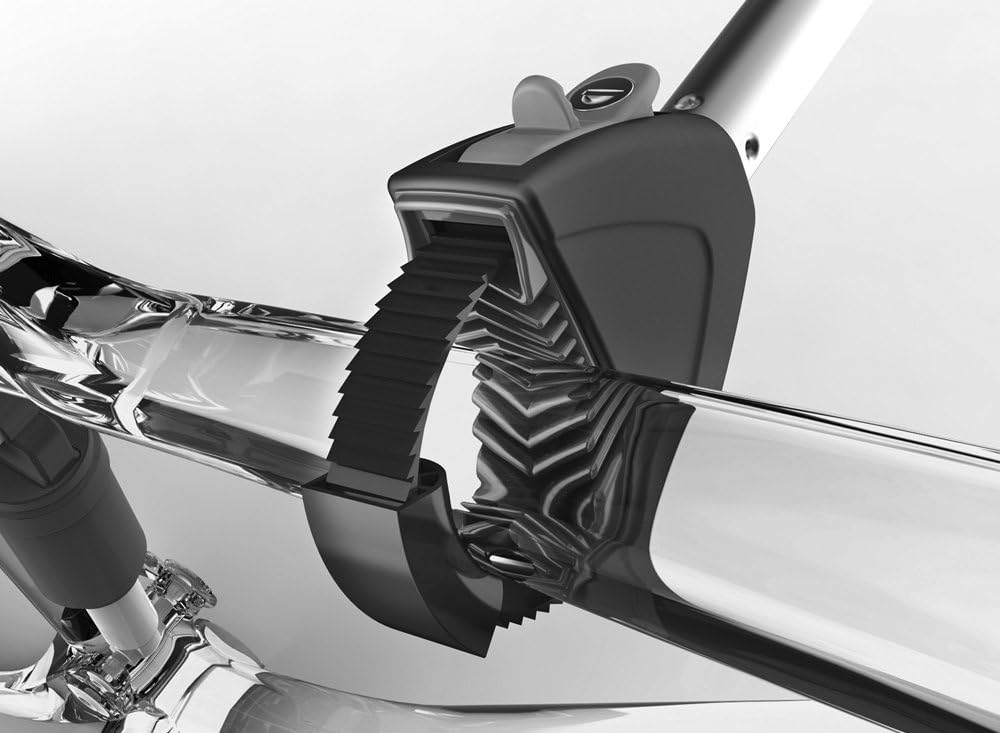
Image description: Detailed view of the padded clamping mechanism designed to securely hold a bicycle frame to the carrier, preventing scratches.
5. Arahan Operasi
Memuatkan Basikal
Always load the heaviest bicycle closest to the vehicle first. Secure the bike frame with the padded grab arms and the wheels with the straps. Repeat this process for subsequent bikes, ensuring proper spacing and stability. Distribute the weight as evenly as possible.
Accessing the Boot (Tilt Function)
The Atera Strada DL 3 features a convenient smooth-running roller pull-out mechanism, allowing the carrier to tilt away from the vehicle for easy boot access, even when fully loaded with bikes. To activate, locate and release the designated lever (usually near the towbar connection) and gently pull the carrier backwards until it tilts sufficiently. Push the carrier back into its upright position until it locks securely before driving.

Image description: The Atera Strada DL 3 bike carrier tilted away from a vehicle, demonstrating its practical boot access feature.
Perlindungan Anti Kecurian
The carrier is equipped with integrated locking mechanisms for both the carrier itself (to the towbar) and the bicycles (via the grab arms). Always use these locking features when the carrier is attached to your vehicle, especially when unattended, to deter theft.
6. Penyelenggaraan dan Penjagaan
- Pembersihan: Clean the carrier regularly with mild soap and water. Avoid using abrasive cleaners, solvents, or high-pressure washers, as these can damage the finish or components.
- Pelinciran: Periodically apply a suitable lubricant to all moving parts, such as the tilt mechanism, quick-release levers, and locking cylinders, to ensure smooth operation and prevent corrosion.
- Pemeriksaan: Before each use, conduct a thorough inspection of all components. Check for any signs of wear, damage, cracks, or loose fasteners. Pay particular attention to the towbar connection, wheel straps, and frame clamps. Replace any damaged parts immediately.
- Storan: When not in use, store the carrier in a dry, protected area, away from direct sunlight and extreme temperatures. The compact design allows for convenient storage in a garage or shed.
7. Penyelesaian masalah
Lampu Tidak Berfungsi
- Check the electrical connection to the vehicle's towbar socket. Ensure it is fully inserted and that the pins are clean and free of corrosion.
- Inspect the carrier's wiring for any visible damage or kinks.
- Verify the vehicle's fuses related to the towbar electrics. Consult your vehicle's owner's manual for fuse box locations.
Carrier Feels Loose on Towbar
- Ensure the quick-release fastener is fully engaged and locked. It should click into place firmly.
- Check the towbar ball for cleanliness and ensure it is the correct size and in good condition.
- If the issue persists, the clamping mechanism may require adjustment or repair. Contact a qualified professional or ATERA support.
Bikes Not Secure
- Ensure all wheel straps are tightened securely around the bike wheels.
- Verify that the padded grab arms are correctly positioned and clamped firmly onto the bike frames. Avoid clamping on cables or hydraulic lines.
- Adjust the position of bikes on the carrier to optimize stability and weight distribution. Ensure bikes are not touching each other or the vehicle.
8. Spesifikasi Teknikal
| Ciri | Perincian |
|---|---|
| Model | Atera Strada DL 3 (022601) |
| Jenama | ATERA |
| Kapasiti | 3 Bicycles (expandable to 4 with optional adapter) |
| Kapasiti Beban Maksimum | 45 kg |
| Dimensi (L x W x H) | 100 x 25 x 72 cm |
| Berat Barang | 14.4 kg |
| Frame Diameter Compatibility | 2.5 - 8 cm |
| Keserasian Lebar Tayar | Sehingga 2.4 inci |
| Wheel Track Spacing | 18 sm |
| Jenis Pemasangan | Towbar (Quick-release) |
| bahan | Keluli dan Aluminium |
| Sambungan elektrik | 13-pin |
9. Waranti dan Sokongan
ATERA products are manufactured to high quality standards and undergo rigorous testing. For detailed warranty information, please refer to the specific warranty documentation included with your purchase or visit the official ATERA webtapak.
For technical support, spare parts, or service inquiries, please contact your local authorized ATERA dealer or the manufacturer directly. When contacting support, please provide your product model number (022601) and purchase details to assist with efficient service.
You can find contact information and further resources on the official ATERA webtapak: www.atera.de
Dokumen Berkaitan - 022601
 |
Panduan Pengguna Pembawa Belakang Atera Strada/Genio Panduan komprehensif untuk memasang, menggunakan dan menyelesaikan masalah pembawa basikal belakang siri Atera Strada dan Genio, termasuk maklumat tentang keserasian e-basikal, jenis bar tunda dan keperluan undang-undang. |
 |
Atera Strada EVO RV Towbar Mounted Bike Rack User Manual and Technical Specifications Comprehensive guide for the Atera Strada EVO RV towbar mounted bike rack, including installation, usage, safety warnings, technical specifications, and regulatory information. Covers different models and configurations for transporting bicycles. |
 |
Rak Basikal Towbar Atera STRADA SPORT - Manual Pengguna dan Spesifikasi Teknikal Panduan komprehensif untuk rak basikal penunda Atera STRADA SPORT, meliputi pemasangan, penggunaan, amaran keselamatan, spesifikasi teknikal dan butiran bahagian. Termasuk arahan berbilang bahasa dan maklumat keserasian untuk pelbagai kenderaan dan cangkuk tunda. |
 |
Pemasangan Rak Basikal dan Panduan Pengguna Atera STRADA SPORT M Panduan komprehensif untuk rak basikal Atera STRADA SPORT M, meliputi pemasangan, penggunaan, keselamatan dan spesifikasi teknikal. Termasuk arahan dan gambar rajah berbilang bahasa. |
 |
Rak Basikal Atera STRADA EVO: Panduan Pemasangan dan Penggunaan Arahan dan spesifikasi terperinci untuk pembawa basikal Atera STRADA EVO, termasuk panduan berbilang bahasa, peraturan keselamatan dan kapasiti muatan. |
 |
Atera GENIO PRO Bike Rack Installation and User Manual Comprehensive guide for installing and using the Atera GENIO PRO bike rack, including safety instructions, parts list, and maintenance. Covers mounting, bike loading, and technical specifications. |
Ask a question about this manual
Ask about setup, troubleshooting, compatibility, parts, safety, or missing instructions. Manuals+ will review the question and use this page’s manual context to help answer it.