
1. Pengenalan
This manual provides essential instructions for the safe and effective use of your OLYMPUS Voice-Trek VN-7200 IC Recorder. Please read this manual thoroughly before using the device and keep it for future reference.
2. Produk Lebihview
The OLYMPUS Voice-Trek VN-7200 is a portable digital voice recorder designed for easy and reliable audio capture. It features a large LCD display for clear information, intuitive controls, and 2GB of internal storage. The device is optimized for one-handed operation with prominent record and stop buttons.

Rajah 2.1: Depan view of the OLYMPUS Voice-Trek VN-7200 IC Recorder, showing the large LCD screen, control buttons, and built-in speaker.
3. Persediaan
3.1. Pemasangan Bateri
The VN-7200 operates on two AAA batteries. Ensure correct polarity when inserting the batteries.
- Cari penutup petak bateri di bahagian belakang peranti.
- Luncurkan penutup ke arah yang ditunjukkan oleh anak panah untuk membukanya.
- Masukkan dua bateri AAA, padankan terminal (+) dan (-) seperti yang ditunjukkan di dalam petak.
- Tutup penutup petak bateri dengan selamat.
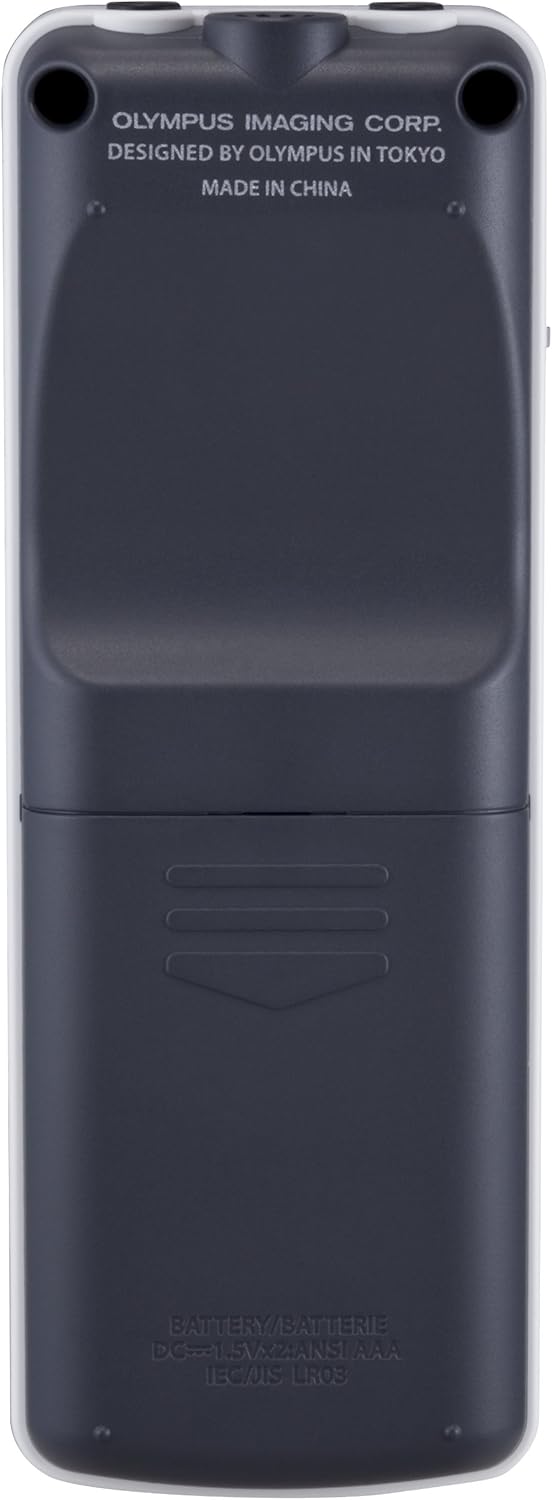
Rajah 3.1: Belakang view of the recorder, illustrating the battery compartment location.
3.2. Hidupkan/Mati Kuasa
To power on or off the device, use the power switch located on the side.
- To turn on: Slide the power switch upwards to the 'ON' position. The LCD screen will illuminate.
- To turn off: Slide the power switch downwards to the 'OFF' position. The screen will turn off.

Rajah 3.2: Sisi view of the recorder, highlighting the power switch and hold function.
3.3. Connecting Headphones/Microphone
The device features dedicated ports for headphones and an external microphone.
- Jack fon kepala: Connect standard 3.5mm headphones to the port labeled with a headphone icon for private listening.
- Jack Mikrofon: Connect an external 3.5mm microphone to the port labeled with a microphone icon for enhanced recording quality or specific recording scenarios.

Rajah 3.3: Atas view of the recorder, showing the headphone and external microphone input jacks.
4. Arahan Operasi
4.1. Rakaman Audio
To begin recording, press the large red 'REC' button. The device supports voice-activated recording (VCVA) to automatically start and stop recording based on sound levels.
- Pastikan peranti dihidupkan.
- Tekan ke REC (Record) button to start recording. The recording indicator will light up.
- Untuk menjeda rakaman, tekan butang BERHENTI butang sekali. Tekan REC sekali lagi untuk menyambung semula.
- To stop recording completely, press the BERHENTI button twice. The recorded file akan diselamatkan.
4.2. Main balik
After recording, you can play back your audio files menggunakan butang kawalan.
- Navigasi ke yang dikehendaki file menggunakan Folder/Index butang dan Maju/Mundur butang.
- Tekan ke Play/OK butang untuk memulakan main balik.
- Semasa main balik, gunakan Kelantangan (+/-) butang untuk melaraskan kelantangan.
- Tekan ke BERHENTI butang untuk menghentikan main balik.
4.3. File Pengurusan
The VN-7200 offers various file management functions including file splitting, moving, and locking.
- File Pemisahan: This function allows you to divide a long recording into multiple smaller files. Access this option through the menu.
- File Pergerakan: Anda boleh bergerak files between different folders on the device to organize your recordings.
- File Kunci: To prevent accidental deletion, you can lock important files. Terkunci files cannot be deleted until unlocked.
- Pengindeksan: Add index marks during recording or playback to easily locate specific points in a file.
4.4. Navigasi Menu
The large LCD and intuitive buttons allow for easy navigation through the device's settings and functions.
- Tekan ke Display/Menu butang untuk mengakses menu utama.
- Gunakan Maju/Mundur butang untuk menatal melalui pilihan menu.
- Tekan ke Play/OK butang untuk memilih pilihan atau mengesahkan tetapan.
- The display shows important information such as date, time, current mode, file information, and warnings in an easy-to-understand format.
5. Penyelenggaraan
Proper maintenance ensures the longevity and optimal performance of your IC recorder.
- Pembersihan: Gunakan kain lembut dan kering untuk membersihkan bahagian luar peranti. Jangan gunakan pembersih cecair atau bahan kasar.
- Storan: Simpan perakam di tempat yang sejuk dan kering, jauh daripada cahaya matahari langsung, suhu yang melampau dan kelembapan yang tinggi. Tanggalkan bateri jika peranti tidak akan digunakan untuk tempoh yang lama bagi mengelakkan kebocoran.
- Elakkan Kesan: Lindungi peranti daripada titisan dan hentaman, yang boleh merosakkan komponen dalaman.
6. Penyelesaian masalah
If you encounter issues with your VN-7200, refer to the following common solutions:
| Masalah | Penyelesaian |
|---|---|
| Peranti tidak dihidupkan. | Check if batteries are inserted correctly and have sufficient charge. Ensure the power switch is in the 'ON' position. |
| Cannot record audio. | Verify that there is sufficient free space on the device. Check if the microphone is connected properly (if using external). Ensure the device is not in 'HOLD' mode. |
| Tiada bunyi semasa main balik. | Adjust the volume. Check if headphones are properly connected (if used). Ensure the speaker is not obstructed. |
| Files tidak dapat dipadamkan. | Semak sama ada files are locked. Unlock them via the menu before attempting to delete. |
7. Spesifikasi
Key technical specifications for the OLYMPUS Voice-Trek VN-7200 IC Recorder:
| Ciri | Perincian |
|---|---|
| Jenama | OLYMPUS |
| Nombor Model | VN-7200 |
| Saiz Skrin | 1 inci |
| Kapasiti Storan | 2 GB |
| Masa Penggunaan Berterusan | Up to 1151 Hours (recording) |
| Peranti Serasi | PC |
| Jenis Bateri | 2 x bateri AAA (tidak termasuk) |
| Berat Barang | 249 gram |
| Dimensi Pakej | 15.6 x 13 x 4.4 cm |
| Tarikh Tayangan | 24 Jun 2011 |
8. Waranti dan Sokongan
For information regarding warranty coverage, technical support, or service, please refer to the warranty card included with your product or visit the official OLYMPUS webtapak. Simpan bukti pembelian anda untuk tuntutan waranti.