
pengenalan
This manual provides detailed instructions for the safe installation, operation, and maintenance of your Utilitech 3-Light 123-Watt Bronze Dusk-to-Dawn Security Light. Please read all instructions carefully before beginning installation and retain this manual for future reference. This security light is designed for outdoor use and features a built-in motion sensor and photo-control for automated operation.
Maklumat Keselamatan
AMARAN: Risiko renjatan elektrik. Putuskan sambungan kuasa pada fius atau pemutus litar sebelum pemasangan atau servis.
- Produk ini mesti dipasang mengikut kod pemasangan yang berkenaan oleh orang yang biasa dengan pembinaan dan pengendalian produk serta bahaya yang terlibat.
- Pastikan bekalan voltage is 120 Volts AC, 60 Hz.
- Use only suitable bulbs as specified in the 'Specifications' section.
- Jangan cuba mengubah suai lekapan. Sebarang pengubahsuaian boleh membatalkan waranti dan menimbulkan bahaya keselamatan.
- This fixture is UL Safety Listed, ensuring compliance with recognized safety standards.
Kandungan Pakej
Before beginning installation, ensure all parts are present. If any part is missing or damaged, do not attempt to assemble, install, or operate the product.
- Security Light Fixture (1)
- Perkakasan Pemasangan (skru, nat wayar, dll.)
- Manual Arahan (1)
Persediaan dan Pemasangan
This security light is designed for wall mount installation and requires hardwiring to an existing electrical circuit.
1. Bersedia untuk Pemasangan
- Matikan kuasa pada pemutus litar atau kotak fius ke kotak salur keluar tempat lekapan akan dipasang.
- Buka bungkusan lekapan dan komponennya dengan berhati-hati.
2. Memasang Lekapan
- Pasangkan pendakap pelekap pada kotak simpang elektrik menggunakan skru yang disediakan. Pastikan ia dipasang dengan kukuh.
- Feed the electrical wires from the junction box through the center hole of the mounting bracket.
3. Sambungan Pendawaian
- Sambungkan wayar pembumian kuprum kosong dari lekapan ke wayar pembumian dari kotak simpang menggunakan nat wayar.
- Connect the white (neutral) wire from the fixture to the white (neutral) wire from the junction box using a wire nut.
- Connect the black (hot) wire from the fixture to the black (hot) wire from the junction box using a wire nut.
- Berhati-hati masukkan semua wayar ke dalam kotak simpang.
4. Securing the Fixture and Installing Bulbs
- Align the fixture with the mounting bracket and secure it with the provided screws. Ensure a tight seal against the mounting surface to prevent water intrusion.
- Install three (3) Halogen or compact fluorescent bulbs (not included) into the sockets. Do not exceed the maximum wattage specified in the 'Specifications' section.
- Adjust the light heads to the desired direction.
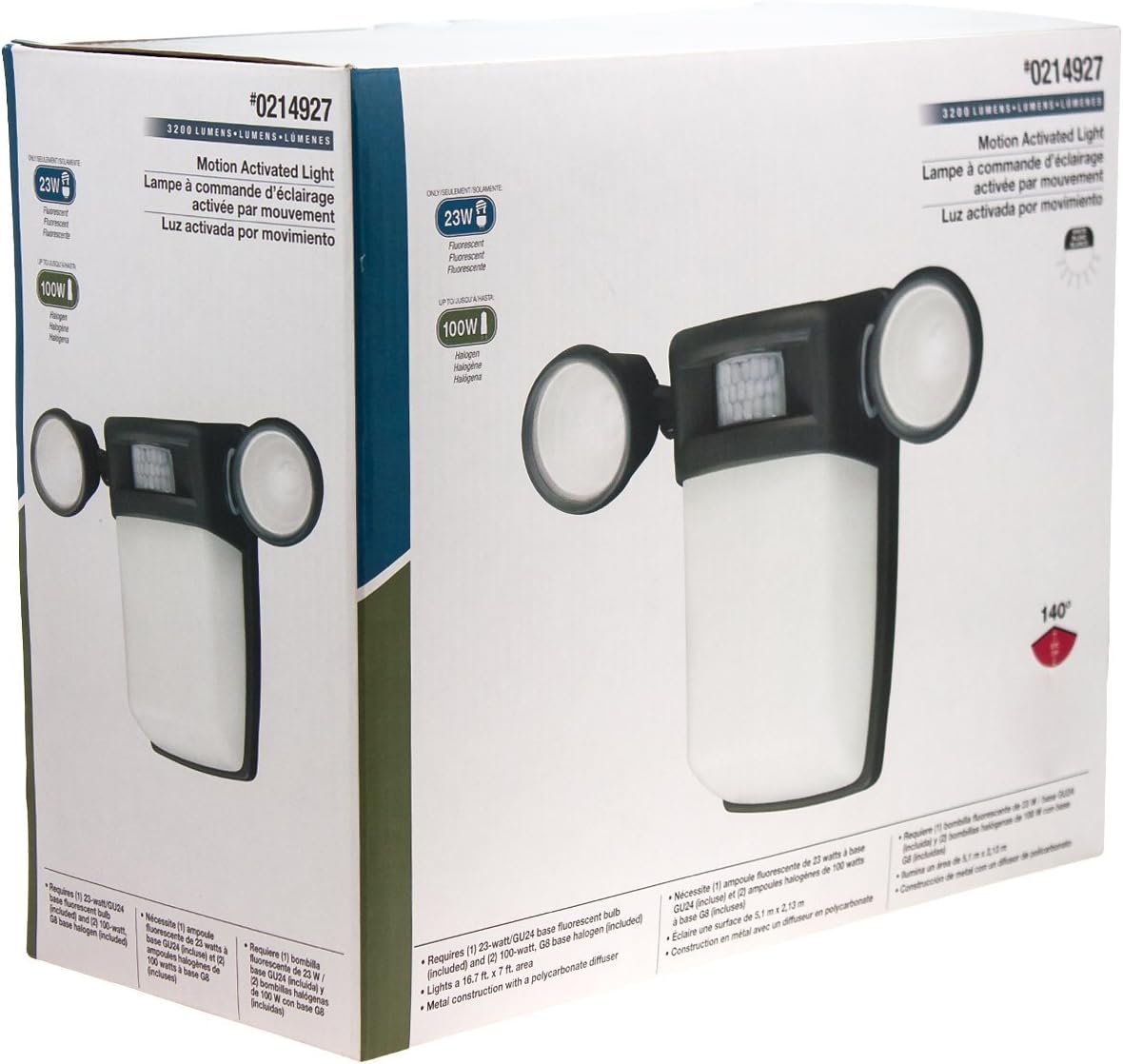
Rajah 1: Depan view of the Utilitech 3-Light 123-Watt Bronze Dusk-to-Dawn Security Light in its retail packaging. This image shows the overall design with three adjustable light heads and the central motion sensor.

Rajah 2: Sisi view of the Utilitech 3-Light 123-Watt Bronze Dusk-to-Dawn Security Light in its retail packaging. This perspective highlights the depth of the fixture and the positioning of the light heads relative to the main body.
Arahan Operasi
This security light is equipped with both a photo-control sensor for dusk-to-dawn operation and a 140° automatic motion sensor for enhanced security.
Ciri Senja ke Subuh
The integrated photo-control sensor detects ambient light levels. The light will automatically turn on at dusk and turn off at dawn, providing continuous illumination during nighttime hours. No manual adjustment is typically required for this feature.
Operasi Sensor Gerakan
The 140° automatic motion sensor detects movement within its range. When motion is detected, the light will activate for a set duration. The fixture may include adjustable settings for sensitivity and duration. Refer to the specific controls on your fixture for adjustment. Some models may also feature remote control capabilities for these settings.
Melaraskan Kepala Lampu
The three light heads are adjustable. Gently pivot each light head to direct illumination to your desired coverage area.
Penyelenggaraan
Regular maintenance ensures optimal performance and extends the lifespan of your security light.
- Pembersihan: Bersihkan lekapan secara berkala dengan lembut, damp cloth. Do not use abrasive cleaners or solvents, as they may damage the finish or electrical components. Ensure power is off before cleaning.
- Penggantian mentol: Turn off power at the circuit breaker before replacing bulbs. Allow bulbs to cool completely before handling. Replace with three (3) Halogen or compact fluorescent bulbs of the specified wattage.
- Pembersihan Sensor: Keep the motion sensor lens and photo-control sensor free of dirt, dust, and obstructions to ensure proper operation.
Menyelesaikan masalah
If your security light is not functioning as expected, refer to the following common issues and solutions:
| Masalah | Kemungkinan Punca | Penyelesaian |
|---|---|---|
| Light does not turn on at all. | No power, faulty bulbs, wiring issue, or defective sensor. | Check circuit breaker. Ensure bulbs are correctly installed and not burnt out. Verify wiring connections. If issues persist, consult a qualified electrician. |
| Lampu kekal menyala secara berterusan. | Motion sensor sensitivity too high, duration setting too long, or photo-control sensor obstructed/faulty. | Adjust motion sensor sensitivity and duration settings. Ensure photo-control sensor is not blocked by debris or external light sources. |
| Lampu menyala pada siang hari. | Photo-control sensor is obstructed or in a shaded area. | Ensure the photo-control sensor is exposed to natural daylight and not covered by dirt or obstructions. |
| Motion sensor does not detect movement. | Sensor sensitivity too low, obstructed view, or incorrect angle. | Increase sensor sensitivity. Clear any obstructions from the sensor's field of view. Adjust the sensor's angle to cover the desired area. |
Spesifikasi
| Ciri | Spesifikasi |
|---|---|
| Jenama | Utilitech |
| Nombor Model | 0214927 |
| Voltage | 120 Volt AC, 60 Hz |
| Wattage | 123 Watt (jumlah) |
| Jenis Mentol | Halogen or Compact Fluorescent (3 bulbs required) |
| Light Heads | 3, boleh laras |
| Sudut Penderia Pergerakan | 140 darjah |
| Ciri Senja ke Subuh | Yes, photo-control sensor |
| bahan | logam |
| Selesai | Gangsa |
| Jenis Pemasangan | Lekap di dinding |
| Dimensi (H x W x D) | 10.25 in x 13.5 in x 5.75 in |
| Berat Barang | 3.5 paun |
| Penyenaraian Keselamatan | UL Tersenarai |