
pengenalan
This manual provides comprehensive instructions for the safe and effective installation, operation, and maintenance of the Lutron NFTV-WH Standard Switch. The NFTV-WH is a 0-10VDC single-pole slide-to-off dimmer designed for fluorescent lighting applications. It incorporates advanced lighting innovations such as voltage compensation, radio frequency interference suppression, and an accessible Air gap switch for enhanced safety and quality. The dimmer also features power failure memory, which restores the last-used setting after a power interruption.
Produk Selesaiview
The Lutron NFTV-WH dimmer is engineered for durability and reliable performance. It is constructed from heavy-duty materials, including brass and copper, ensuring a long product life. A matching wall plate is included for a complete installation.
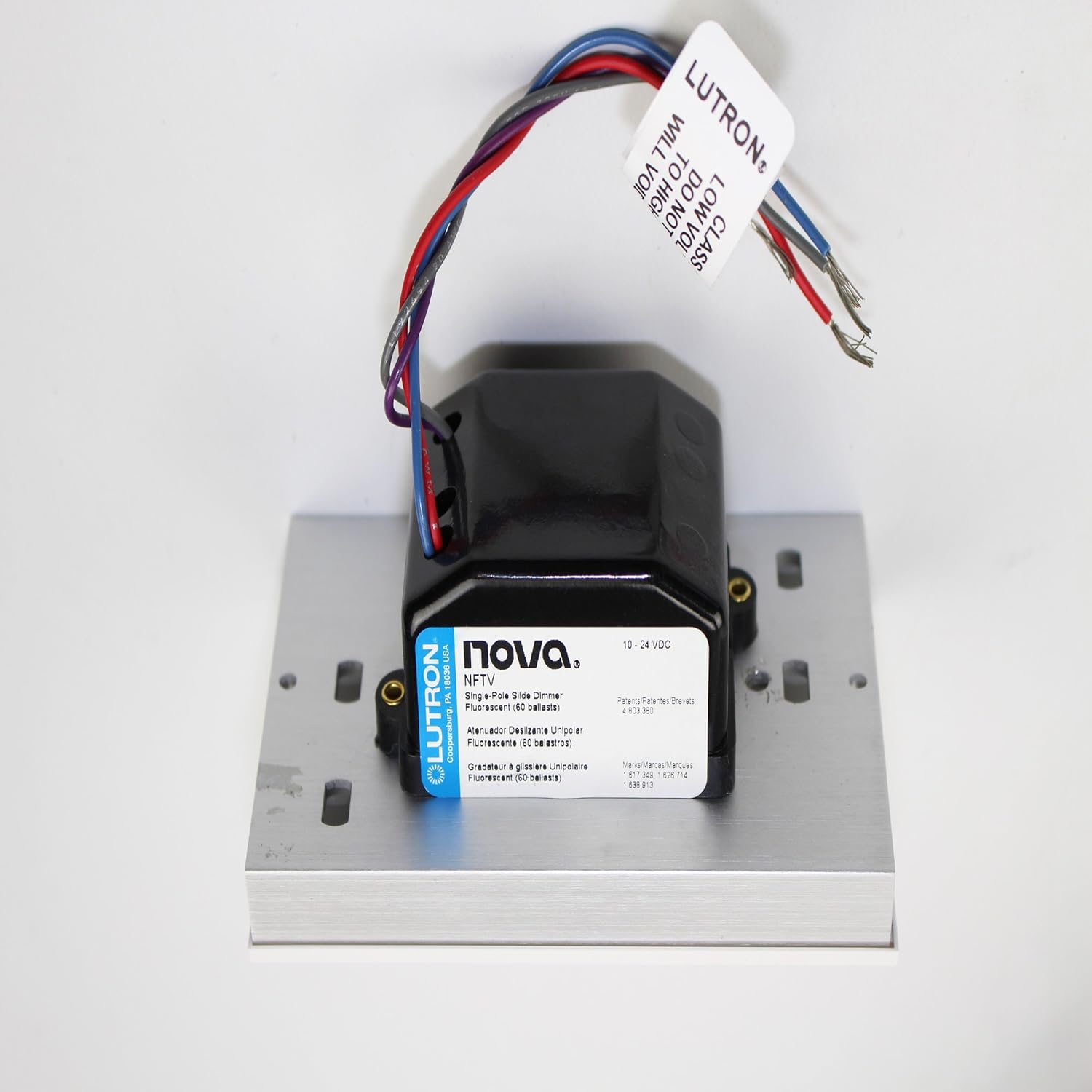
Rajah 1: Lutron NFTV-WH 0-10VDC Fluorescent Dimmer Module. This image displays the dimmer module with its connected wires, illustrating the compact design and wiring terminals essential for installation.

Rajah 2: Lutron NFTV-WH Product Packaging. This image shows the retail packaging for the Lutron NFTV-WH, highlighting the brand, model number, and key product information as it appears on the box.
Persediaan dan Pemasangan
Maklumat Keselamatan Penting: Before beginning installation, ensure power is turned off at the circuit breaker. Installation should be performed by a qualified electrician or in accordance with local electrical codes.
- Pemutusan Kuasa: Cari pemutus litar yang mengawal lekapan lampu dan matikan kuasa. Sahkan kuasa dimatikan menggunakan voltantage penguji.
- Keluarkan Suis Sedia Ada: Carefully remove the existing wall plate and switch from the wall box. Disconnect the wires from the old switch.
- Wiring the NFTV-WH:
- Connect the line (hot) wire to the appropriate terminal on the NFTV-WH.
- Connect the load wire (to the light fixture) to the appropriate terminal.
- Connect the neutral wire (if present and required by local code) and ground wire according to standard electrical practices.
- Connect the 0-10VDC control wires to the compatible fluorescent dimming ballasts. Refer to the ballast manufacturer's instructions for specific wiring details.
Note: The NFTV-WH is a single-pole switch, meaning it controls a light from one location.
- Pemasangan: Carefully fold the wires into the wall box and secure the NFTV-WH dimmer to the wall box using the provided screws.
- Pasang Plat Dinding: Attach the included wall plate over the dimmer.
- Pulihkan Kuasa: Hidupkan semula kuasa pada pemutus litar.
Arahan Operasi
The Lutron NFTV-WH dimmer provides intuitive control over your fluorescent lighting.
- Menghidupkan/Mematikan: Use the slide switch to turn the lights on or off. The switch operates in a slide-to-off manner.
- Peredupan: Move the slide control up or down to adjust the light level. Moving the slide up increases brightness, and moving it down decreases brightness.
- Suis Jurang Udara: For maintenance or bulb replacement, pull the Air gap switch (located on the dimmer) to completely disconnect power to the fixture, ensuring safety. Push it back in for normal operation.
- Memori Kegagalan Kuasa: In the event of a power interruption, the dimmer will recall and restore the last set light level once power is restored.
- Voltage Pampasan: The dimmer features square law dimming, which increases voltage response at low control levels to compensate for infrared loss, providing a smoother dimming experience.
Penyelenggaraan
The Lutron NFTV-WH dimmer is designed for minimal maintenance. To clean the surface, wipe with a soft, damp cloth. Do not use abrasive cleaners or solvents, as these can damage the finish. Ensure the Air gap switch is pulled out before cleaning to disconnect power.
Menyelesaikan masalah
- Lampu tidak menyala:
- Periksa pemutus litar untuk memastikan kuasa dihidupkan.
- Verify the Air gap switch is fully pushed in.
- Pastikan semua sambungan pendawaian selamat.
- Confirm that the fluorescent ballasts are compatible with 0-10VDC dimming.
- Lights do not dim properly:
- Ensure the 0-10VDC control wires are correctly connected to the ballasts.
- Verify the ballasts are functioning correctly and are designed for dimming.
- Check for any loose connections in the control wiring.
- Operasi sekejap:
- Check for loose wiring connections at the dimmer and the light fixture.
- Ensure the dimmer is not overloaded (refer to specifications for wattagdan).
Spesifikasi
| Model | NFTV-WH |
| Mod Operasi | Off, Slide Switch |
| Penilaian Semasa | 16 Amps |
| Jenis Kenalan | Biasa Terbuka |
| Jenis Penyambung | Terminal Skru |
| Jenis Suis | Suis Dimmer |
| Terminal | skru |
| bahan | Tembaga, Kuprum |
| Dimensi (L x W x H) | 2.75 x 4.56 x 4.56 inci |
| Jenis Litar | 1 hala (Tiang tunggal) |
| Jenis Pemasangan | Lekap di dinding |
| Jenis Penggerak | slaid |
| Bilangan Jawatan | 1 |
| Kaedah Kawalan | Touch (Slide) |
| Protokol Ketersambungan | Infrared (Internal control, not user-facing) |
| Wattage | 1920 watt |
| warna | putih |
| Penilaian Perlindungan Antarabangsa | IP54 |
| Spesifikasi Met | UL |
| UPC | 027557752701 |
| Berat Barang | 1 paun |
| Komponen yang Disertakan | Nova Fluor. 0-10V Control Wh, Wall Plate |
Maklumat Waranti
The Lutron NFTV-WH Standard Switch is covered by a manufacturer's warranty. For specific details regarding warranty coverage, duration, and claims process, please refer to the documentation included with your product or contact Lutron customer support directly.
Sokongan Pelanggan
For further assistance, technical support, or to explore other Lutron products, please visit the official Lutron webtapak atau hubungi bahagian perkhidmatan pelanggan mereka.
Anda boleh mendapatkan lebih banyak maklumat dan sumber sokongan dengan melawati Kedai Lutron di Amazon.