
Tomato B004WSJAW0
Mosi Oa Tunya (Victoria Falls) Audio CD User Guide
By Van Kampen
1. Produk Lebihview
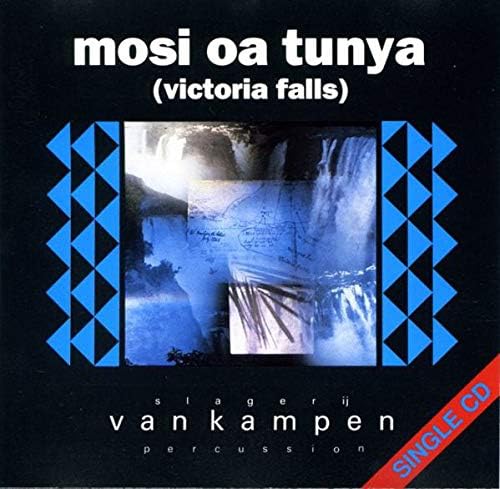
The Mosi Oa Tunya (Victoria Falls) audio CD is a musical release by artist Van Kampen, produced by Tomato. This single CD features a collection of tracks, including different versions of the title track and an additional piece. It is designed for playback on standard audio CD players.


2. Persediaan
Menyediakan Mosi Oa Tunya (Victoria Falls) audio CD for playback is straightforward.
- Buka bungkusan CD: Carefully remove the CD from its jewel case. Hold the CD by its edges to avoid touching the playing surface.
- Sediakan Pemain CD anda: Ensure your audio CD player is powered on and ready to accept a disc. Open the disc tray or lid.
- Masukkan CD: Place the CD into the disc tray with the label side facing up. Ensure it is seated correctly in the center spindle.
- Close the Tray/Lid: Gently close the disc tray or lid of your CD player.
3. Arahan Operasi
Once the CD is inserted, you can begin playback.
- Mula Main Semula: Press the "Play" button on your CD player or remote control. The CD player should automatically begin playing the first track.
- Navigate Tracks: Gunakan butang "Laluan Seterusnya" atau "Laluan Sebelumnya" untuk melangkau antara lagu.
- Jeda/Berhenti: Gunakan butang "Jeda" untuk menghentikan main balik buat sementara waktu dan "Berhenti" untuk menamatkan main balik.
- Laraskan Kelantangan: Control the playback volume using your amplifier, receiver, or the volume controls on your CD player if available.
4. Track List
The Mosi Oa Tunya (Victoria Falls) audio CD features the following tracks:
| Track No. | Tajuk | Tempoh |
|---|---|---|
| 1 | Mosi Oa Tunya (Radio Version) | 3:30 |
| 2 | Mosi Oa Tunya (Long Version) | 5:02 |
| 3 | Wakarimasen | 8:16 |
Note: Tracks 1 and 2 are also featured on the album "A Long Walk On A Short Pier".
5. Penyelenggaraan dan Penjagaan
Proper care will extend the life and maintain the sound quality of your audio CD.
- Pengendalian: Sentiasa pegang CD pada tepi luarnya atau lubang tengah. Elakkan daripada menyentuh permukaan permainan yang berkilat.
- Pembersihan: If the CD becomes dirty or smudged, gently wipe it with a soft, lint-free cloth (e.g., a microfiber cloth) from the center outwards in a straight line. Do not wipe in circular motions. Use a specialized CD cleaning solution if necessary, but avoid abrasive cleaners or solvents.
- Storan: Store the CD in its original jewel case when not in use. Keep it away from direct sunlight, extreme temperatures, and high humidity.
- Elakkan calar: Do not place the CD on rough surfaces or allow it to come into contact with sharp objects.
6. Penyelesaian masalah
Jika anda menghadapi masalah semasa main balik, pertimbangkan penyelesaian biasa berikut:
- Ponteng atau Gagap:
- Check the CD for visible smudges or fingerprints. Clean the disc as described in the Maintenance section.
- Inspect the CD for deep scratches or cracks. Severely damaged discs may not play correctly.
- Pastikan pemain CD berada di atas permukaan yang stabil dan rata untuk mengelakkan getaran.
- Try playing another CD to determine if the issue is with the player or the disc.
- Tiada Bunyi:
- Verify that your audio system (amplifier, speakers) is powered on and connected correctly.
- Check the volume levels on your CD player and amplebih hidup.
- Pastikan sumber input yang betul dipilih pada anda amppenguat/penerima.
- Cakera Tidak Dikenali:
- Ensure the CD is inserted correctly, label side up.
- Bersihkan cakera.
- Some older CD players may have difficulty reading certain types of discs (e.g., CD-R/RWs, though this is a standard audio CD).
7. Spesifikasi
| Atribut | Perincian |
|---|---|
| Tajuk Produk | Mosi Oa Tunya (Victoria Falls) |
| Artis | Van Kampen |
| Format | CD audio |
| Label / Manufacturer | tomato |
| ASIN | B004WSJAW0 |
| Rujukan Pengeluar | 2696713 |
| Bilangan Cakera | 1 |
| Dihentikan oleh Pengeluar | ya |
| Tahun Keluaran | 1989 (based on copyright info on disc image) |
8. Sokongan
For further assistance or inquiries regarding the Mosi Oa Tunya (Victoria Falls) audio CD, please refer to the contact information provided by the original retailer or the record label, Tomato.
Given the product's nature as an audio CD and its "discontinued by manufacturer" status, direct product support from the manufacturer may be limited.
Ask a question about this manual
Ask about setup, troubleshooting, compatibility, parts, safety, or missing instructions. Manuals+ will review the question and use this page’s manual context to help answer it.