
1. Pengenalan
The Hobart 500553 Handler 210 MVP is a versatile MIG and flux core welding machine designed for performance and portability. It features a Multi-Voltage Plug (MVP) allowing operation on common 115V or 230V input power sources without additional tools. This welder is capable of handling diverse projects, welding materials as thin as 24 gauge up to 3/8 inch in a single pass. Its intuitive design and fine-tuned controls ensure improved arc performance with reduced spatter and better bead appearance.
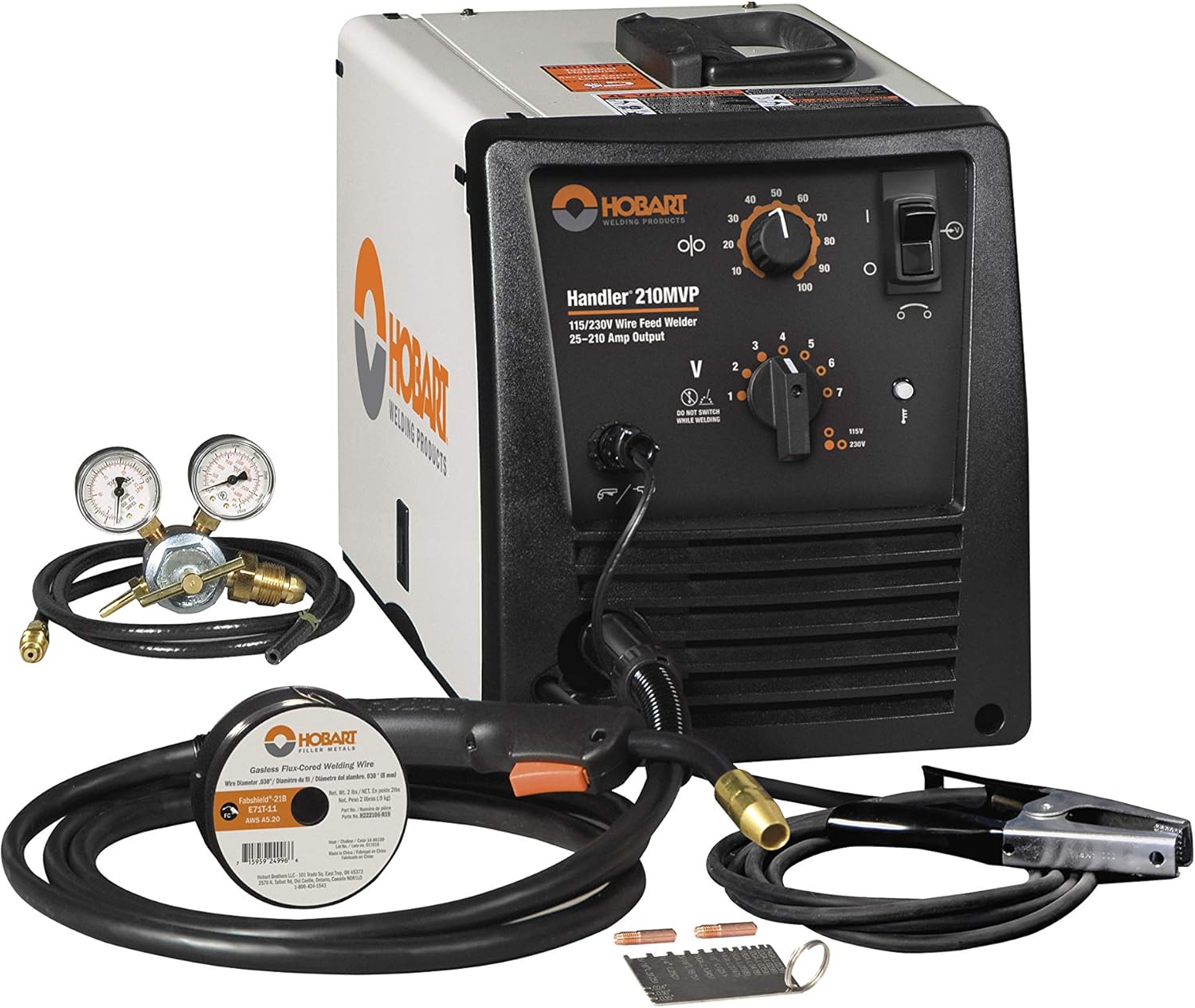
Image: The Hobart 500553 Handler 210 MVP MIG Welder, a compact and powerful welding unit.
2. Langkah-langkah Keselamatan
Always prioritize safety when operating welding equipment. Read and follow all labels and the Owner's Manual carefully before installing, operating, or servicing the unit. Familiarize yourself with the safety information provided throughout the manual and in each section.
General Welding Hazards:
- Kejutan elektrik: Can kill. Always verify the supply ground and ensure proper grounding. Do not touch live electrical parts.
- Asap dan Gas: Can be hazardous to your health. Ensure adequate ventilation.
- Sinar Arka: Can injure eyes and burn skin. Always wear appropriate welding helmet and protective clothing.
- Kebakaran dan Letupan: Welding can cause fire or explosion. Keep flammable materials away from the work area.
- Bahagian Panas: Boleh menyebabkan melecur teruk. Biarkan peralatan sejuk sebelum mengendalikan.
Only qualified personnel should install, operate, maintain, and repair this unit. Always wear appropriate personal protective equipment (PPE) including welding helmet, gloves, and protective clothing.
Video: Seorang pegawai tamatview of the Hobart 500553 Handler 210 MVP MIG Welder, highlighting its features and capabilities.
3. Persediaan
3.1. Membongkar
Carefully remove the welder and all accessories from the packaging. Inspect for any shipping damage. Retain packaging for future transport or storage.
3.2. Power Connection (Multi-Voltage Plug - MVP)
The Handler 210 MVP features a Multi-Voltage Plug (MVP) that allows connection to either a 115V or 230V input power source. The machine automatically detects the input voltage, eliminating the need for manual switching inside the unit.
- Select the appropriate plug (115V or 230V) for your power source.
- Align the arrows on the power cable and the chosen plug.
- Screw the plug securely onto the power cable.
- Plug the machine into the input power outlet.
3.3. Gas Connection (for MIG Welding)
For MIG welding, connect the included gas regulator and 5-foot gas hose to your shielding gas cylinder and the welder's gas inlet.
3.4. Pemasangan Wayar
The welder includes a spool hub assembly that accommodates 4-inch or 8-inch spools of welding wire. Follow the instructions in the owner's manual for proper wire routing through the drive system.

Imej: Dari dekat view of the industrial cast aluminum wire drive system inside the Hobart Handler 210 MVP, showing the wire spool and feed mechanism.
3.5. Tanah Clamp Sambungan
Connect the heavy-duty ground clamp and cable to your workpiece. Ensure a clean, secure connection for optimal welding performance and safety.
4. Arahan Operasi
4.1. Kawalan Ke Atasview
The front panel of the Handler 210 MVP features intuitive controls for precise welding adjustments:
- Variable Speed Wire Feed Control: Melaraskan kelajuan di mana wayar kimpalan disuap.
- Seven Tap Voltage Tetapan: Allows fine-tuning of the welding voltage for different materials and thicknesses.
- Suis kuasa: Menghidupkan dan mematikan unit.

Imej: A terperinci view of the Hobart Handler 210 MVP control panel, showing the wire feed speed dial and the seven-position voltagpemilih e.
4.2. Welding Guide
A quick reference welding guide is conveniently located on the inside of the access door. This guide provides recommended voltage and wire feed speed settings based on the material type, wire type, and material thickness. Use this chart to set up your machine accurately without guesswork.

Image: The welding guide and specifications chart for the Hobart Handler 210 MVP, located inside the access door, providing recommended settings for various materials and thicknesses.
4.3. Welding Aluminum (Optional Spool Gun)
For welding aluminum, the optional SpoolRunner 100 spool gun (Part Number 300796) can be directly plugged into the unit. No other adapters are required, simplifying the process of welding aluminum with this machine.
5. Penyelenggaraan
Regular maintenance ensures the longevity and optimal performance of your Hobart Handler 210 MVP.
- Pembersihan Am: Keep the welder clean and free from dust and debris. Use compressed air to clear ventilation openings.
- Penggantian Petua Sentuh: Regularly inspect and replace worn contact tips to maintain consistent arc performance.
- Wire Drive System Inspection: Periodically check the wire drive rollers for wear and ensure proper tension. Clean any wire shavings or debris from the drive system.
- Cable and Hose Inspection: Inspect all cables and hoses for cuts, abrasions, or damage. Replace any damaged components immediately.
6. Penyelesaian masalah
If you encounter issues with your welder, refer to the following common troubleshooting tips:
- Tiada Lengkungan: Check power connections, ensure the ground clamp is securely attached to a clean metal surface, and verify wire feed is functioning.
- Kualiti Kimpalan yang Buruk: Laraskan kelajuan suapan wayar dan voltage settings according to the welding guide. Ensure proper gas flow (for MIG) and clean the workpiece.
- Isu Pemberian Kawat: Check for tangled wire, worn contact tips, or incorrect drive roller tension.
- Terlalu panas: The machine has self-resetting thermal overload protection. If it overheats, allow it to cool down. Ensure proper ventilation around the unit.
For more detailed troubleshooting, consult the comprehensive owner's manual.
7. Spesifikasi
| Pengeluar | Hobart |
| Nombor Bahagian | 500553 |
| Nombor Model Item | 500553 |
| Berat Barang | 79 paun |
| Dimensi Produk | 19.5 x 10.63 x 12.38 inci |
| Gaya | Mig welder |
| bahan | logam |
| Sumber Kuasa | AC |
| Kaedah Pemasangan | Gas-welding |
| Kuantiti Pakej Item | 1 |
| AmpJulat erage | 25-210 amps |
| Kitaran Tugas | 30% (230 volts) |
| Bahan Kimpalan | Keluli, Keluli Tahan Karat, Aluminium |
| Input Voltage | 115/230 volt |
| Komponen yang Disertakan | One 10 ft. (3m) H100S4-10 gun, One 10 ft. (3m) work cable with clamp, Built-in gas solenoid valve and dual-gauge regulator with gas hose |
8. Waranti
The Hobart 500553 Handler 210 MVP MIG Welder comes with a Waranti terhad 3 tahun. For specific terms and conditions, please refer to the warranty information included in your product packaging or contact Hobart customer support.
9. Sokongan
For technical assistance, parts, or service, please contact Hobart customer support. Refer to your owner's manual for detailed contact information.