
pengenalan
This manual provides instructions for the proper setup, operation, and maintenance of your RadioShack Pro-197 Radio Scanner. This base/mobile scanner offers advanced digital voice decoding capabilities and a range of features for monitoring various radio transmissions. Please read this manual thoroughly before operating your device.
Maklumat Keselamatan
Observe the following safety precautions to prevent damage to the scanner or injury to yourself.
- Sumber Kuasa: Use only the specified power adapter. Incorrect voltage boleh merosakkan unit tersebut.
- Antena: Ensure the antenna is securely connected. Do not operate without an antenna for extended periods.
- Persekitaran: Avoid exposing the scanner to extreme temperatures, humidity, dust, or direct sunlight.
- Pembersihan: Putuskan kuasa sebelum membersihkan. Gunakan kain lembut dan kering. Jangan gunakan pembersih cecair atau aerosol.
- Servis: Jangan cuba menservis unit ini sendiri. Rujuk semua servis kepada kakitangan yang berkelayakan.
Kandungan Pakej
Sahkan bahawa pakej anda mengandungi item berikut:
- RadioShack Pro-197 Radio Scanner
- Penyesuai Kuasa AC
- Antena teleskop
- Manual Pengguna
Produk Selesaiview
Familiarize yourself with the main components and controls of your Pro-197 scanner.
Panel Depan
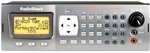
This image displays the front panel of the RadioShack Pro-197 Radio Scanner, featuring the large display screen, the numeric keypad, and various control buttons and knobs for operation.
- paparan: Shows frequency, channel information, and menu options.
- Pad kekunci: Digunakan untuk memasukkan frekuensi, nombor saluran dan navigasi menu.
- Butang Fungsi: Three buttons located under the display, whose purpose changes based on the current screen, with on-screen text help.
- Tombol Kelantangan: Melaraskan tahap output audio.
- Squelch Knob: Adjusts the threshold for signal reception, eliminating static.
- Pad Navigasi: Used for scrolling through lists and making selections.
Sambungan Panel Belakang
The rear panel typically includes connections for the antenna, power input, and auxiliary ports for external speakers or computer connectivity.
Persediaan
Follow these steps for initial setup of your Pro-197 scanner.
- Sambungkan Antena: Screw the supplied telescopic antenna into the antenna jack on the rear of the scanner. Ensure it is finger-tight.
- Sambungkan Kuasa: Plug the AC power adapter into the DC IN jack on the rear of the scanner, then plug the adapter into a standard AC outlet.
- Hidupkan kuasa: Press the POWER button to turn on the scanner. The display should illuminate.
Arahan Operasi
This section details how to operate your Pro-197 scanner, including programming and utilizing its key features.
Pengimbasan Asas
Once powered on, the scanner can begin scanning pre-programmed channels or user-defined frequencies. Refer to the on-screen prompts and the function buttons for initiating and controlling scan operations.
Programming Frequencies
The Pro-197 allows storage of up to 1,800 frequencies. Programming can be done manually or via computer software.
- Pengaturcaraan Manual: Use the keypad to enter frequencies directly. This method can be complex due to the scanner's advanced features.
- Pengaturcaraan komputer: For easier and more efficient programming, it is highly recommended to use compatible computer software (e.g., Win500) and a programming cable. Websites like Radio-Reference.com offer extensive databases of frequencies and support forums.
V-Scanner Memory
The scanner features 21 V-scanner memory banks, providing a total capacity to store over 39,000 objects (channels, talkgroups, etc.). This allows for organized storage and quick recall of different scanning configurations.
S.A.M.E. (Specific Area Message Encoding)
The Pro-197 includes S.A.M.E. reception capabilities, enabling the scanner to receive localized weather and emergency alerts specific to user-set counties. This feature helps ensure you receive relevant warnings without unnecessary alerts from distant areas.
Sistem Trunking
The Pro-197 is designed to trunk all three popular system types, allowing it to follow conversations on complex trunked radio systems used by public safety and other organizations.
Penyelenggaraan
Proper care will ensure the longevity and optimal performance of your scanner.
- Pembersihan: Use a soft, dry, lint-free cloth to clean the exterior of the scanner. Do not use abrasive cleaners, solvents, or strong chemicals.
- Storan: When not in use for extended periods, store the scanner in a cool, dry place, away from direct sunlight and extreme temperatures.
- Penjagaan Antena: Periodically check the antenna connection for tightness and ensure the antenna is not bent or damaged.
Menyelesaikan masalah
If you encounter issues with your scanner, refer to the following table for common problems and solutions.
| Masalah | Penyelesaian |
|---|---|
| Pengimbas tidak dihidupkan. | Check that the AC power adapter is securely connected to both the scanner and a working electrical outlet. Ensure the power button is pressed. |
| Penerimaan yang lemah atau statik. | Verify the antenna is properly connected and undamaged. Adjust the squelch control. Ensure you are using an appropriate antenna for the frequency band you are trying to receive. Move the scanner away from sources of interference. |
| Kesukaran pengaturcaraan frekuensi. | Manual programming can be complex. Consider using computer programming software (e.g., Win500) and a compatible programming cable. Consult online resources like Radio-Reference.com for detailed guides and community support. |
| Tiada audio daripada pembesar suara. | Check the volume level. Ensure no headphones are plugged into the headphone jack. |
Spesifikasi
Technical specifications for the RadioShack Pro-197 Radio Scanner.
| Ciri | Perincian |
|---|---|
| Nombor Model | Pro-197 |
| Jenama | RadioShack |
| Teknologi Ketersambungan | Tambahan, USB |
| Teknologi Penala | digital |
| Sumber Kuasa | Elektrik Bertali |
| Pancaragam Radio Disokong | AM/FM (Note: Scanner supports a much wider range of frequencies) |
| Berat Barang | 2.69 paun |
| Dimensi Pakej | 14.3 x 8.1 x 4.2 inci |
| UPC | 040293019341 |
| Kapasiti Memori | 1,800 frequencies; 21 V-scanner memory (over 39,000 objects) |
Waranti dan Sokongan
For warranty information, technical support, or service inquiries, please refer to the official RadioShack webtapak atau hubungi bahagian perkhidmatan pelanggan mereka. Simpan resit pembelian anda sebagai bukti pembelian untuk sebarang tuntutan waranti.