
pengenalan
Thank you for choosing the Casio G-Shock GW-M5600A-7ER. This watch combines robust G-Shock durability with advanced radio-controlled timekeeping and solar power technology. This manual provides essential information for proper setup, operation, and maintenance of your watch. Please read it carefully to ensure optimal performance and longevity.
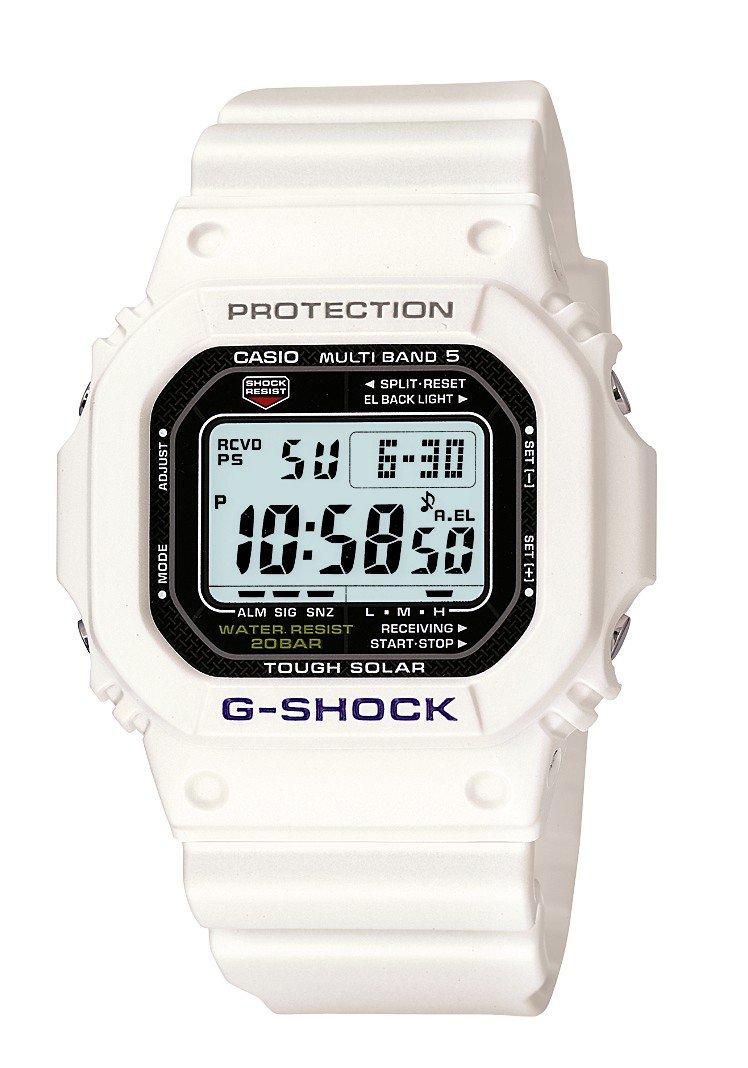
Imej: Depan view of the Casio G-Shock GW-M5600A-7ER watch, showcasing its digital display and resin strap.
Ciri-ciri Utama
- Radio-Controlled Timekeeping: Automatically receives time calibration signals for accurate timekeeping.
- Berkuasa Suria: Equipped with a solar panel that converts light into electrical power, eliminating the need for battery replacement.
- Rintangan Air 200 Meter: Suitable for swimming, snorkeling, and diving (excluding saturation diving).
- Rintangan Kejutan: Designed to withstand impacts and vibrations.
- Paparan Digital: Clear and easy-to-read digital time and function display.
- Fungsi Jam Randik: Mengukur masa berlalu, masa pecahan dan masa tempat pertama-kedua.
- Fungsi Penggera: Multiple daily alarms and an hourlisyarat masa y.
- Masa Dunia: Displays current time in major cities and specific areas around the world.
- Kaca Mineral: Protective, scratch-resistant hard mineral lens.
- Pembinaan Resin Tahan Lama: High-performance and durable resin case and strap.
Persediaan
1. Pengecasan Awal
Your watch is powered by a solar cell. Before initial use, expose the watch face to bright light for several hours to ensure it is sufficiently charged. The watch may arrive with a low charge, indicated by a flashing 'CHG' or 'LOW' indicator on the display. Avoid prolonged storage in dark places.
2. Setting Your Home City
The Home City setting is crucial for correct time calibration and World Time functionality. Refer to the detailed instructions in the full manual for specific button operations to set your Home City. This setting determines which time calibration signal the watch attempts to receive.
3. Time Calibration Signal Reception
The watch automatically attempts to receive a time calibration signal up to six times a day (or five times a day for the Chinese calibration signal). For optimal reception, place the watch near a window at night, away from metal objects and electronic devices. Manual reception can also be initiated:
- In Timekeeping Mode, hold down the 'A' button (top left) for several seconds until the current time calibration status appears.
- Press the 'D' button (bottom right) to initiate manual reception.
- The watch will display 'RCVD' upon successful reception.
Arahan Operasi
Navigasi Mod
Press the 'C' button (bottom left) to cycle through the different modes:
- Mod Penjagaan Masa: Memaparkan masa dan tarikh semasa.
- Mod Masa Dunia: Displays current time in various time zones.
- Mod Penggera: Set and activate daily alarms.
- Mod Jam Randik: Ukur masa berlalu.
- Mod Pemasa Undur: Set a countdown from a specified time.
Menggunakan Jam Randik
- Navigate to Stopwatch Mode using the 'C' button.
- Press the 'D' button (bottom right) to start/stop the stopwatch.
- Press the 'B' button (top right) to record split times or reset the stopwatch when stopped.
Menetapkan Penggera
- Navigate to Alarm Mode using the 'C' button.
- Hold down the 'A' button (top left) until the alarm time starts flashing.
- Use the 'B' and 'D' buttons to adjust the hour and minute settings.
- Press 'A' to confirm and exit the setting screen.
- Press 'D' to toggle the alarm ON/OFF.
Pencahayaan
Press the 'B' button (top right) to illuminate the display for easy viewing in low light conditions. The duration of illumination can be adjusted in the watch settings.
Penyelenggaraan
Mengecas Jam Tangan
To maintain optimal performance, ensure your watch is regularly exposed to light. The power indicator on the display shows the current charge level. If the charge level is low, expose the watch to direct sunlight or strong artificial light. Avoid covering the watch face when charging.
Pembersihan
Lap jam tangan dengan kain lembut dan kering untuk menghilangkan kotoran dan lembapan. Untuk kotoran degil, gunakan kain lembut dampdicairkan dengan air dan detergen neutral yang lembut, kemudian lap sehingga kering. Elakkan menggunakan agen meruap seperti pencair atau benzin, kerana ia boleh merosakkan komponen resin.
Langkah Berjaga-jaga Ketahanan Air
While your watch is water-resistant to 200 meters, it is important to observe the following:
- Jangan kendalikan butang semasa jam tangan basah atau tenggelam.
- Avoid exposing the watch to hot water or steam (e.g., in showers, saunas) as this can compromise seals.
- After exposure to saltwater, rinse the watch thoroughly with fresh water and wipe dry.
Menyelesaikan masalah
Time Not Syncing
- Check Home City Setting: Ensure your Home City is correctly set to a region that receives time calibration signals.
- Reception Environment: Move the watch to a location with better signal reception, ideally near a window, away from electronic interference.
- Penerimaan Manual: Attempt a manual time calibration signal reception (refer to Setup section).
- Tahap Caj: Ensure the watch has sufficient charge. Low power can affect signal reception.
Paparan adalah Kosong atau Malap
- Tahap Caj: The watch may be in power-saving mode or have a very low charge. Expose it to bright light for an extended period.
- Penjimatan Kuasa: The watch enters power-saving mode when left in the dark for a certain period. Press any button or expose it to light to reactivate the display.
Butang Tidak Menjawab
- Tetapkan semula: In rare cases, a full reset might be necessary. Consult the full Casio manual for your specific module number (usually found on the watch's case back) for detailed reset procedures.
- Air: Ensure the watch is completely dry if it has been exposed to water.
Spesifikasi
| Nombor Model | GW-M5600A-7ER |
| Pengeluar | G-SHOCK |
| Jenis Paparan | digital |
| Pergerakan | Kuarza |
| Sumber Kuasa | Berkuasa Suria |
| Kedalaman Rintangan Air | 200 Meter |
| Jenis Bahan Sarung | damar |
| Jenis Bahan Band | damar |
| Jenis Bahan Tetingkap Dail | Mineral |
| Diameter Kes | 49 mm |
| Ketebalan Kes | 17 mm |
| Lebar Jalur | 25 mm |
| Jenis Genggam | Tang Buckle |
| Bentuk Barang | Segi empat |
| Warna Band | putih |
| Warna Dail | Kelabu |
Waranti dan Sokongan
Your Casio G-Shock GW-M5600A-7ER watch comes with a Waranti pengilang selama 2 tahun. Waranti ini melindungi kecacatan pada bahan dan mutu kerja di bawah penggunaan biasa. Sila simpan bukti pembelian anda untuk tuntutan waranti.
For detailed warranty terms, service, or technical support, please refer to the official Casio website or contact your local authorized Casio service center. Contact information can typically be found in the full product manual or on the manufacturer's webtapak.