
Arahan Keselamatan Penting
Please read these instructions carefully before installation and use. Keep this manual for future reference. Incorrect installation or use may cause damage to the product or injury.
- Pastikan semua komponen ada dan tidak rosak sebelum dipasang.
- Jangan melebihi kapasiti berat maksimum pelekap.
- Gunakan alat yang sesuai untuk pemasangan.
- If you are unsure about any part of the installation, seek professional assistance.
- Jauhkan kanak-kanak dan haiwan peliharaan semasa pemasangan.
- Periksa dengan kerap semua sambungan dan pengikat untuk kesesakan.
Produk Selesaiview
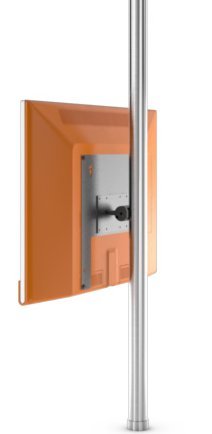
Image showing the Loewe Screen LIFT PLUS (65486B10) TV mount, designed for floor mounting. This image illustrates the overall design and structure of the product.
The Loewe Screen LIFT PLUS (65486B10) is a floor-standing mount designed to securely hold compatible Loewe televisions. It offers a stable and elegant solution for positioning your display.
Kandungan Pakej
Before proceeding with the installation, please verify that all the following components are included in your package:
- Loewe Screen LIFT PLUS main assembly
- Mounting hardware kit (screws, washers, spacers)
- Arahan pemasangan (manual ini)
- Tools required for assembly (not included): Phillips head screwdriver, Allen wrench set, level.
Persediaan dan Pemasangan
1. Membongkar dan Penyediaan
- Keluarkan semua komponen dari pembungkusan dengan berhati-hati.
- Letakkan semua bahagian pada permukaan yang lembut dan bersih untuk mengelakkan calar.
- Identify all components against the package contents list.
2. Assembling the Floor Stand
Follow the diagrams provided in the separate assembly guide (if applicable) to connect the base to the main support column. Ensure all screws are tightened securely but do not overtighten.
3. Attaching the VESA Mount to the TV
This mount supports VESA 75 x 75 standard. Refer to your television's manual for specific VESA mounting hole locations.
- Carefully place your television face down on a soft, clean surface.
- Align the VESA mounting plate from the Screen LIFT PLUS with the mounting holes on the back of your TV.
- Secure the mounting plate using the appropriate screws and washers from the hardware kit. Ensure a snug fit without overtightening.
4. Mounting the TV onto the Stand
- With assistance, carefully lift the television with the attached VESA plate.
- Hook the VESA plate onto the corresponding bracket on the Screen LIFT PLUS stand.
- Secure the TV to the stand using the provided locking mechanism or screws, as detailed in the assembly guide.
- Ensure the TV is level and securely attached before releasing itu.
Arahan Operasi
The Loewe Screen LIFT PLUS is primarily a static floor mount. Once installed, its operation involves ensuring the television is securely positioned.
- Kedudukan: Place the assembled unit in your desired viewing location. Ensure it is on a stable, level surface.
- Pengurusan Kabel: Utilize any integrated cable management features of the stand to route power and signal cables neatly and safely.
Penyelenggaraan
Regular maintenance ensures the longevity and safety of your Loewe Screen LIFT PLUS.
- Pembersihan: Wipe the stand with a soft, dry cloth. Do not use abrasive cleaners or solvents.
- Pemeriksaan Pengikat: Periksa semua skru dan bolt secara berkala untuk memastikan ia kekal ketat. Ketatkan semula jika perlu.
- Semakan Kestabilan: Ensure the stand remains stable and level. If it appears wobbly, re-check the assembly.
Menyelesaikan masalah
Bahagian ini menangani isu biasa yang mungkin anda hadapi.
| Masalah | Kemungkinan Punca | Penyelesaian |
|---|---|---|
| Pendirian goyah. | Pengikat longgar; lantai tidak rata. | Ensure all screws are tightened. Move to a level surface or use shims under the base. |
| TV not securely attached. | Incorrect VESA plate attachment; locking mechanism not engaged. | Re-check VESA plate installation on TV. Ensure TV is properly hooked onto the stand and locking screws are tightened. |
| Scratches on TV during installation. | Lack of protective surface. | Always place TV face down on a soft, clean blanket or cloth during assembly. |
Spesifikasi
- model: Loewe Screen LIFT PLUS (65486B10)
- Nombor Bahagian: 65486B10
- Jenis Pemasangan: Lantai Lantai
- Maximum VESA Standard: VESA 75 x 75
- Peranti Serasi: Loewe Individual 40 Compose, Loewe Individual 46 Compose
- Keserasian Saiz Skrin: Up to 46 Inch (as per compatible devices)
- Bateri Termasuk: Tidak
- Tarikh Pertama Tersedia: 15 Januari 2020
Waranti dan Sokongan
For warranty information and technical support, please refer to the documentation provided with your original purchase or visit the official Loewe webtapak. Simpan bukti pembelian anda untuk tuntutan waranti.
Pengeluar: Loewe
Webtapak: www.loewe.tv
