
pengenalan
The GIGABYTE GM-M7600 is a wireless precision optical mouse designed for comfortable and reliable use. This manual provides instructions for setting up, operating, maintaining, and troubleshooting your device.
Kandungan Pakej
Sila semak kandungan pakej untuk memastikan semua item ada:
- GIGABYTE GM-M7600 Wireless Optical Mouse
- Portable Nano USB Receiver
- 2 x Bateri AAA
Persediaan
1. Memasang Bateri
The GM-M7600 mouse requires two AAA batteries for operation. The batteries are included in the package.
- Cari penutup petak bateri di bahagian bawah tetikus.
- Gelongsor atau angkat penutup perlahan-lahan untuk membuka petak.
- Insert the two AAA batteries, ensuring the positive (+) and negative (-) terminals align correctly with the markings inside the compartment.
- Tutup penutup petak bateri dengan selamat.
2. Menyambungkan Penerima USB
The mouse connects to your computer via a portable Nano USB receiver.
- Locate the Nano USB receiver. It may be stored inside the mouse's battery compartment or packaged separately.
- Plug the Nano USB receiver into an available USB port on your computer (Laptop or Personal Computer).
- Your operating system (e.g., Windows XP, Linux) should automatically detect and install the necessary drivers. This process may take a few moments.
- Once the drivers are installed, the mouse is ready for use.
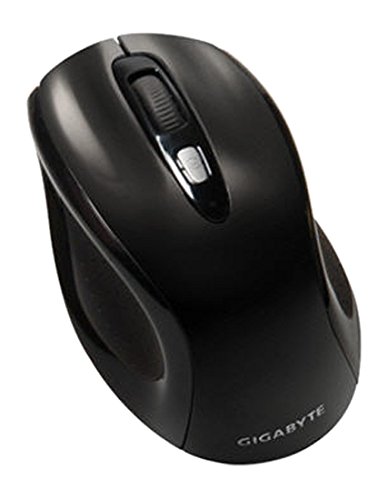
Rajah 1: GIGABYTE GM-M7600 Wireless Optical Mouse. This image displays the ergonomic design of the mouse, highlighting its form factor and the location of its buttons. The Nano USB receiver is typically stored within the mouse or connected to a computer's USB port.
Arahan Operasi
1. Menghidupkan/Mematikan
The mouse typically has a power switch on its underside. Slide the switch to the 'ON' position to activate the mouse. Slide it to 'OFF' when not in use to conserve battery life.
2. Melaraskan DPI (Sensitiviti)
The GM-M7600 features an adjustable DPI switch, allowing you to change the mouse sensitivity between 800 DPI and 1600 DPI. This switch is usually located near the scroll wheel. Press the DPI button to toggle between the two sensitivity settings.
3. Fungsi Asas Tetikus
- Klik Kiri: Butang utama untuk memilih item, membuka files, and interacting with software.
- Klik kanan: Butang sekunder untuk mengakses menu konteks dan pilihan tambahan.
- Roda Tatal: Digunakan untuk menatal dokumen dan web pages. It can also function as a middle click button.
Penyelenggaraan
1. Pembersihan
Untuk mengekalkan prestasi dan penampilan yang optimum:
- Disconnect the mouse from your computer and turn off the power switch.
- Gunakan kain lembut dan tidak berbulu sedikit dampdisapu dengan air atau larutan pembersih lembut untuk mengelap permukaan tetikus.
- Elakkan menggunakan bahan kimia yang keras, pembersih yang melelas, atau menyembur cecair terus ke tetikus.
- Clean the optical sensor area on the underside of the mouse with a dry cotton swab to remove any dust or debris.
2. Penggantian Bateri
When the mouse performance degrades or it stops responding, it may be time to replace the batteries.
- Matikan tetikus menggunakan suis kuasa.
- Open the battery compartment as described in the 'Installing Batteries' section.
- Keluarkan bateri AAA lama.
- Insert two new AAA batteries, observing the correct polarity (+/-).
- Close the battery compartment and turn the mouse back on.
Menyelesaikan masalah
If you encounter issues with your GIGABYTE GM-M7600 mouse, try the following solutions:
- Tetikus tidak bertindak balas:
- Pastikan tetikus dihidupkan.
- Periksa sama ada bateri dipasang dengan betul dan mempunyai cas yang mencukupi. Gantikan jika perlu.
- Ensure the Nano USB receiver is securely plugged into a working USB port on your computer. Try a different USB port.
- Mulakan semula komputer anda.
- Pergerakan kursor tidak menentu:
- Bersihkan sensor optik di bahagian bawah tetikus.
- Pastikan anda menggunakan tetikus pada permukaan yang sesuai. Elakkan permukaan yang sangat reflektif atau lutsinar.
- Check for any wireless interference. Move the mouse closer to the receiver or away from other wireless devices.
- DPI switch not working:
- Ensure the mouse is powered on and connected.
- Press the DPI button firmly.
Spesifikasi
| Nama Model | GM-M7600 |
| Jenama | GIGABYTE |
| Teknologi Ketersambungan | 2.4GHz Radio Frequency Wireless |
| Pengesanan Pergerakan | Optik |
| DPI boleh laras | 800 / 1600 DPI |
| Bilangan Butang | 3 (Left, Right, Scroll Wheel/Middle Click) |
| Sumber Kuasa | 2 x Bateri AAA (termasuk) |
| Jenis Penerima | Portable Nano USB Receiver |
| Peranti Serasi | Komputer riba, Komputer Peribadi |
| Sokongan Sistem Pengendalian | Linux, Windows XP |
| Bahan Kepungan | Plastic with Rubberized Finish |
| warna | Hitam |
Waranti dan Sokongan
For warranty information and technical support, please refer to the warranty card included with your product or visit the official GIGABYTE webtapak. Simpan resit pembelian anda untuk tuntutan waranti.