
1. Produk Lebihview
The CASIO WAVE CEPTOR DQD-700J-8JF is a radio-controlled digital alarm clock designed for accurate timekeeping and environmental monitoring. It features a large, easy-to-read LCD display that shows the current time, date, day of the week, temperature, and humidity. Equipped with a dual electronic alarm function, it allows users to set two separate alarm times with options for daily, weekday, or weekend activation. The clock also includes a radio wave reception indicator to confirm successful time synchronization.
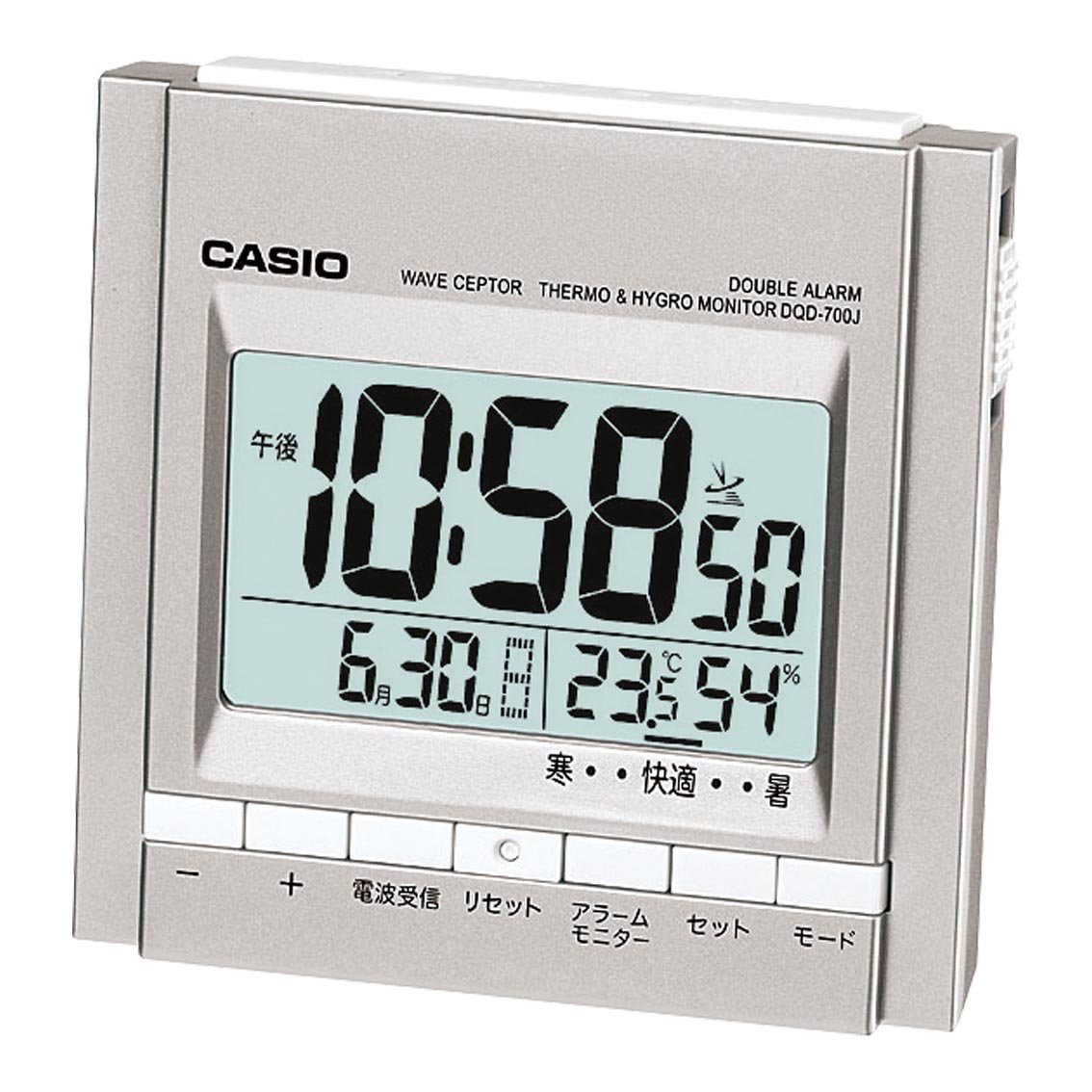
Rajah 1: Depan view of the CASIO WAVE CEPTOR DQD-700J-8JF radio clock, displaying time, date, temperature, and humidity on its digital screen.
2. Persediaan
2.1 Pemasangan Bateri
- Buka penutup petak bateri yang terletak di bahagian belakang unit.
- Masukkan dua bateri AAA, pastikan kekutuban (+/-) betul.
- Tutup penutup petak bateri dengan selamat.
2.2 Initial Time Setting (Radio Wave Reception)
Upon battery installation, the clock will automatically attempt to receive radio wave signals to set the correct time and date. Place the clock in a location with good signal reception, ideally near a window and away from electronic devices that may cause interference. The radio wave reception indicator will show the signal strength.
- If reception is successful, the time and date will be set automatically.
- If reception fails, the clock will display a default time. You may need to manually set the time (refer to Section 3.1).
3. Arahan Operasi
3.1 Menetapkan Penggera
This clock features two independent electronic alarms (Alarm 1 and Alarm 2).
- Tekan ke SET ALARM button to select Alarm 1 or Alarm 2. The selected alarm icon will flash.
- Gunakan JAM dan MINIT buttons to adjust the desired alarm time.
- Tekan ke MODE button to cycle through alarm day settings: HARIAN (Monday-Sunday), HARI MINGGU (Monday-Friday), or HUJUNG MINGGU (Saturday-Sunday).
- Tekan ke ALARM ON / OFF switch to activate or deactivate the alarm. The alarm icon will appear when active.
3.2 Using the Temperature and Humidity Display
The clock continuously displays the current indoor temperature and humidity. No special operation is required to view bacaan-bacaan ini.
- Temperature is displayed in degrees Celsius (°C).
- Humidity is displayed as a percentage (%).
3.3 Hourly Berpadu
hourly chime can be activated or deactivated. Refer to the specific button on your device, often labeled KIMIA or Isyarat, to toggle this feature.
4. Penyelenggaraan
To ensure optimal performance and longevity of your CASIO WAVE CEPTOR clock, follow these maintenance guidelines:
- Pembersihan: Wipe the clock with a soft, dry cloth. Avoid using abrasive cleaners, solvents, or chemical sprays, as these can damage the casing atau paparan.
- Penggantian Bateri: Replace batteries promptly when the display dims or functions become erratic. Always replace all batteries at the same time with new ones of the same type. Dispose of used batteries according to local regulations.
- Storan: If storing the clock for an extended period, remove the batteries to prevent leakage and potential damage.
5. Penyelesaian masalah
If you encounter issues with your clock, please refer to the following common problems and solutions:
- Time not updating or incorrect:
- Ensure the clock is placed in an area with good radio signal reception, away from electronic interference.
- Check if the batteries are low or incorrectly installed.
- Perform a manual time setting if automatic reception consistently fails (refer to the full product manual for detailed steps on manual time setting, if available).
- Penggera tidak berbunyi:
- Verify that the alarm is activated (alarm icon visible on display).
- Check the alarm volume setting, if adjustable.
- Ensure the alarm time is correctly set.
- Paparan malap atau kosong:
- Gantikan bateri dengan yang baru.
- Periksa pemasangan bateri yang betul.
6. Spesifikasi
| Ciri | Perincian |
|---|---|
| Nombor Model | DQD-700J-8JF |
| Jenama | CASIO |
| Body Size (W x H x D) | 89mm x 92mm x 60mm |
| Dimensi Item (W x H) | 8.9cm x 6cm |
| Berat Barang | 175g (0.21 kg) |
| bahan | Synthetic Resin |
| warna | Perak |
| Jenis Paparan | LCD Digital |
| Sumber Kuasa | Battery Operated (2 AAA batteries included) |
| Pergerakan | Kuarza |
| Ciri Khas | Radio Wave Reception, Dual Electronic Alarm, Temperature Display, Humidity Display, Hourly Berpadu |
| Jenis Pemasangan | Freestanding |
| Negara Asal | China |
7. Waranti dan Sokongan
This CASIO product is covered by a manufacturer's warranty. For detailed information regarding warranty terms, conditions, and duration, please refer to the warranty card included with your purchase or visit the official CASIO website. For technical support, troubleshooting assistance beyond this manual, or service inquiries, please contact CASIO customer service through their official channels.
Sila simpan bukti pembelian anda untuk tuntutan waranti.