
pengenalan
The Mackie HD1221 is a 12-inch 2-way compact high-definition powered loudspeaker designed for professional audio applications. It features 1200W of Class-D Fast Recovery amplification, high-definition audio processing, and custom-designed transducers by EAW. This manual provides essential information for the safe and effective use of your HD1221 loudspeaker, including setup, operation, maintenance, and troubleshooting.
Maklumat Keselamatan
Before operating the Mackie HD1221 loudspeaker, please read and understand all safety instructions. Failure to do so may result in electric shock, fire, or other injuries. Keep these instructions for future reference.
- Sumber Kuasa: Sambungkan unit hanya kepada bekalan kuasa daripada jenis yang diterangkan dalam arahan pengendalian atau seperti yang ditandakan pada perkakas.
- Pembumian: Ensure the loudspeaker is properly grounded to prevent electric shock.
- Pengudaraan: Jangan sekat sebarang bukaan pengudaraan. Pasang mengikut arahan pengilang.
- Air dan Kelembapan: Jangan gunakan peralatan ini berhampiran air atau dedahkannya kepada titisan atau percikan.
- Pembersihan: Bersihkan hanya dengan kain kering.
- Servis: Rujuk semua servis kepada kakitangan perkhidmatan yang berkelayakan. Servis diperlukan apabila radas telah rosak dalam apa jua cara, seperti kord bekalan kuasa atau palam rosak, cecair telah tertumpah atau objek jatuh ke dalam radas, radas telah terdedah kepada hujan atau lembapan, tidak beroperasi seperti biasa. , atau telah digugurkan.
- Pemasangan: Gunakan hanya dengan troli, dirian, tripod, pendakap atau meja yang ditentukan oleh pengilang, atau dijual dengan radas. Apabila troli digunakan, berhati-hati apabila menggerakkan kombinasi troli/radas untuk mengelakkan kecederaan daripada terbalik.
Kandungan Pakej
Verify that the following items are included in your Mackie HD1221 package:
- Mackie HD1221 Powered Loudspeaker
- Kabel Kuasa
- Panduan Mula Pantas (jika berkenaan)
- Maklumat Waranti
Jika ada barang yang hilang atau rosak, sila hubungi pengedar anda dengan segera.
Produk Selesaiview
The Mackie HD1221 is a versatile loudspeaker designed for various applications, including main PA, stage monitor, and flown installations. It features a robust construction and advanced audio processing.
Depan dan Sebelah Views
Rajah 1: Depan dan sisi view of the HD1221 loudspeaker, highlighting the durable grille and integrated handles for portability.

Rajah 2: Bahagian kiri view of the HD1221 loudspeaker.
Kawalan dan Sambungan Panel Belakang

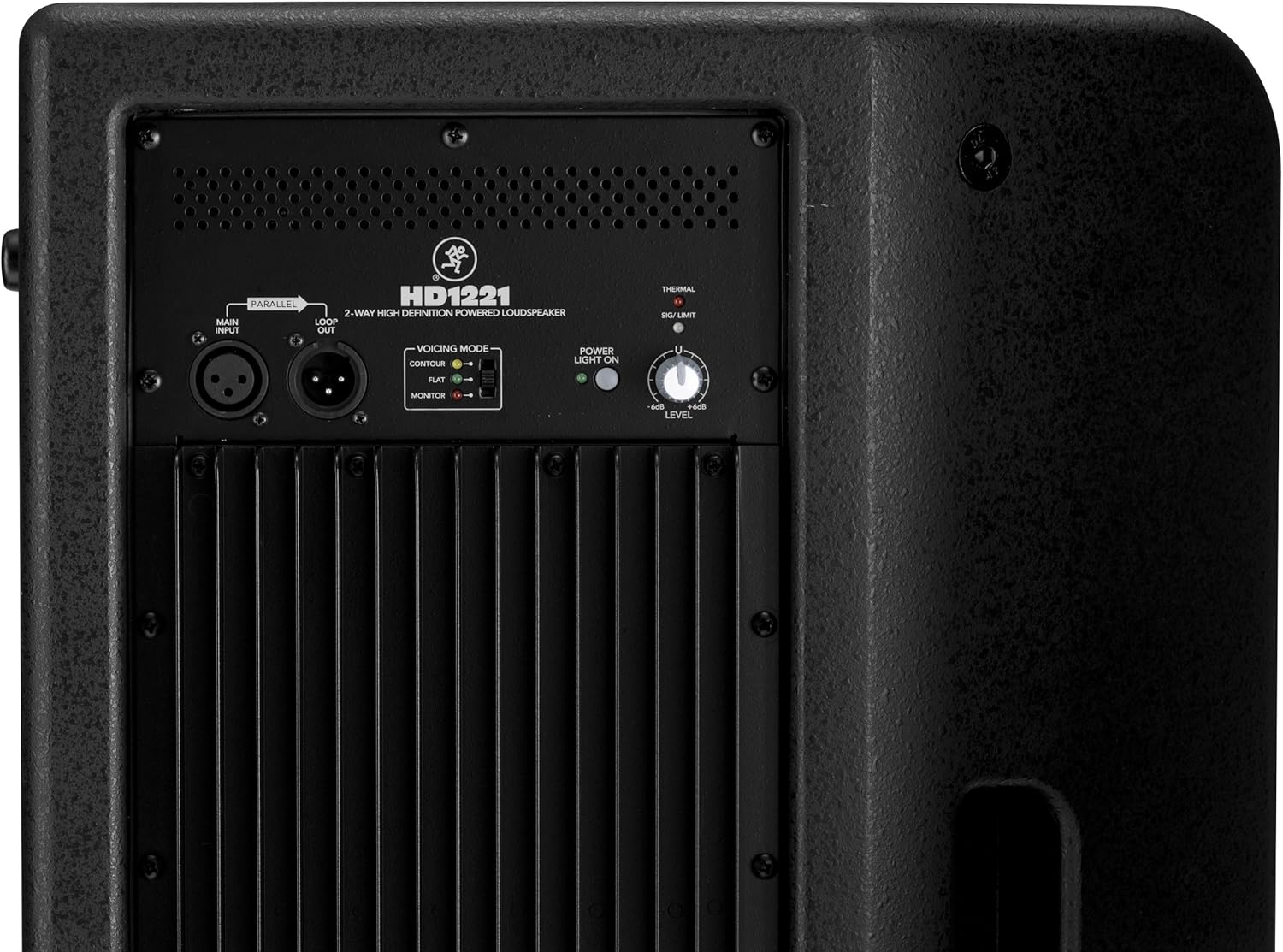
Figure 3: Rear panel of the HD1221, detailing the input/output section, voicing mode switch, power indicator, and level control knob.
- Main Input (XLR): Connect your audio source here.
- Loop Out (XLR): Provides a parallel output of the main input signal for connecting to additional loudspeakers or other audio equipment.
- Voicing Mode Switch: Selects between Contour, Flat, and Monitor modes to optimize the loudspeaker's frequency response for different applications.
- Lampu Kuasa Hidup: Menunjukkan status kuasa unit.
- Thermal/Sig/Limit Indicators: Provide visual feedback on the loudspeaker's operational status, including thermal protection, signal presence, and limiting.
- Kawalan Tahap: Melaraskan kelantangan output keseluruhan pembesar suara.
- Input Kuasa AC: Connects the power cable to the mains supply.
Komponen Dalaman
Gambar 4: Dalaman view of the HD1221, showcasing the 12-inch neodymium woofer and 1.75-inch titanium compression driver, designed by EAW.
Persediaan
Proper setup ensures optimal performance and safety. Follow these steps for initial setup:
Sambungan Kuasa
- Ensure the Level control on the rear panel is set to its minimum position.
- Connect the supplied AC power cable to the AC Power Input on the rear panel of the HD1221.
- Palamkan hujung kabel kuasa yang lain ke dalam salur keluar elektrik yang dibumikan.
Sambungan Audio
- Connect your audio source (e.g., mixer, instrument) to the Main Input (XLR) on the rear panel.
- If connecting multiple loudspeakers, use the Loop Out (XLR) to send the signal to the next loudspeaker.
Pilihan Pemasangan
The HD1221 offers several mounting options for flexibility:
Pemasangan Tiang

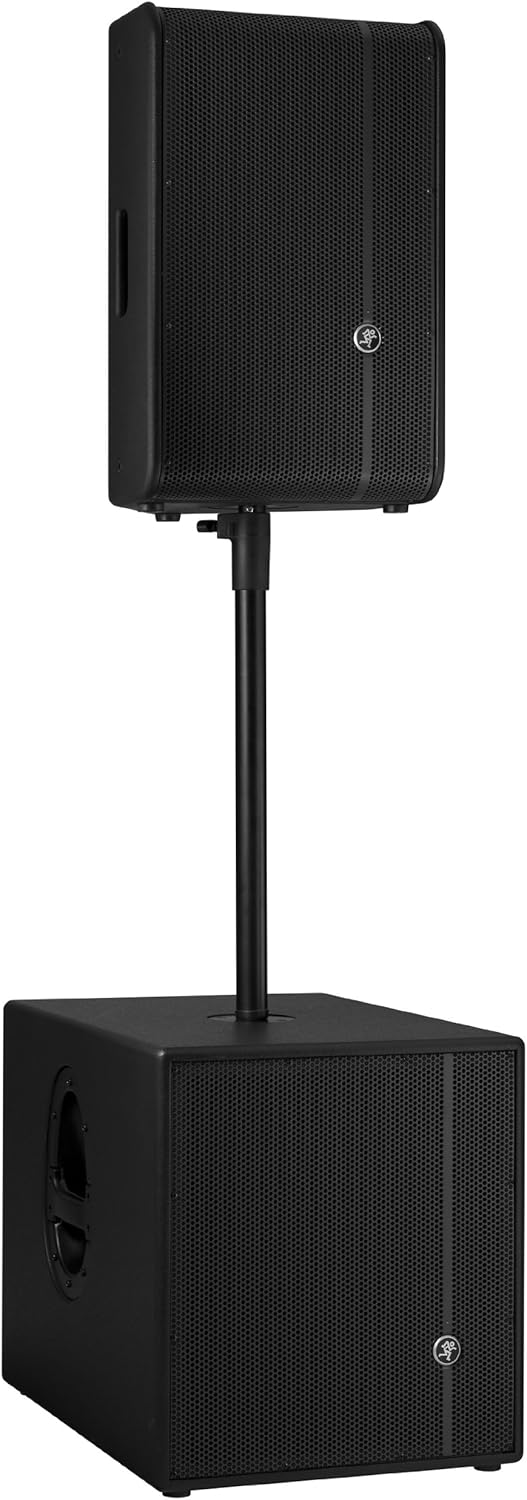
Figure 5: The HD1221 mounted on a pole, typically above a subwoofer like the HD1501 for a full-range PA system.
The HD1221 can be mounted on a standard speaker pole stand. Ensure the stand is stable and rated for the weight of the loudspeaker (approximately 58 lbs).
Stage Monitor Placement
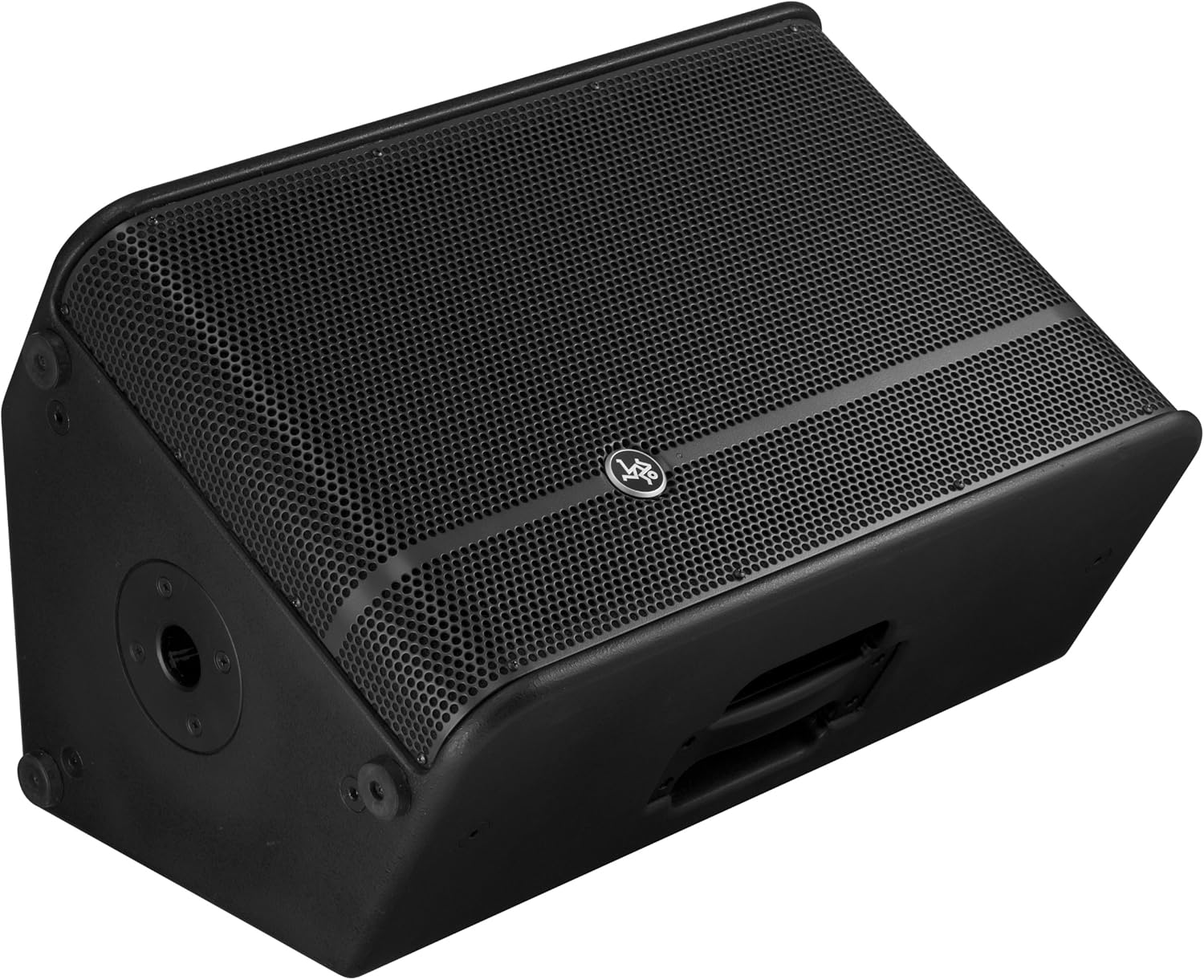
Figure 6: The HD1221 configured as a stage monitor, utilizing its 60-degree angle for optimal sound projection towards the performer.
The cabinet design allows for use as a stage monitor with a 60-degree angle. Place the loudspeaker directly on the stage floor, angled towards the performer.
Flying/Suspension

Figure 7: The HD1221 suspended vertically using appropriate rigging hardware.

Figure 8: The HD1221 suspended horizontally using appropriate rigging hardware.
The HD1221 can be flown both vertically and horizontally. Always use certified rigging hardware and consult with a qualified professional for safe installation. The user-rotatable horn allows for precise sound placement in either orientation.
Arahan Operasi
Setelah pembesar suara dipasang, ikuti langkah-langkah berikut untuk operasi:
- Hidupkan kuasa: Turn on your audio source (mixer, etc.) first, then turn on the HD1221 loudspeaker. The 'Power Light On' indicator should illuminate.
- Set Voicing Mode: Use the Voicing Mode switch on the rear panel to select the appropriate setting for your application:
- Kontur: Provides a sculpted frequency response, often suitable for music playback.
- Flat: Offers a neutral frequency response, ideal for critical listening or when external EQ is used.
- Pantau: Optimizes the frequency response for use as a stage monitor, reducing low-end rumble and enhancing clarity.
- Laraskan Tahap: Slowly increase the Level control on the rear panel to achieve the desired volume. Monitor the 'Sig/Limit' indicator; if it flashes frequently or stays lit, reduce the input level from your source or the HD1221's level to prevent distortion and potential damage.
- Matikan: When finished, turn off the HD1221 loudspeaker first, then turn off your audio source.
Video Produk Rasmi
Video 1: Tamatview of the Mackie HD1221 12-inch 2-Way High-Definition Powered Loudspeaker, demonstrating its features and applications.
Penyelenggaraan
Regular maintenance helps prolong the life and performance of your HD1221 loudspeaker.
- Pembersihan: Use a dry, lint-free cloth to clean the exterior of the loudspeaker. Do not use liquid cleaners or solvents.
- gril: Periodically check the steel grille for any damage or debris. Clean gently if necessary.
- Sambungan: Pastikan semua kabel disambungkan dengan selamat dan bebas daripada kerosakan.
- Storan: When not in use, store the loudspeaker in a dry, temperate environment, protected from dust and extreme temperatures.
Menyelesaikan masalah
If you encounter issues with your HD1221, refer to the following common problems and solutions:
| Masalah | Kemungkinan Punca | Penyelesaian |
|---|---|---|
| Tiada keluaran bunyi | No power; incorrect connections; low level setting; faulty cable. | Check power cable and outlet. Verify audio cable connections. Increase Level control. Test with a different cable. |
| Bunyi herot | Input level too high; faulty cable; damaged speaker component. | Reduce input level from source or HD1221. Check 'Sig/Limit' indicator. Test with a different cable. If distortion persists, contact support. |
| Tiada lampu kuasa | No power; power switch off; internal fuse blown. | Ensure power cable is connected and outlet is active. Check power switch. If still no light, contact support. |
| Overheating (Thermal indicator lit) | Insufficient ventilation; prolonged high-volume operation. | Ensure adequate airflow around the unit. Reduce volume. Allow unit to cool down. |
Spesifikasi
Detailed technical specifications for the Mackie HD1221 powered loudspeaker:
- Output Kuasa: Puncak 1200W
- Jenis pembesar suara: 2-Way High-Definition Powered Loudspeaker
- woofer: 12-inch Neodymium Woofer
- Pemacu Mampatan: 1.75-inch Titanium Compression Driver
- tanduk: Tanduk 90° x 50° boleh diputar pengguna
- Bahan Kabinet: Papan Lapis Birch 15mm
- gril: Keluli tergelek sejuk
- Sudut Monitor: 60 darjah
- Voicing Modes: Contour, Flat, Monitor
- Amppemberitahuan: Class-D Fast Recovery
- Impedans: 8 ohm
- Berat Barang: 58 paun
- Protokol Ketersambungan: Wi-Fi (Note: This specification might refer to internal processing or future features, as direct Wi-Fi audio input is not typical for this type of speaker.)
- Nombor Model: HD1221
- UPC: 663961030495
Waranti
The Mackie HD1221 loudspeaker comes with a comprehensive warranty:
- Elektronik: Waranti 3 tahun
- Pemandu: Waranti 2 tahun
Please retain your proof of purchase for warranty claims. For full terms and conditions, refer to the warranty card included with your product or visit the official Mackie webtapak.
Sokongan
For additional assistance, technical support, or service inquiries, please contact Mackie Customer Support. You can find contact information and frequently asked questions on the official Mackie webtapak.
Sumber Dalam Talian: Lawati Mackie Store on Amazon untuk maklumat produk dan kemas kini.