pengenalan
This manual provides comprehensive instructions for the setup, operation, maintenance, and troubleshooting of your Smith Corona Dictionary Display Electronic Typewriter Model 900. Please read this manual thoroughly before using the device to ensure proper function and longevity.
1. Persediaan
Follow these steps to prepare your typewriter for first use.
1.1 Membongkar
Carefully remove the typewriter from its packaging. Retain all packaging materials for future transport or storage. Inspect the unit for any signs of damage. If damage is observed, contact your retailer immediately.
1.2 Sambungan Kuasa
Locate the power cord. Insert the small end of the power cord into the power input port at the rear of the typewriter. Plug the other end into a standard electrical outlet (120V AC, 60Hz). Ensure the power switch is in the OFF position before connecting to power.
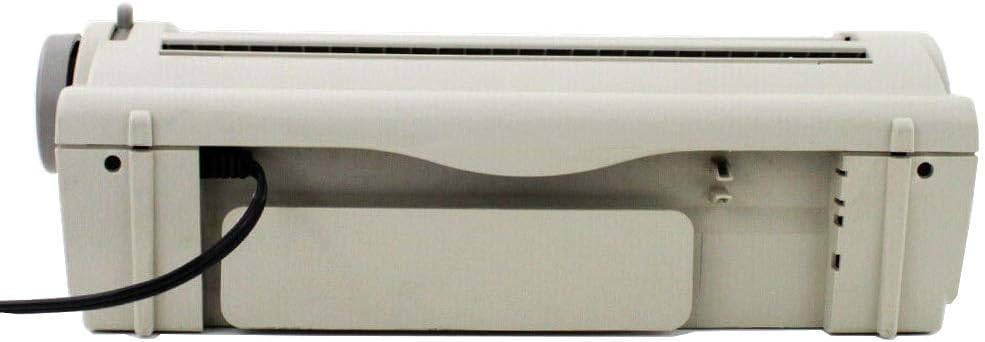
Imej: belakang view of the Smith Corona Model 900 typewriter, illustrating the power cord connection point on the left side.
1.3 Pemuatan Kertas
- Ensure the paper bail is lifted.
- Insert a sheet of paper into the paper entry slot at the back of the platen.
- Align the paper using the paper guide.
- Lower the paper bail to secure the paper against the platen.
- Use the platen knob on the right side to advance the paper to the desired starting position.

Imej: Depan view of the Smith Corona Model 900 typewriter, demonstrating a sheet of paper correctly loaded into the machine.
1.4 Ribbon Installation
The typewriter uses a specific ribbon cartridge. Open the ribbon cover (refer to the diagram in the quick start guide if available). Carefully insert the new ribbon cartridge, ensuring it clicks into place. Follow the arrows on the cartridge for correct threading. Close the ribbon cover.
2. Arahan Operasi
This section details the basic functions and advanced features of your typewriter.
2.1 Penaipan Asas
- Hidupkan suis kuasa.
- The display will show a ready message.
- Begin typing on the keyboard. Characters will appear on the display before being printed on paper.
- Tekan ke Kembali key to advance to the next line.

Imej: A terperinci view of the Smith Corona Model 900's keyboard and the integrated display, which shows the word "Hello" as it is being typed.
2.2 Dictionary Display Function
The Model 900 features a built-in dictionary. As you type, the display may offer suggestions or corrections. To utilize this feature:
- If a word is misspelled, the typewriter may highlight it or offer alternatives on the display.
- Use the arrow keys (Up, Down, Left, Right) to navigate through suggestions.
- Tekan Betul to accept a suggested correction.
2.3 Correction Features
The typewriter includes a correction system to rectify errors:
- WordEraser: Tekan ke WordEraser key to erase the last typed word.
- Betul: Tekan ke Betul key to erase the last character typed. Repeated presses will erase additional characters.
- Lift-Off Correction: For more precise corrections, position the print head over the error and press the appropriate correction key.
2.4 Pilihan Pemformatan
The Model 900 offers basic formatting capabilities:
- Bold Print: To highlight text for emphasis, activate the bold function before typing the desired text.
- Garis bawah: Use the underline function to stress certain points in your document.
- Visible Typing Line: This feature helps to clearly see what is being typed, improving accuracy.
- Pemusatan Automatik: The typewriter can automatically center text on a line.
- Phrase Abbreviation: Insert a phrase for a two-character abbreviation to save typing time.
3. Penyelenggaraan
Regular maintenance ensures optimal performance and extends the life of your typewriter.
3.1 Membersihkan Bahagian Luar
Wipe the exterior of the typewriter with a soft, damp cloth. Avoid using abrasive cleaners or solvents, as these can damage the plastic surfaces. Ensure the typewriter is unplugged before cleaning.
3.2 Cleaning the Platen and Print Head
Periodically clean the platen (the rubber roller) with a lint-free cloth dampened with rubbing alcohol to remove ink residue and paper dust. Gently clean the print head area with a soft brush or compressed air to prevent blockages and maintain print quality.
3.3 Penggantian Reben
Replace the ribbon cartridge when the print becomes faint or inconsistent. Refer to section 1.4 for ribbon installation instructions. Always use genuine Smith Corona replacement ribbons for best results.
4. Penyelesaian masalah
This section addresses common issues you might encounter with your typewriter.
| Masalah | Kemungkinan Punca | Penyelesaian |
|---|---|---|
| Typewriter does not turn on. | Power cord not connected, power outlet not working, power switch off. | Ensure power cord is securely plugged in. Test the outlet with another device. Verify the power switch is in the ON position. |
| Faint or inconsistent print. | Ribbon is old or depleted, ribbon not installed correctly. | Replace the ribbon cartridge. Check ribbon installation as per section 1.4. |
| Paper does not feed correctly. | Paper not aligned, paper bail not lowered, platen dirty. | Re-align paper and ensure paper bail is down. Clean the platen as described in section 3.2. |
| Keys are sticking. | Habuk atau serpihan di bawah kunci. | Use compressed air to clear debris around the keys. Avoid liquid cleaners. |
5. Spesifikasi
Key technical specifications for the Smith Corona Dictionary Display Electronic Typewriter Model 900.
- Nombor Model: 900
- Pengeluar: Smith Corona
- ASIN: B003TZ5LKC
- Berat Barang: 11.28 paun (5.12 kg)
- Dimensi Pakej: 19 x 18.6 x 8.5 inci (48.26 x 47.24 x 21.59 cm)
- Keperluan Kuasa:
- Voltan: 120V
- Hz: 60Hz
- Amperes: 0.7A
- Tarikh Mula-mula Tersedia: 26 Jun 2010

Imej: Satu jarak dekat view of the product label located on the underside of the typewriter, detailing electrical specifications such as voltage, frequency, and current draw, along with the model number.
6. Waranti dan Sokongan
For detailed information regarding warranty coverage, technical support, or service inquiries, please refer to the official documentation provided with your Smith Corona Dictionary Display Electronic Typewriter Model 900 or visit the official Smith Corona website. This manual does not contain specific warranty terms or support contact information.