
1. Pengenalan
This manual provides detailed instructions for the proper use and care of your Sigma 70-200mm f/2.8 APO EX DG HSM OS FLD Telephoto Zoom Lens. Designed for Nikon Digital DSLR Cameras, this high-performance lens offers exceptional image quality and versatility for various photographic applications, including sports, wildlife, portraits, and photojournalism.
Sila baca manual ini dengan teliti sebelum menggunakan kanta untuk memastikan prestasi dan jangka hayat yang optimum.

Figure 1: Sigma 70-200mm f/2.8 Telephoto Zoom Lens for Nikon DSLR Cameras.
2. Ciri-ciri Utama
- 70-200mm Focal Length: Versatile telephoto zoom range.
- Constant f/2.8 Maximum Aperture: Excellent low-light performance and shallow depth of field.
- Optical Stabilizer (OS): Provides up to 4 stops of image stabilization, with dual modes for normal and panning shots.
- Hypersonic Motor (HSM): Ensures fast, quiet, and accurate autofocusing with full-time manual focus override.
- FLD Glass Elements: Offers optical performance comparable to fluorite glass, reducing chromatic aberrations.
- Special Low Dispersion (SLD) Glass: Enhances image sharpness and contrast.
- Super Multi-Layer Coating: Minimizes flare and ghosting for clear, high-quality images.
- Internal Focusing and Zooming: Maintains constant lens length during operation.
- Jarak Fokus Minimum: 140cm (55.1 inches) with a maximum magnification of 1:8.
3. Persediaan
3.1 Memasang Lensa
- Pastikan kedua-dua kamera dan lensa dimatikan.
- Tanggalkan penutup lensa belakang dan penutup badan kamera.
- Align the mounting index mark on the lens with the corresponding mark on the camera body.
- Rotate the lens clockwise (for Nikon F-mount) until it clicks into place. Do not force the lens.
3.2 Menanggalkan Kanta
- Pastikan kamera dimatikan.
- Semasa menekan butang pelepas lensa pada badan kamera, putar lensa mengikut lawan jam sehingga ia berhenti.
- Keluarkan kanta daripada kamera.
- Pasangkan penutup kanta belakang pada kanta dan penutup badan pada kamera untuk melindunginya daripada habuk dan kerosakan.
3.3 Memasang Tudung Lensa
The lens hood helps to block extraneous light and reduce flare. Align the lens hood with the front of the lens and twist until it locks into place. For storage, the hood can be reversed and attached to the lens.

Figure 2: Sigma 70-200mm f/2.8 lens with its hood attached.
3.4 Menggunakan Kolar Tripod
The lens includes a removable tripod collar for better balance when mounted on a tripod, especially given the lens's weight. Loosen the knob on the collar to rotate the lens for vertical or horizontal shooting, or to remove the collar entirely.
4. Operasi
4.1 Autofokus (AF) dan Fokus Manual (MF)
The lens features a switch to select between Autofocus (AF) and Manual Focus (MF) modes. In AF mode, the Hypersonic Motor (HSM) provides fast and quiet focusing. Full-time manual focus override is available, allowing you to fine-tune focus manually even when in AF mode by simply turning the focus ring.
4.2 Optical Stabilizer (OS)
The Optical Stabilizer (OS) function helps to reduce camera shake, especially useful in low light or when shooting at longer focal lengths. The OS switch allows you to turn the stabilization ON or OFF. This lens offers two OS modes:
- Mod 1 (Biasa): For general shooting, compensating for vertical and horizontal camera shake.
- Mode 2 (Panning): For tracking moving subjects horizontally, compensating only for vertical camera shake.
Nota:
- Turn the OS OFF when using a tripod to prevent potential image blur.
- The OS may produce a slight sound during operation; this is normal.
4.3 Mengezum
Rotate the zoom ring to adjust the focal length between 70mm and 200mm. The internal zooming mechanism ensures the lens length remains constant.
4.4 Using with APS-C Cameras
When used with APS-C (crop sensor) cameras, the effective focal length will be approximately 105-300mm (depending on the camera's crop factor). This provides an even greater telephoto reach.
4.5 Using with Teleconverters
This lens is compatible with Sigma APO teleconverters (sold separately) to further extend its focal length. Refer to the teleconverter's manual for specific attachment and usage instructions.
5. Penyelenggaraan
5.1 Membersihkan Lensa
- Gunakan berus peniup untuk menghilangkan habuk dari permukaan kanta.
- For smudges or fingerprints, use a clean, soft microfiber cloth specifically designed for optics, along with a small amount of lens cleaning solution.
- Never use harsh chemicals or abrasive materials on the lens elements or body.
5.2 Penyimpanan
- Sentiasa pasangkan penutup kanta hadapan dan belakang apabila tidak digunakan.
- Simpan kanta di tempat yang sejuk dan kering, jauh dari cahaya matahari langsung dan suhu yang melampau.
- If storing for an extended period, consider using a desiccant to prevent mold and mildew.

Figure 3: Sigma 70-200mm f/2.8 lens stored in its soft case.
6. Penyelesaian masalah
| Masalah | Kemungkinan Punca | Penyelesaian |
|---|---|---|
| Lens not focusing | AF/MF switch set to MF; dirty lens contacts; insufficient light. | Set switch to AF; clean lens and camera contacts; use adequate lighting. |
| Imej adalah kabur | OS is off; camera shake; incorrect focus; slow shutter speed. | Turn OS ON; use faster shutter speed; ensure proper focus; use a tripod. |
| OS not working | OS switch is OFF; lens not fully mounted. | Turn OS ON; re-mount lens securely. |
| Kanta tidak dikenali oleh kamera | Dirty lens contacts; improper mounting. | Clean lens and camera contacts; re-mount lens securely. |
7. Spesifikasi
| Ciri | Perincian |
|---|---|
| Dimensi Produk | 7.76 x 3.39 x 3.39 inci |
| Berat Barang | 3.2 paun (1.43 kg) |
| Nombor Model Item | 589306 |
| Jenama | Sigma |
| Panjang Fokus | 70-200mm |
| Apertur Maksimum | f/2.8 |
| Aperture minimum | f/22 |
| Jenis Kanta | Zum Telefoto |
| Pemasangan yang Serasi | Nikon F (FX) |
| Jarak Fokus Minimum | 140cm / 55.1 inci |
| Pembesaran Maksimum | 1:8 |
| Saiz Penapis | 77mm |
| Penstabilan Imej | Optical Stabilizer (OS) |
| Motor Fokus Automatik | Hypersonic Motor (HSM) |
| Tarikh Mula-mula Tersedia | 1 Februari 2010 |
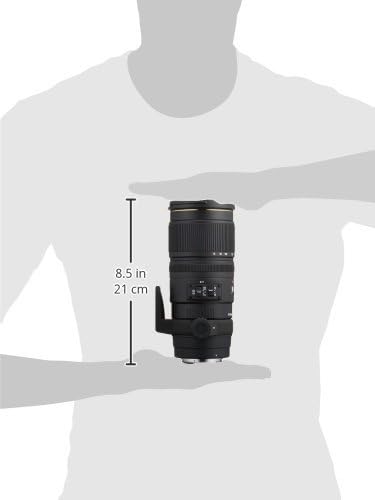
Figure 4: Approximate dimensions of the Sigma 70-200mm f/2.8 lens.
8. Waranti & Sokongan
8.1 Maklumat Waranti
This Sigma lens is covered by a 4-year Sigma USA warranty. Please retain your proof of purchase for warranty claims. For detailed terms and conditions, refer to the warranty card included with your product or visit the official Sigma webtapak.
8.2 Sokongan Pelanggan
For technical assistance, service, or any inquiries regarding your Sigma lens, please contact Sigma Corporation of America customer support. Contact information can be found on the official Sigma webtapak atau dalam pembungkusan produk.
9. Video Produk Rasmi
9.1 Sigma 70-200mm f/2.8 APO EX DG HSM OS FLD Large Aperture Telephoto Zoom Lens Overview
Video ini memberikan penamatview of the Sigma 70-200mm f/2.8 APO EX DG HSM OS FLD Large Aperture Telephoto Zoom Lens, highlighting its key features and benefits for various photography styles. Duration: 2 minutes 39 seconds.
9.2 Sigma 70-200mm Lens Features and Usage
This video delves into the features and practical usage of the Sigma 70-200mm lens, demonstrating its capabilities for professional and enthusiast photographers. Duration: 3 minutes 5 seconds.