
pengenalan
The Taylor Pro Digital 4-Event Timer is designed to track up to four separate timing events simultaneously. This device features a large LCD display for clear visibility and offers versatile placement options with its integrated magnets and built-in stand. It supports countdown timing up to 99 hours, 59 minutes, and 59 seconds, and includes a memory function for recalling previous settings.
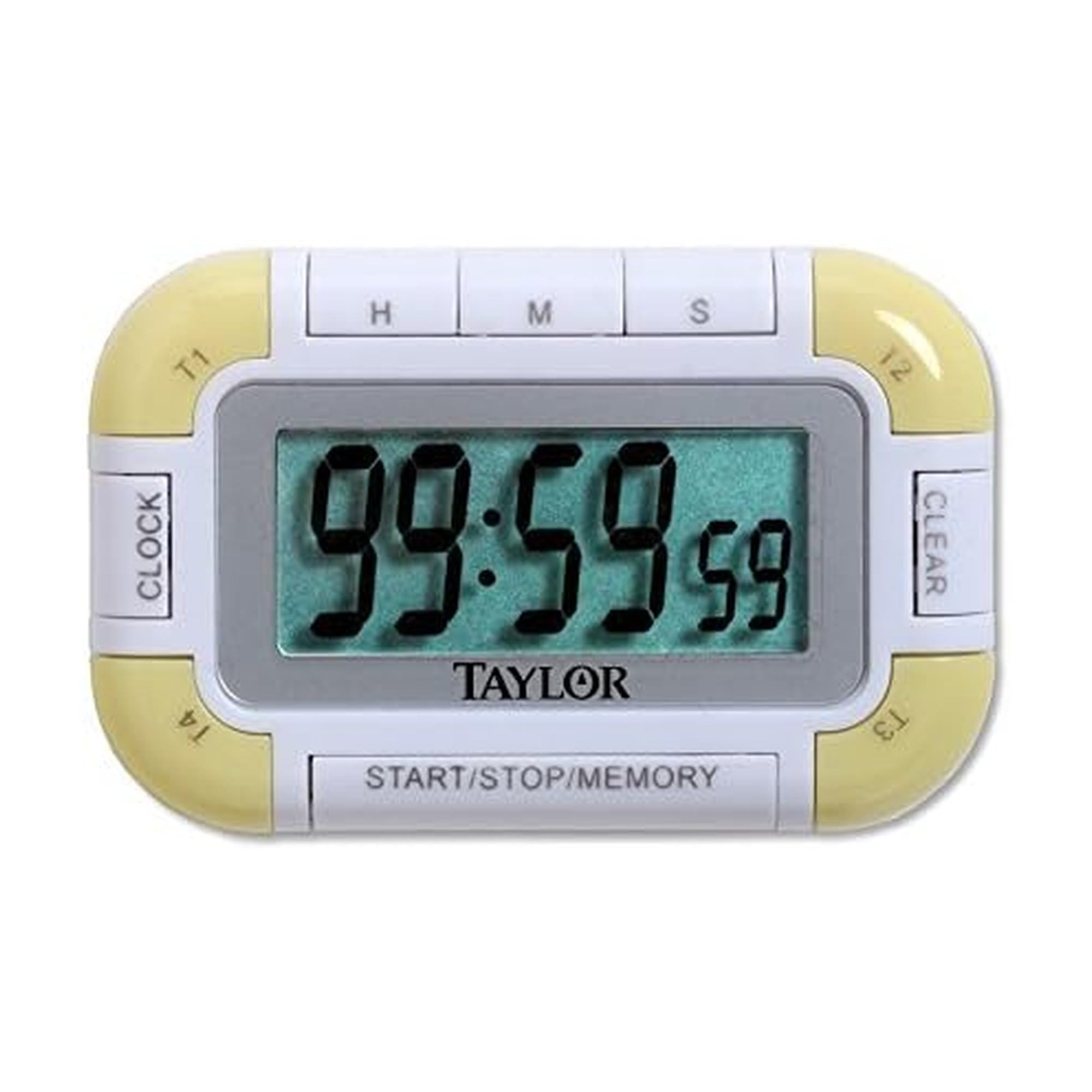
Rajah 1: Depan view of the Taylor Pro Digital 4-Event Timer.
Maklumat Keselamatan
WARNING: This product contains button cell batteries. Swallowing a button cell battery can cause severe internal burns in as little as 2 hours and can lead to death. Keep new and used batteries away from children. If the battery compartment does not close securely, stop using the product and keep it away from children. If you think batteries might have been swallowed or placed inside any part of the body, seek immediate medical attention.

Figure 2: Button cell battery safety warning.
Kandungan Pakej
- Taylor Pro Digital 4-Event Timer (Model 5862)
- Manual Arahan
- 2 x Product Specific Batteries (pre-installed or included separately)
Ciri-ciri Produk
- Four Independent Timers: Track up to four events simultaneously.
- Paparan LCD Besar: 0.8-inch display for clear time readings.
- Peletakan Serbaguna: Strong magnets for metal surfaces and a built-in stand for countertops.
- Extended Countdown: Sets times up to 99 hours, 59 minutes, 59 seconds.
- Distinctive Alarms: Each timer has a unique beep pattern.
- Fungsi Memori: Recalls the last set time for each event.

Rajah 3: Terperinci view of the timer's display and control buttons.
Persediaan
Pemasangan Bateri
- Cari petak bateri di belakang pemasa.
- Buka penutup petak.
- Insert two product-specific batteries, ensuring correct polarity (+/-).
- Tutup penutup petak bateri dengan selamat.
Kuasa Awal Hidup
Once batteries are installed, the timer should automatically power on and display '00:00:00' or the current time if a clock function is present (refer to display for confirmation).
Arahan Operasi
Selecting a Timer (T1, T2, T3, T4)
Tekan ke T1/T2/T3/T4 buttons to select the desired timer. The active timer will be indicated on the display.
Setting a Countdown Timer
- Select the desired timer (T1-T4).
- Tekan ke HR butang untuk menetapkan jam, MIN for minutes, and SEK for seconds. Each press increases the value. Hold the button for faster adjustment.
- To clear a set time, press the JELAS button while the timer is selected and stopped.
Starting and Stopping a Timer
- After setting the desired time, press the MULA/BERHENTI butang untuk memulakan kira detik.
- To pause the countdown, press MULA/BERHENTI sekali lagi.
- Untuk menyambung semula, tekan MULA/BERHENTI sekali lagi.
Fungsi Penggera
When a timer reaches zero, it will emit an audible alarm. Each of the four timers has a distinct alarm sound to help differentiate between events. Press any button to silence the alarm.
Fungsi Memori
The timer automatically stores the last set time for each of the four events. To recall a previously set time, select the desired timer (T1-T4) and press the MEMORI button. The last set time for that specific timer will be displayed.
Penyelenggaraan
Pembersihan
Lap pemasa dengan lembut, damp kain. Jangan gunakan pembersih yang melelas atau rendam unit di dalam air.
Penggantian Bateri
When the display becomes dim or the timer functions erratically, it is time to replace the batteries. Follow the battery installation steps outlined in the Setup section.
Menyelesaikan masalah
| Masalah | Kemungkinan Punca | Penyelesaian |
|---|---|---|
| Paparan kosong atau malap. | Bateri lemah atau mati. | Gantikan bateri dengan yang baharu, memastikan kekutuban yang betul. |
| Pemasa tidak bermula. | Time not set or START/STOP not pressed. | Ensure a time is set for the selected timer. Press START/STOP. |
| Penggera tidak berbunyi. | Volume setting too low (if applicable) or timer not reaching zero. | Ensure timer counts down to zero. Check for any mute function (if available). |
| Butang tidak bertindak balas. | Bateri lemah atau kerosakan dalaman. | Gantikan bateri. Jika isu berterusan, hubungi sokongan pelanggan. |
Spesifikasi
- Nombor Model: 5862
- Jenama: Taylor
- Bahan: plastik
- warna: Putih/Hijau
- Berat Barang: 2.4 Auns
- Dimensi Produk: 7 x 5.1 x 6.68 inci
- Saiz Skrin: 0.8 Inci (LCD)
- Bilangan Pemasa: 4
- Max Countdown: 99 Jam, 59 Minit, 59 Saat
- Bateri: 2 Product Specific batteries (required)
Waranti
This Taylor Pro Digital 4-Event Timer (Model 5862) comes with a Waranti 1 tahun covering parts and labor from the date of purchase. This warranty does not cover damage caused by misuse, accident, unauthorized modifications, or normal wear and tear. Please retain your proof of purchase for warranty claims.
Sokongan
For further assistance, troubleshooting not covered in this manual, or warranty inquiries, please contact Taylor customer support. Refer to the product packaging or the official Taylor webtapak untuk maklumat hubungan terkini.