
KILOTECH KWS 1000
Kilotech Platform Scale - KWS 1000 User Manual
Model: KWS 1000 | Capacity: 300 Lb / 150 kg
1. Produk Lebihview
The Kilotech KWS 1000 Platform Scale is designed for accurate and reliable weighing of various items up to 300 pounds or 150 kilograms. It features a robust stainless steel platform and a clear, backlit digital display for easy readability. This scale is suitable for industrial, commercial, and general weighing applications requiring precision and durability.
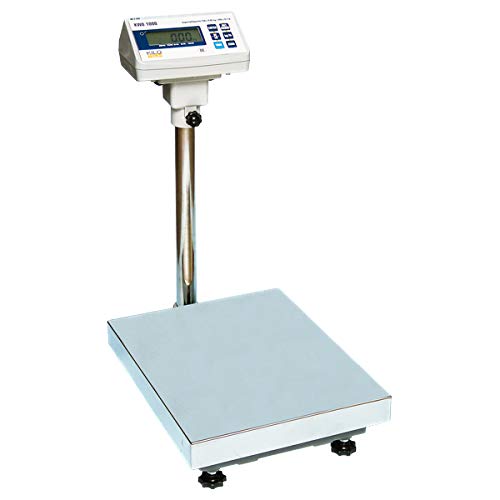
Image 1.1: The Kilotech KWS 1000 Platform Scale, showing the large weighing platform, the sturdy vertical support pole, and the digital display unit with a backlit screen and control buttons.
2. Arahan Persediaan
- Membongkar: Carefully remove all components from the packaging. Verify that all parts are present: weighing platform, display unit, support pole, and power adapter.
- Perhimpunan:
- Attach the support pole to the weighing platform using the provided fasteners. Ensure it is securely tightened.
- Mount the display unit onto the top of the support pole. Secure it in place with the locking mechanism or screws.
- Connect the cable from the weighing platform to the designated port on the display unit.
- penempatan: Place the scale on a firm, level, and stable surface to ensure accurate readings. Avoid locations with excessive vibrations, drafts, or extreme temperature fluctuations.
- meratakan: Adjust the four adjustable feet located on the underside of the platform until the scale is perfectly level. Use a spirit level if available.
- Sambungan Kuasa: Plug the power adapter into the DC input port on the display unit, then connect it to a suitable electrical outlet.
- Kuasa Awal Hidup: Tekan ke HIDUP/MATI button. The display should light up and perform a self-test before showing "0.00".
3. Arahan Operasi
3.1 Penimbangan Asas
- Ensure the scale is powered on and displays "0.00". If not, press the SIFAR butang.
- Gently place the item to be weighed in the center of the weighing platform.
- Wait for the reading to stabilize. The weight will be displayed on the screen.
- Remove the item from the platform. The display should return to "0.00" or a negative value if the item was removed before stabilization.
3.2 Penukaran Unit
To switch between weighing units (e.g., pounds (lb) and kilograms (kg)):
- With the scale displaying "0.00", press the UNIT butang.
- The display will cycle through available units (e.g., lb, kg). Stop when the desired unit is shown.
3.3 Fungsi Tara
The tare function allows you to weigh items in a container by subtracting the container's weight.
- Letakkan bekas kosong di atas platform penimbang. Paparan akan menunjukkan beratnya.
- Tekan ke SASARAN button. The display will reset to "0.00", effectively subtracting the container's weight.
- Place the items to be weighed into the container. The display will show only the net weight of the items.
- To clear the tare, remove both the container and the items, then press the SASARAN button again, or power cycle the scale.
4. Penyelenggaraan
- Pembersihan: Wipe the scale's platform and display unit with a soft, damp kain. Jangan gunakan pembersih yang melelas, pelarut, atau rendam unit dalam air.
- Storan: Apabila tidak digunakan untuk tempoh yang lama, simpan penimbang di persekitaran yang kering dan bebas habuk.
- Penentukuran: Regular calibration is recommended to maintain accuracy, especially after relocation or significant temperature changes. Refer to the advanced user manual or contact Kilotech support for calibration procedures.
- Bateri (jika berkenaan): If your model uses internal rechargeable batteries, ensure it is charged regularly to prolong battery life. Avoid complete discharge.
5. Penyelesaian masalah
| Masalah | Kemungkinan Punca | Penyelesaian |
|---|---|---|
| Skala tidak dihidupkan. | No power, faulty power adapter, or discharged battery. | Check power connection. Ensure adapter is working. Charge battery if applicable. |
| Bacaan yang tidak tepat. | Scale not level, unstable surface, or needs calibration. | Adjust leveling feet. Place on a stable surface. Perform calibration. |
| Paparan menunjukkan "LEBIHAN MUATAN" atau "ERR". | Berat melebihi kapasiti maksimum. | Remove excess weight. Do not exceed 300 lb / 150 kg. |
| Display does not return to zero. | Residual weight on platform or tare function active. | Ensure platform is clear. Press the SIFAR or SASARAN butang. |
6. Spesifikasi
| Ciri | Perincian |
|---|---|
| Model | KWS 1000 |
| Jenama | KILOTECH |
| Kapasiti Maksimum | 300 Pounds (lb) / 150 Kilograms (kg) |
| Ketepatan Bacaan | 100 g |
| Paparan | Paparan Digital Bercahaya Belakang |
| Faktor Bentuk | Mini Platform Scale |
| Rujukan Pengeluar | 851685 |
| ASIN | B003DWP28M |
7. Waranti dan Sokongan
For warranty information, technical support, or service inquiries, please contact Kilotech customer service. Keep your purchase receipt and product serial number handy for faster assistance.
- Pengeluar: Kilotech
- Polisi Pemulangan: 30-day refund/replacement (as per Amazon.ca policy at time of purchase)
- Hubungi: Refer to the official Kilotech website or your product documentation for current contact details.
Ask a question about this manual
Ask about setup, troubleshooting, compatibility, parts, safety, or missing instructions. Manuals+ will review the question and use this page’s manual context to help answer it.