
1. Produk Lebihview
The Sigma 50-500mm f/4.5-6.3 APO DG OS HSM lens is an advanced optical design offering a 10x power high-performance zoom range, covering standard to super-telephoto focal lengths. It features Sigma's Optical Stabilization (OS) system, allowing for the use of shutter speeds approximately 4 stops slower than typically possible, enhancing handheld photography in various lighting conditions. This lens is designed for use with full-frame digital SLR cameras and is also compatible with smaller APS-C size sensors. Its versatile range makes it suitable for landscape, wildlife, nature, and sports photography, with the added ability to close-focus on small subjects like flowers.

Figure 1: Sigma 50-500mm f/4.5-6.3 APO DG OS HSM SLD Ultra Telephoto Zoom Lens.
The lens incorporates four Special Low Dispersion (SLD) glass elements for optimal color correction and sharpness across the entire zoom range. A super Multi-Layer lens coating reduces flare and ghosting, ensuring high image quality. Its compact design, under 9 inches long and approximately 4.5 pounds, makes it a practical option for photographers on the go.
Video 1: Tamatview of the Sigma 50-500mm Lens, highlighting its features and capabilities.
Video 2: Detailed presentation of the Sigma 50-500mm f/4.5-6.3 APO DG OS HSM SLD Ultra Telephoto Zoom Lens, showcasing its design and optical performance.
2. Apa yang ada di dalam Kotak
Upon opening the product packaging, ensure all the following items are present:
- Sigma 50-500mm f/4.5-6.3 APO DG OS HSM SLD Ultra Telephoto Zoom Lens
- Petal Lens Hood
- Cap Lensa Depan
- Cap Lensa Belakang
- Tripod Collar (pre-attached or separate)
3. Persediaan
3.1 Memasang Kanta pada Kamera Anda
- Tanggalkan penutup kanta belakang daripada kanta dan penutup badan daripada kamera anda.
- Align the mounting index on the lens with the corresponding index on your camera body.
- Insert the lens into the camera mount and turn it clockwise (for Nikon F mount) until it clicks securely into place.
- Pastikan kanta dipasang dengan kukuh sebelum digunakan.
3.2 Menggunakan Kolar Tripod
The lens includes a tripod collar for balanced mounting on a tripod or monopod, especially given its weight. To use, loosen the locking knob on the collar, rotate the lens to your desired orientation, and then tighten the knob to secure it.
3.3 Attaching the Lens Hood and Caps
Attach the petal lens hood by aligning its mark with the mark on the front of the lens and twisting until it locks. The lens hood helps to prevent stray light from entering the lens, reducing flare and ghosting. Always use the front and rear lens caps when the lens is not in use or detached from the camera to protect the optical elements.
4. Mengendalikan Lensa
4.1 Mengezum
Rotate the zoom ring to adjust the focal length between 50mm and 500mm. The lens features a zoom lock switch at the 50mm position to prevent the lens from extending unintentionally during transport.
4.2 Autofocus (HSM)
This lens is equipped with a Hyper Sonic Motor (HSM) for fast, quiet, and precise autofocusing. Ensure your camera's focus mode is set to autofocus. You can typically override autofocus manually by turning the focus ring, even when the camera is in AF mode.
4.3 Optical Stabilization (OS) System
The Optical Stabilization (OS) system helps to minimize camera shake, especially when shooting handheld at slower shutter speeds or longer focal lengths. Activate the OS function using the switch on the lens barrel. The OS system offers different modes for various shooting scenarios, such as general shooting or panning. Refer to your camera's manual for specific settings related to in-viewfinder stabilization if applicable for Sony and Pentax mounts.
4.4 Close-Focusing Capabilities
The lens allows for close focusing on small subjects, making it versatile for detailed shots of flowers or other intricate elements in nature. Experiment with different focal lengths and distances to achieve desired macro-like effects.
5. Penyelenggaraan
Penjagaan dan penyelenggaraan yang betul akan memastikan jangka hayat dan prestasi optimum kanta anda.
- Pembersihan: Use a soft, lint-free cloth to gently wipe dust from the lens surfaces. For smudges or fingerprints, use a specialized lens cleaning solution and a microfiber cloth. Avoid harsh chemicals or abrasive materials.
- Perlindungan: Always attach the lens caps when the lens is not in use. When changing lenses, do so in a clean, dust-free environment to prevent dirt or moisture from entering the camera body or fouling the imaging sensor.
- Storan: Store the lens in a cool, dry place away from direct sunlight and extreme temperatures. If storing for an extended period, consider using a dehumidifying cabinet or silica gel packets to prevent mold growth.
6. Penyelesaian masalah
If you encounter any issues with your Sigma 50-500mm lens, please consider the following general troubleshooting steps:
- Focusing Issues: Ensure the AF/MF switch on the lens is set correctly. Check your camera's focus settings. Clean the lens contacts on both the lens and camera body.
- Penstabilan Imej: Verify the OS switch is engaged if you intend to use stabilization. Ensure your shutter speed is not excessively slow for the given focal length, even with OS.
- Lens Not Recognized: Re-attach the lens to the camera, ensuring it clicks securely. Clean the electrical contacts on both the lens and camera.
For persistent problems or technical assistance, please refer to the Warranty and Support section for contact information.
7. Spesifikasi
Key technical specifications for the Sigma 50-500mm f/4.5-6.3 APO DG OS HSM SLD Ultra Telephoto Zoom Lens:
| Ciri | Spesifikasi |
|---|---|
| Nombor Model | 738306 |
| Panjang Fokus | 50-500mm |
| Apertur Maksimum | f/4.5-6.3 |
| Jenis Kanta | Zum Telefoto Ultra |
| Penstabilan Optik | Ya (OS) |
| Motor Fokus Automatik | Hyper Sonic Motor (HSM) |
| Elemen Khas | SLD (Special Low Dispersion) Glass Elements |
| Salutan Lensa | Super Multi-Layer Coating |
| Pemasangan yang Serasi | Nikon F (FX) |
| Dimensi Produk | 8.62 x 4.09 x 4.09 inci |
| Berat Barang | 4.34 paun |
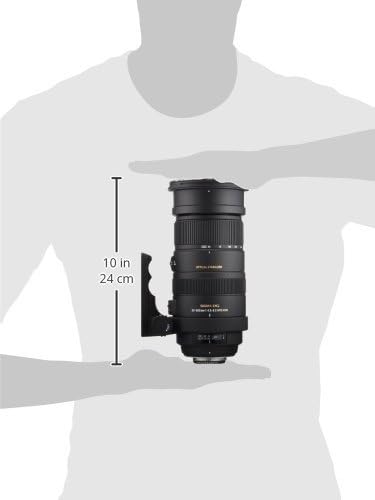
Rajah 2: Sisi view of the Sigma 50-500mm lens, showing mounting details and controls.
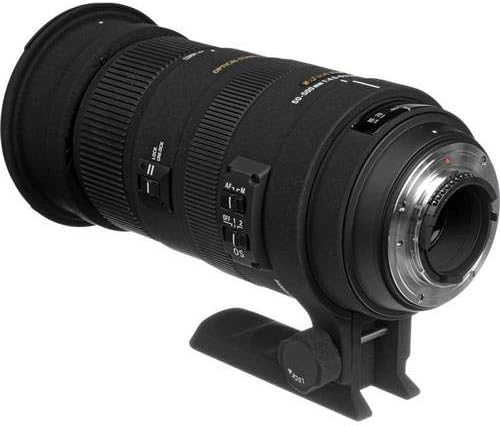
Rajah 3: Bersudut view of the Sigma 50-500mm lens, highlighting its robust construction.
8. Waranti dan Sokongan
8.1 Maklumat Waranti
This Sigma lens comes with a Waranti AS 3 tahun. Please retain your proof of purchase for warranty claims. The warranty covers manufacturing defects and ensures the product meets its specified performance standards under normal use. For full terms and conditions, please refer to the warranty card included with your product or visit the official Sigma webtapak.
8.2 Sokongan Pelanggan
For technical support, service, or any inquiries regarding your Sigma 50-500mm lens, please contact Sigma Corporation of America customer service. Contact details can typically be found on the official Sigma webtapak atau dalam pembungkusan produk.