
Degen DE1125
DEGEN DE1125 User Manual
Model: DE1125 | Brand: Degen
1. Produk Lebihview
The DEGEN DE1125 is a compact and versatile portable device that integrates multiple functionalities into a single unit. It serves as a world-band radio, an MP3 player, a digital recorder, and an ebook reader. Designed for portability, it features a slim profile and lightweight construction, making it ideal for travel and on-the-go use.
Ciri-ciri utama termasuk:
- Pocket-size world-band radio with built-in speaker and Digital Signal Processing (DSP) technology.
- 4 GB flash memory MP3 player for music playback.
- Digital recorder for radio programs and voice recording, offering up to 150 hours of recording time (at 32 kbps).
- 255 preset memories for radio stations.
- Built-in battery charger.
- LED back-lit display for clear visibility.
- Digital clock, sleep timer, key lock, and numeric volume indicator.
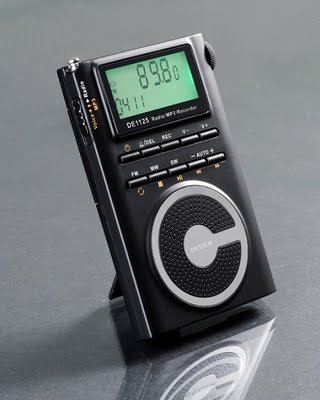
Figure 1.1: The DEGEN DE1125 portable radio and multimedia player, shown standing upright with its integrated kickstand.
2. Panduan Persediaan
2.1 Membongkar dan Pemeriksaan Awal
Keluarkan semua komponen dari pembungkusan dengan berhati-hati. Sahkan bahawa semua item yang disenaraikan di bawah ada dan tidak rosak:
- DEGEN DE1125 Unit
- Fon telinga
- AC Wall Plug (Charger)
- Kabel USB
- Beg Bawa
- Bateri boleh dicas semula
- Manual Pengguna (dokumen ini)
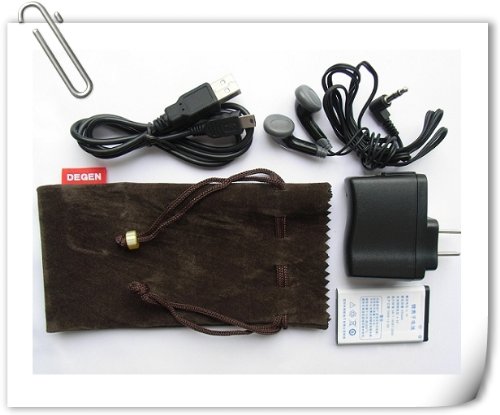
Figure 2.1: All included accessories for the DEGEN DE1125, including earphones, USB cable, AC adapter, carrying pouch, and rechargeable battery.
2.2 Pemasangan dan Pengecasan Bateri
The DE1125 is powered by a rechargeable lithium battery. Before first use, ensure the battery is properly installed and fully charged.
- Cari petak bateri di bahagian belakang peranti.
- Insert the rechargeable battery, ensuring correct polarity as indicated inside the compartment.
- Tutup penutup petak bateri dengan selamat.
- Connect the small end of the USB cable to the mini-USB port on the side of the DE1125.
- Connect the standard USB end of the cable to the AC wall plug, then plug the AC wall plug into a standard electrical outlet. Alternatively, connect the standard USB end directly to a computer's USB port for charging.
- The display will indicate charging status. Allow the battery to fully charge before initial use.
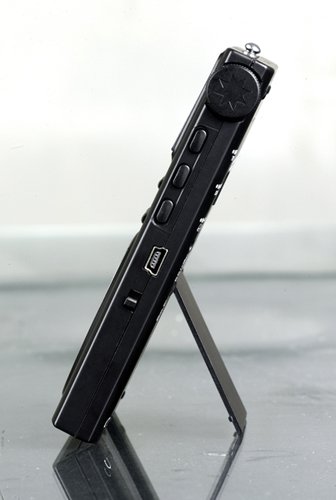
Rajah 2.2: Sisi view of the DEGEN DE1125, highlighting the mini-USB port for charging and data transfer.
3. Arahan Operasi
3.1 Kawalan Am
Familiarize yourself with the buttons and display on the DE1125:
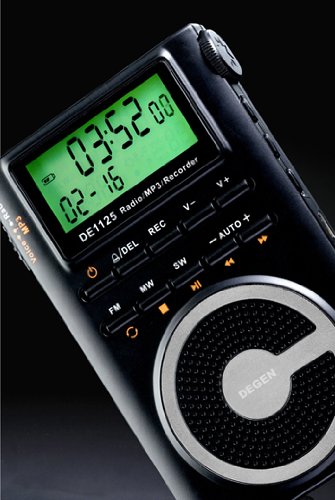
Rajah 3.1: Jarak dekat view of the DEGEN DE1125's display and control panel, showing buttons for power, mode selection, tuning, and volume.
- Butang kuasa (): Tekan dan tahan untuk menghidupkan atau mematikan peranti.
- Volume Buttons (V+, V-): Laraskan tahap output audio.
- Butang Menu: Access the main menu or settings within a mode.
- Butang Navigasi (, ): Navigate through menus or adjust frequencies/tracks.
- Mode Buttons (FM, MW, SW, MP3, REC): Pilih mod operasi yang dikehendaki.
- Butang Main/Jeda (): Start or pause playback in MP3 mode, or confirm selections.
3.2 Radio Operation (FM, AM, SW)
The DE1125 supports FM (64.0 - 108.0 MHz), MW (520-1710 KHz), and SW (2.3-23.0 MHz) bands.
- Hidupkan peranti.
- Press the corresponding mode button (FM, MW, or SW) to select the desired radio band.
- Pilihan Penalaan:
- Auto-Imbas: Press and hold the 'AUTO' button to automatically scan and store available stations.
- Penalaan Manual: Gunakan butang navigasi (, ) to fine-tune the frequency step-by-step.
- Penalaan Digital: Enter the desired frequency directly using the numeric keypad (if available, or through menu options).
- ATS (Auto Tuning Storage): Automatically scans and stores strong signals into memory presets.
- Stesen Pratetap: The device can store up to 255 preset stations. Use the 'M+' and 'M-' buttons to navigate through stored presets.
3.3 Fungsi Pemain MP3
The DE1125 features 4GB of internal flash memory for MP3 playback.

Figure 3.2: The DEGEN DE1125 display indicating the 'Music' mode, ready for MP3 playback.
- Press the 'MP3' button to enter MP3 player mode.
- Untuk memindahkan muzik files from your computer, connect the DE1125 to your computer using the provided USB cable. The device will appear as a removable disk drive. Drag and drop your MP3 files into the device's storage.
- Gunakan butang navigasi (, ) to select tracks.
- Tekan butang Main / Jeda () untuk memulakan atau menjeda main balik.
3.4 Digital Recorder Function
The DE1125 can record radio programs or function as a voice recorder.

Figure 3.3: The DEGEN DE1125 display showing the 'Record' mode, indicating readiness for audio capture.

Figure 3.4: The DEGEN DE1125 display showing the 'Voice' mode, used for voice recording functions.
- Press the 'REC' button to enter recording mode.
- Select either 'Radio Record' or 'Voice Record' from the menu.
- Press the 'REC' button again to start recording. The display will show recording time.
- Press the 'REC' button again to stop recording. Recorded files are saved to the internal memory.
- To play back recordings, navigate to the 'Recordings' folder in MP3 mode.
3.5 Ebook Reader Function
The DE1125 supports basic ebook reading functionality.

Figure 3.5: The DEGEN DE1125 display showing the 'Ebook' mode, indicating readiness to display text files.
- Connect the DE1125 to your computer via USB.
- Transfer compatible text files (e.g., .TXT) to the device's internal memory.
- Putuskan sambungan peranti daripada komputer.
- Navigate to the 'Ebook' mode using the menu or mode selection.
- Select the desired ebook file untuk membuka dan membaca.
4. Penjagaan dan Penyelenggaraan
Proper care ensures the longevity and optimal performance of your DEGEN DE1125.
- Pembersihan: Use a soft, dry cloth to clean the exterior of the device. Do not use liquid cleaners, aerosols, or abrasive materials.
- Storan: Store the device in a cool, dry place away from direct sunlight, extreme temperatures, and high humidity. Use the provided carrying pouch for protection during transport.
- Penjagaan Bateri: To maintain battery health, avoid fully discharging the battery frequently. If storing for an extended period, charge the battery to about 50% and recharge every few months.
- Pendedahan Air: Peranti ini tidak kalis air. Elakkan pendedahan kepada air atau cecair lain.
- Kesan: Lindungi peranti daripada jatuh dan hentaman, yang boleh merosakkan komponen dalaman atau skrin.
5. Penyelesaian masalah
If you encounter issues with your DEGEN DE1125, refer to the following common problems and solutions:
| Masalah | Kemungkinan Punca | Penyelesaian |
|---|---|---|
| Peranti tidak dihidupkan. | Bateri habis atau tidak dipasang dengan betul. | Cas bateri. Pastikan bateri dimasukkan dengan kekutuban yang betul. |
| No radio reception or poor signal. | Weak signal area, antenna not extended, interference. | Extend the telescopic antenna fully. Move to an area with better reception. Avoid sources of electronic interference. |
| MP3 filetidak bermain. | Tidak disokong file format, corrupted file, tidak files on device. | pastikan files are in MP3 format. Re-transfer files. Verify files exist in the device's memory. |
| Cannot record audio. | Insufficient storage space, incorrect mode. | Padam yang lama files to free up space. Ensure you are in the correct recording mode (Radio Record or Voice Record). |
| Skrin kosong atau beku. | System error, low battery. | Press and hold the power button for 10 seconds to force a restart. Charge the battery. |
6. Spesifikasi Teknikal
| Ciri | Spesifikasi |
|---|---|
| Jenama | Degen |
| Model | DE1125 |
| Dimensi Produk | 11 x 1.5 x 6.7 cm |
| Berat Barang | 113 g |
| Kapasiti Penyimpanan Memori | 4 GB |
| Antara Muka Perkakasan | USB |
| Teknologi Penala | AM, FM, SW |
| Julat Frekuensi FM | 64.0 - 108.0 MHz |
| MW Frequency Range | 520 - 1710 KHz |
| Julat Kekerapan SW | 2.3 - 23.0 MHz |
| Peranti Serasi | Fon telinga |
| Jenis Paparan | LED |
| Saiz Skrin | 0.5 Inches (visible diagonal 1" / 2 cm) |
| Sumber Kuasa | Dikuasakan Bateri |
| Jenis Bateri | Lithium Rechargeable |
| Jenis Penyambung | USB |
| Jenis Media yang Serasi | MP3 |
| bahan | Lain-lain |
7. Waranti dan Sokongan
7.1 Maklumat Waranti
This product is covered by a manufacturer's warranty. Please refer to the warranty policy provided at the time of purchase or contact your retailer for specific details regarding warranty duration and terms. Keep your proof of purchase for warranty claims.
7.2 Sokongan Pelanggan
For technical assistance, troubleshooting beyond this manual, or inquiries about your DEGEN DE1125, please contact the retailer or the manufacturer's customer support. Refer to the contact information provided with your purchase documentation.
Ask a question about this manual
Ask about setup, troubleshooting, compatibility, parts, safety, or missing instructions. Manuals+ will review the question and use this page’s manual context to help answer it.