
1. Pengenalan
The VTech Learning Fun Tool Box is an interactive educational toy designed for young children aged 12 to 36 months. This toy encourages role-play and introduces basic concepts such as shapes, numbers, and colors through engaging activities. It includes realistic tool play pieces and features two distinct modes of play: Learning Mode and Play Mode.
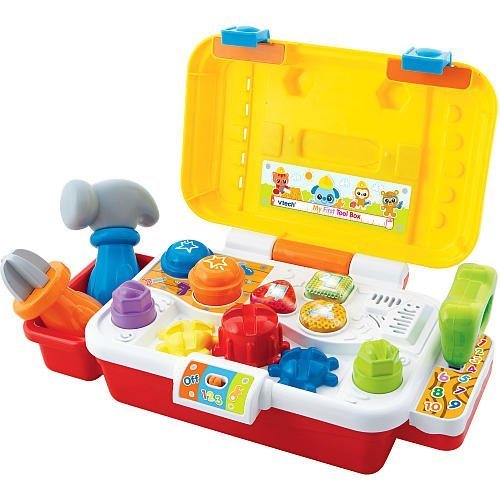
Image 1.1: The VTech Learning Fun Tool Box, a colorful toy featuring a yellow toolbox with a red handle, a blue screwdriver, a green wrench, a red hammer, and a yellow saw. The front of the toolbox includes three light-up buttons and interactive elements like gears and bolts.
2. Kandungan Pakej
Pastikan semua item yang disenaraikan di bawah terdapat dalam pakej anda:
- 1 x VTech Learning Fun Tool Box unit
- 1 x Alat pemutar skru
- 1 x Wrench tool
- 1 x Saw tool
- 1 x Hammer tool
- Manual Arahan (dokumen ini)
3. Ciri-ciri Utama
- Realistic Role-Play Tools: Includes a screwdriver, hammer, wrench, and saw for imaginative play.
- Elemen Interaktif: Features three gears, two bolts, two nails, and three light-up buttons for engaging interaction.
- Reka Bentuk Mudah Alih: Equipped with an exterior handle for easy carrying.
- Educational Play Modes: Offers two modes of play to teach shapes, numbers, and colors.
- Kesesuaian Umur: Sesuai untuk kanak-kanak 12 bulan ke atas.
4. Persediaan
4.1 Pemasangan Bateri
The VTech Learning Fun Tool Box requires batteries for operation. Locate the battery compartment on the underside of the unit. Use a screwdriver to open the compartment cover. Insert the required batteries, ensuring correct polarity (+/-). Replace the cover and secure it with the screw. Always use new batteries of the recommended type for optimal performance.
5. Arahan Operasi
5.1 Hidupkan/Mati Kuasa
To turn the unit on, slide the power switch, typically located on the side or back of the toolbox, to the 'ON' position. To conserve battery life, slide the switch to the 'OFF' position when the toy is not in use.
5.2 Mod Main
The Learning Fun Tool Box features two primary play modes:
- Mod Pembelajaran: In this mode, the toy introduces shapes, numbers, and colors. Pressing the light-up buttons or interacting with the tools (screwdriver, wrench, hammer, saw) will trigger educational phrases and sounds related to these concepts.
- Mod Main: This mode encourages imaginative play with realistic tool sounds and phrases. Children can pretend to fix things, turn gears, tighten bolts, and tap nails, enhancing their role-play experience.
Switch between modes by pressing a dedicated mode button or by specific interactions as indicated by the toy's voice prompts.
5.3 Tool Interaction
- Pemutar skru: Use the screwdriver to turn the gears on the toolbox, activating sounds and phrases.
- Sepana: Use the wrench to interact with the bolts, triggering specific responses.
- tukul: Tap the nails with the hammer for sound effects.
- Saw: Engage the saw with designated areas for sawing sounds.
6. Penyelenggaraan
6.1 Pembersihan
To clean the VTech Learning Fun Tool Box, wipe the surface with a slightly damp cloth. Do not immerse the toy in water or use harsh cleaning agents, as this may damage the electronic components. Ensure the toy is completely dry before storage or further use.
6.2 Penyimpanan
Store the toy in a cool, dry place away from direct sunlight and extreme temperatures. If the toy will not be used for an extended period, remove the batteries to prevent leakage and potential damage.
7. Penyelesaian masalah
7.1 No Power or Intermittent Sound
- Periksa sama ada suis kuasa berada dalam kedudukan 'ON'.
- Pastikan bateri dipasang dengan betul dengan kekutuban yang betul.
- Gantikan bateri lama atau habis dengan yang baru.
- Clean the battery contacts if they appear dirty.
7.2 Incorrect Responses or Malfunctions
- Turn the unit off and then on again to reset it.
- Ensure that the tools are being used with the correct interactive points on the toolbox.
- If issues persist, refer to the VTech customer support for further assistance.
8. Spesifikasi
| Nama Jenama | VTech |
| Nombor Model | 80-113100 |
| ASIN | B002T37EF0 |
| Nombor Pengenalan Perdagangan Global | 03417761131008 |
| Umur Minimum Pengilang | 12 Bulan |
| Umur Maksimum Pengilang | 36 Bulan |
| Dimensi Item (L x W x H) | 10.24 x 4.33 x 4.53 inci |
| Berat Barang | 2.5 paun |
| Jenis Bahan | plastik |
| Objektif Pendidikan | Pengecaman Warna |
9. Waranti dan Sokongan
9.1 Maklumat Waranti
VTech products are manufactured to high-quality standards. For specific warranty details, please refer to the warranty card included with your purchase or visit the official VTech webtapak. Simpan bukti pembelian anda untuk tuntutan waranti.
9.2 Sokongan Pelanggan
If you have any questions, require technical assistance, or need to report a problem with your VTech Learning Fun Tool Box, please contact VTech customer support. Contact information can typically be found on the VTech official webtapak atau pada pembungkusan produk.


