
pengenalan
The Nokia Bluetooth Stereo Headset BH-905 is designed to provide a superior audio experience with active noise cancellation and wide compatibility. This manual provides instructions for setting up, operating, and maintaining your headset to ensure optimal performance.
The headset features 10 microphones: 8 dedicated to capturing ambient noise for cancellation and 2 for capturing speech in noisy environments. It offers versatile connectivity, supporting both wireless Bluetooth and wired connections with various devices.
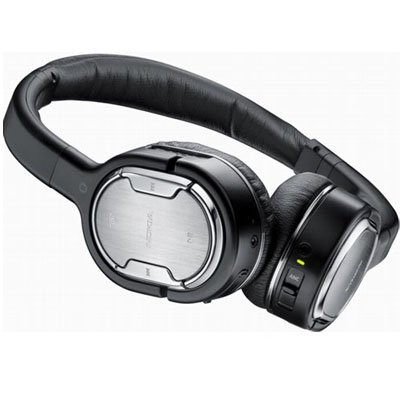
Image: The Nokia Bluetooth Stereo Headset BH-905, showcasing reka bentuknya yang anggun dan cawan atas telinga.
Ciri-ciri Utama
- Pembatalan Bunyi Aktif (ANC): Significantly reduces ambient noise for an immersive listening experience.
- 10 Mikrofon: Utilizes 8 microphones for noise capture and 2 for clear speech transmission in loud surroundings.
- Keserasian Luas: Connects wirelessly via Bluetooth or wired to a variety of mobile phones, music players, and other audio devices.
- Seamless Control: Intuitive controls allow for easy switching between music and calls without needing to look at the device.
Persediaan
Berpasangan Bluetooth
- Ensure your headset is charged and powered off.
- Aktifkan Bluetooth pada peranti mudah alih anda.
- Press and hold the power button on the headset until the indicator light flashes blue rapidly, indicating pairing mode.
- On your device, search for Bluetooth devices and select "Nokia BH-905" from the list.
- If prompted, enter the passcode (usually "0000").
- Once paired, the indicator light will turn solid blue or flash slowly.
Sambungan Berwayar
For devices without Bluetooth or when battery is low, use the provided audio cables. The headset includes plugs for standard audio jacks and airplane adapters for versatile use.
- Connect one end of the audio cable to the headset's audio input port.
- Connect the other end to your audio source (e.g., mobile phone, MP3 player, airplane entertainment system).
Arahan Operasi
Hidupkan/Mati Kuasa
- Untuk menghidupkan kuasa, tekan dan tahan butang kuasa sehingga lampu penunjuk menyala.
- Untuk mematikan kuasa, tekan dan tahan butang kuasa sehingga lampu penunjuk padam.
Pembatalan Bising Aktif (ANC)
The BH-905 features advanced Active Noise Cancellation technology. With 8 dedicated microphones, it captures ambient low-frequency noise and generates an inverse sound wave, effectively canceling out unwanted sounds. This allows for a clearer audio experience, especially in noisy environments like airplanes or busy streets.
- To activate ANC, locate the ANC switch on the headset and slide it to the 'On' position. A green indicator light will confirm activation.
- To deactivate ANC, slide the switch to the 'Off' position.
Pengurusan Panggilan
The headset is equipped with 2 microphones specifically designed for speech. These microphones not only capture your voice clearly but also work to cancel out ambient noise, ensuring that the person you are speaking with hears you, not your surroundings.
- Menjawab / Menamatkan Panggilan: Use the dedicated call button on the headset.
- Switching between Music and Calls: The headset allows for seamless transitions between listening to music and taking calls. When a call comes in, your music will pause, and you can answer the call directly from the headset.
Main balik Muzik
Control your music directly from the headset using the intuitive buttons. The design supports "blind usage," meaning you can operate the controls by feel without needing to look at them.
- Main/Jeda: Use the play/pause button.
- Langkau Trek: Use the forward/backward track buttons.
- Kawalan Kelantangan: Laraskan kelantangan menggunakan butang kelantangan khusus.
Video: An official Nokia video demonstrating the features and technology behind the BH-905 headset, including its active noise cancellation and multi-microphone system for clear audio and calls.
Penyelenggaraan
- Bersihkan set kepala dengan kerap menggunakan kain lembut dan kering.
- Elakkan daripada mendedahkan alat dengar kepada suhu ekstrem, kelembapan atau cahaya matahari langsung.
- Store the headset in its protective case when not in use to prevent damage.
- Do not attempt to disassemble or modify the headset, as this will void the warranty.
Menyelesaikan masalah
- Tiada Kuasa: Pastikan set kepala dicas sepenuhnya.
- Tidak boleh berpasangan: Make sure the headset is in pairing mode and within range of your device. Try restarting both devices.
- Tiada Bunyi/Kualiti Bunyi Lemah: Check volume levels on both the headset and your connected device. For wired connections, ensure cables are securely plugged in. For Bluetooth, ensure a stable connection.
- ANC Tidak Berfungsi Dengan Berkesan: Ensure the ANC switch is in the 'On' position.
- Callers Cannot Hear Me Clearly: Ensure the headset's microphones are not obstructed.
If issues persist, refer to the Nokia support webtapak atau hubungi perkhidmatan pelanggan untuk bantuan lanjut.
Spesifikasi
| Ciri | Spesifikasi |
|---|---|
| Jenama | Nokia |
| Nombor Model | 02716J5 |
| Faktor Bentuk | Over-ear (two_ear) |
| Kawalan Bunyi | Pembatalan Bunyi Aktif |
| Teknologi Ketersambungan | Bluetooth, Berwayar |
| Teknologi Komunikasi Tanpa Wayar | Bluetooth |
| Ciri-ciri Tambahan | Microphone; Stereo |
| Jenis Kawalan | Kawalan Media |
| Berat Barang | 0.32 paun |
| UPC | 758478021477 |
| GTIN | 758478021477 |
Waranti dan Sokongan
The Nokia Bluetooth Stereo Headset BH-905 comes with a Waranti 12 bulan dari tarikh pembelian. Waranti ini meliputi kecacatan pembuatan di bawah penggunaan biasa. Sila simpan bukti pembelian anda untuk tuntutan waranti.
For technical support, warranty service, or additional information, please visit the official Nokia support website or contact your local Nokia customer service center.