
pengenalan
This manual provides essential instructions for the safe and effective use of your Wiha ClicFix Insert Bit Holder Magnetic 1/4" x 1/4" x 75mm. Please read this manual thoroughly before initial use and retain it for future reference. Proper understanding and adherence to these instructions will ensure optimal performance and longevity of the product.
Persediaan
The Wiha ClicFix Insert Bit Holder is designed for quick and secure attachment of 1/4" hex insert bits to power tools with a 1/4" hex drive. Follow these steps for proper setup:
- Inspect the Bit Holder: Before each use, visually inspect the bit holder for any signs of damage, wear, or deformation. Do not use if damaged.
- Insert into Power Tool: Insert the 1/4" hex shank of the ClicFix bit holder into the chuck or hex drive of your power tool (e.g., drill, impact driver). Ensure it is fully seated and securely fastened by the tool's chuck or locking mechanism.
- Insert Driver Bit: Pull the red ClicFix sleeve forward to unlock the bit holder. Insert a standard 1/4" hex insert bit into the front opening of the bit holder. Release the sleeve to allow it to retract and securely lock the bit in place. The magnetic tip will further assist in holding the bit.
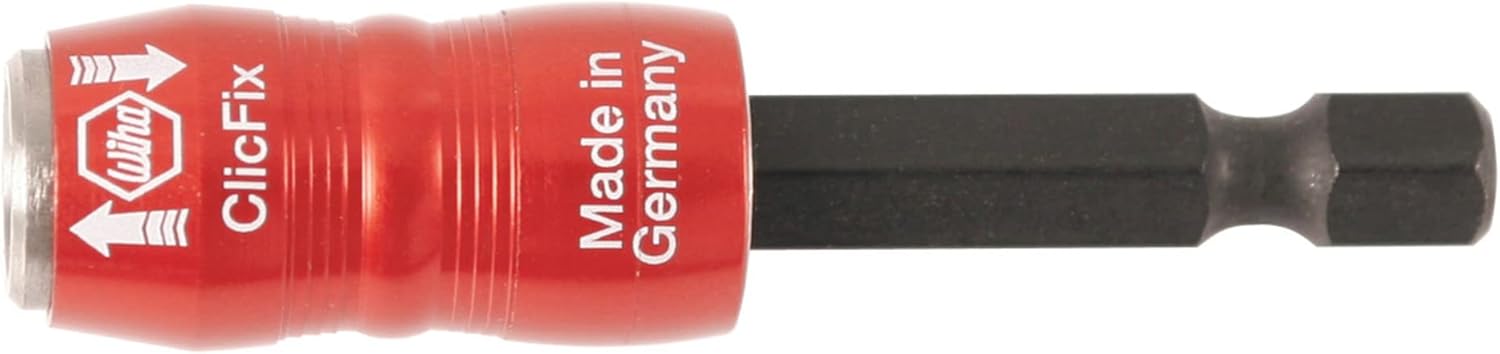
Figure 1: The Wiha ClicFix Insert Bit Holder. This image displays the product's design, highlighting the red ClicFix sleeve and the 1/4" hex shank.
Arahan Operasi
The ClicFix bit holder provides a secure and quick-change solution for various driving applications.
- Sisipan Bit: As described in the setup, pull the red sleeve forward, insert the 1/4" hex bit, and release the sleeve. The bit is now securely held by the ClicFix mechanism and the integrated magnet.
- Memandu: Use your power tool as normal. The ClicFix mechanism ensures the bit remains firmly in place during high-torque applications, reducing wobble and preventing accidental bit ejection.
- Bit Removal: To remove a bit, pull the red ClicFix sleeve forward. The bit will be released, allowing for easy removal and replacement with another bit.

Figure 2: Demonstrating bit insertion into the ClicFix holder. This image shows a hand holding a screwdriver bit, ready to be inserted into the ClicFix bit holder which is attached to a power drill.
Penting: Always ensure the bit is fully engaged and locked before operating the power tool. Failure to do so may result in injury or damage to the tool or workpiece.
Penyelenggaraan
- Pembersihan: Keep the bit holder clean and free from dirt, dust, and debris. Wipe with a dry cloth. Do not use harsh chemicals or solvents.
- Pelinciran: Periodically, a small amount of light machine oil can be applied to the moving parts of the ClicFix sleeve to ensure smooth operation. Wipe off any excess.
- Storan: Store the bit holder in a dry environment, away from corrosive materials and extreme temperatures.
- Pemeriksaan: Regularly inspect the bit holder for wear, especially the internal locking mechanism and the magnetic tip. Replace if significant wear or damage is observed.
Menyelesaikan masalah
| Masalah | Kemungkinan Punca | Penyelesaian |
|---|---|---|
| Bit does not lock securely. | Debris in mechanism; worn locking mechanism; incorrect bit size. | Clean the bit holder thoroughly. Apply light lubricant. Ensure you are using a standard 1/4" hex insert bit. If wear is significant, replace the bit holder. |
| Sleeve is stiff or difficult to move. | Accumulated dirt or lack of lubrication. | Clean the sleeve area and apply a small amount of light machine oil. Work the sleeve back and forth to distribute the lubricant. |
| Bit terjatuh semasa penggunaan. | Bit not fully locked; worn locking mechanism; excessive vibration. | Ensure the sleeve fully retracts after bit insertion. Inspect for wear. If using with an impact driver, ensure the bit holder is rated for impact use and that the bit is designed for impact. |
Spesifikasi
- model: Wiha ClicFix 71491
- Jenis: Insert Bit Holder, Magnetic
- Saiz Batang: 1/4" Heksagon
- Keserasian Bit: 1/4" Hex Insert Bits
- Panjang: 75mm (lebih kurang 2.95 inci)
- Bahan: Blend (as per manufacturer)
- Ciri Khas: Magnetic tip, ClicFix quick-release mechanism
- Dimensi Produk: 2.54 x 2.54 x 7.5 cm (approximate, based on 75mm length)
- Berat Barang: 27.2 g (lebih kurang 0.96 oz)
- Pengeluar: Willi Hahn Corporation
Maklumat Waranti
Wiha products are manufactured to high-quality standards. For specific warranty details regarding your ClicFix Insert Bit Holder, please refer to the official Wiha website or contact Wiha customer service. Retain your proof of purchase for warranty claims.
Sokongan Pelanggan
For technical assistance, product inquiries, or to report an issue, please contact Wiha customer support through their official webtapak:
Please have your product model number (71491) and any relevant purchase information available when contacting support.