
pengenalan
Thank you for choosing the Citizen Eco-Drive Brycen Chronograph Watch, model BL5400-52A. This timepiece combines sophisticated design with advanced Eco-Drive technology, ensuring reliable operation without the need for battery replacement. This manual provides essential information for the proper setup, operation, and maintenance of your watch to ensure its longevity and optimal performance.

Image: Citizen Eco-Drive Brycen Chronograph Watch (BL5400-52A) displayed on a wrist, showcasing its stainless steel design and dial.
Produk Selesaiview and Component Identification
Familiarize yourself with the various components of your Citizen Eco-Drive Brycen watch. Understanding these parts is crucial for correct operation and setting.

Image: Detailed diagram illustrating the watch's components, including the crown, pushers, sub-dials, and hands. The diagram also shows instructions for setting the time and calendar.
Komponen Utama:
- Mahkota: Used for setting time, date, and other functions. It has two positions when pulled out.
- Penolak (Butang): Used to operate chronograph and alarm functions.
- Function Hand: Indicates chronograph minutes, chronograph 1/20 seconds, and other modes.
- Terpakai: Indicates normal seconds, charge status, and setting status.
- 24-Hour Hand: Synchronized with the hour hand, indicates AM/PM.
- Date Indication: Memaparkan tarikh semasa.
- Alarm Indication (ON/OFF): Shows if the alarm is active.
Persediaan
Pengecasan Awal
Your Citizen Eco-Drive watch is powered by light. Before initial use or if the watch has stopped, it requires sufficient charging. Expose the watch dial to a light source (natural or artificial) to charge it. The second hand will indicate the charge status.

Image: Diagram illustrating the watch's behavior when charge is insufficient (second hand points to CHARGE), stopped (second hand points to STOP), and during charging (second hand moves to SET).
- Insufficient Charge Warning: If the charge becomes insufficient during normal time display, the second hand will point to 'CHARGE'.
- Stopped Status: If the watch is left without charging, it will stop, and the second hand will point to 'STOP'.
- mengecas: When charging the watch by subjecting it to light, the second hand will move from 'STOP' to 'SET' position. Continue charging until the second hand moves to 'SET' (approximately 30 minutes or more in bright light).
Menetapkan Masa dan Kalendar
The perpetual calendar in this watch automatically adjusts for odd and even months, including leap years, until February 28, 2100. Follow these steps to set the time and calendar:
- Tarik mahkota ke kedudukannya 1.
- Rotate the crown to change the mode to [TME].
- Tarik mahkota ke kedudukannya 2.
- Press and release the upper right button (B). The second hand points to 0 seconds.
- Press and release the upper right button (B) repeatedly to change the hand/indication to be corrected. Each time you press button (B), the target changes as follows: Hour/Minute → Year → Month → Date (Back to the top). The hands and indications slightly move when selected to show they become adjustable.
- Rotate the crown to adjust the hand/indication. The hour, minute, and 24-hour hands move synchronously. Check whether the time is AM or PM with the 24-hour hand. When you rotate the crown quickly a few times, the hand/indication will move continuously. To stop the rapid movement, rotate the crown in either direction. Year is indicated by the function hand and month by the second hand.
- Repeat steps 5 and 6 until all settings are correct.
- Tolak mahkota ke kedudukannya 0 mengikut sumber masa yang boleh dipercayai untuk menyelesaikan prosedur.
Fungsi Operasi
Fungsi Chronograph
Your watch features a 1/20 second chronograph, capable of measuring elapsed time with high precision.
- To activate the chronograph, ensure the watch is in chronograph mode (refer to mode selection in the full manual).
- Use the pushers to start, stop, and reset the chronograph.
Fungsi Penggera
The watch includes an alarm function that can be set for a specific time.
- To set the alarm, switch the watch to alarm mode.
- Use the crown and pushers to adjust the alarm time.
- The alarm ON/OFF indicator will show its status.
Fungsi Dual Time
The watch supports dual time display, allowing you to track two different time zones simultaneously.
- Refer to the detailed instructions in the full manual for setting and switching between dual time displays.
Penyelenggaraan
Garis Panduan Mengecas
As an Eco-Drive watch, it converts any light into energy. To maintain optimal performance:
- Ensure regular exposure to light.
- Avoid prolonged storage in dark places, which can deplete the power reserve.
- For quick charging, expose the watch to bright light.
Tahan Air
This watch is water resistant up to 100 meters (330 feet).
- It is suitable for snorkeling and swimming.
- Ia adalah bukan suitable for scuba diving or high-impact water sports.
- Jangan kendalikan mahkota atau penolak apabila jam tangan basah atau tenggelam.
Penjagaan dan Pembersihan
To keep your stainless steel watch in excellent condition:
- Lap jam tangan dengan kerap menggunakan kain lembut dan kering untuk menghilangkan kotoran dan kelembapan.
- Untuk kotoran degil, gunakan sedikit damp cloth and mild soap, then rinse thoroughly and dry.
- Avoid exposure to harsh chemicals, solvents, or extreme temperatures.
Menyelesaikan masalah
Jika anda menghadapi masalah dengan jam tangan anda, rujuk masalah dan penyelesaian biasa berikut:
- Watch has stopped or is losing time: Pastikan jam tangan dicas secukupnya dengan mendedahkannya kepada cahaya terang selama beberapa jam.
- Hands are not moving correctly: Check if the crown is pushed in completely to position 0. If not, push it in. If the issue persists, perform a full reset (refer to the detailed manual for specific reset procedures).
- Tarikh salah: Follow the 'Setting the Time and Calendar' instructions to correct the date. Remember the perpetual calendar adjusts automatically, but initial setup is required.
- Penggera tidak berbunyi: Verify that the alarm function is set to 'ON' and the alarm time is correctly configured.
For more complex issues or if troubleshooting steps do not resolve the problem, please contact Citizen customer support.
Spesifikasi
Key technical specifications for the Citizen Eco-Drive Brycen Chronograph Watch BL5400-52A:
| Nombor Model | BL5400-52A |
| Jenis Pergerakan | Eco-Drive E820 Quartz |
| Jenis Paparan | Analog |
| Bahan Kes | Keluli Tahan Karat |
| Bahan Band | Keluli Tahan Karat |
| Bahan Kristal | Kaca Mineral |
| Diameter Kes | 47 mm (48 mm including crown) |
| Ketebalan Kes | 12 mm |
| Lebar Jalur | 23 mm |
| Tahan Air | 100 meter (330 kaki) |
| Ciri Khas | 1/20 Second Chronograph, Alarm, Perpetual Calendar, Dual Time, Date Display |
| Jenis Genggam | Fold-over clasp with hidden double push-button |
Waranti dan Sokongan
Your Citizen Eco-Drive watch is backed by Citizen's manufacturer warranty. For detailed information regarding warranty coverage, terms, and conditions, please refer to the warranty card included with your purchase or visit the official Citizen webtapak.
For technical assistance, service, or any inquiries not covered in this manual, please contact Citizen customer support directly. Contact information can typically be found on the Citizen webtapak atau dalam pembungkusan jam tangan anda.
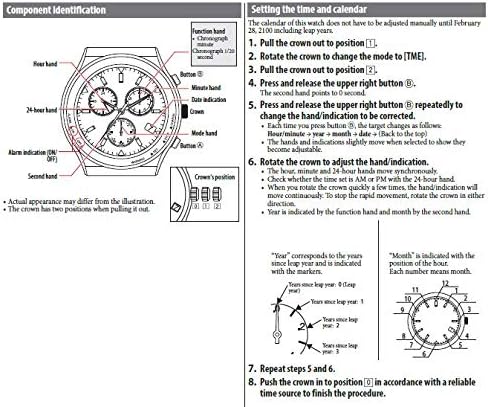
Image: The cylindrical packaging box for Citizen Eco-Drive watches, featuring the brand logo.