
1. Pengenalan
The CSM OmniDrive USB2 LF is an external PC Card drive designed for reading and writing various memory media, including Linear Flash, SRAM, ATA Flash Cards, and ATA Hard Disks. With appropriate adapters, it also supports CompactFlash, SmartMedia, Multimedia Cards, and SD Cards. This device provides a reliable solution for accessing and managing data on a wide range of PC Card formats.
2. Ciri-ciri Utama
- Universal PC Card Reader for USB 2.0 interface.
- Supports Linear Flash, SRAM, ATA Flash, and ATA Hard Disk PC Cards.
- Compatibility with CompactFlash, SmartMedia, SD Card, and Multimedia Cards via adapter.
- Robust aluminum housing for durability.
- Includes CSM Professional software for Windows.
- Long-term available industrial design.
3. Kandungan Pakej
Sila sahkan bahawa semua item terdapat dalam pakej anda:
- OmniDrive USB2 LF unit (in table housing, 3.5" frame or as PCB version)
- Kabel USB
- CD with CSM Professional Software (Drivers for Windows 10, 8, 7, Vista, XP, 2000, 98/Me; PC Card Manager utility; API with DeveloControl-Interface; User manual in multi-language)
- Optional: AC adapter (Euro and US)
4. Persediaan dan Pemasangan
4.1 Keperluan Sistem
- PC compatible computer
- Operating System: Windows 98/SE/Me, Windows 2000, Windows XP/VISTA, Windows 7, Windows 8, Windows 10. Linux support also available.
- Available USB Port (V1.1/2.0)
4.2 Sambungan Perkakasan
- Connect the OmniDrive USB2 LF to your computer using the provided USB cable.
- If using an optional AC adapter, connect it to the device and a power outlet.
4.3 Pemasangan Pemacu dan Perisian
- Insert the CSM Professional Software CD into your computer's optical drive.
- Follow the on-screen instructions to install the necessary drivers and the PC Card Manager software.
- For Linux users, OmniDrive USB2 LF is plug-and-play for ATA Flash Cards. Refer to the Linux documentation for specific driver installation if needed.
5. Arahan Operasi
5.1 Inserting a PC Card
Locate the PC Card slot on the front of the OmniDrive USB2 LF. Gently insert your PC Card (Linear Flash, SRAM, ATA Flash, or ATA Hard Disk) into the slot until it is fully seated. For smaller media like CompactFlash, SmartMedia, SD Card, or Multimedia Cards, ensure they are properly inserted into their respective PCMCIA adapters before inserting the adapter into the OmniDrive unit.

Image: The OmniDrive USB2 LF unit with a PC Card being inserted into the front slot. This image demonstrates the correct orientation for card insertion.
5.2 Using CSM Professional Software (Windows)
The CSM Professional Software suite provides tools for managing your PC Cards:
- PC Card Manager: For general management and access to card contents.
- Flexible DOS Format Utility: To format ATA media.
- Hex Editor and Binary Data Copy Utility: For advanced data manipulation.
- Inspect and Repair Tool: For ATA media diagnostics and repair.
Launch the PC Card Manager from your Start Menu or desktop shortcut. The software will detect the inserted PC Card and allow you to perform read/write operations, format cards, and utilize other utilities.
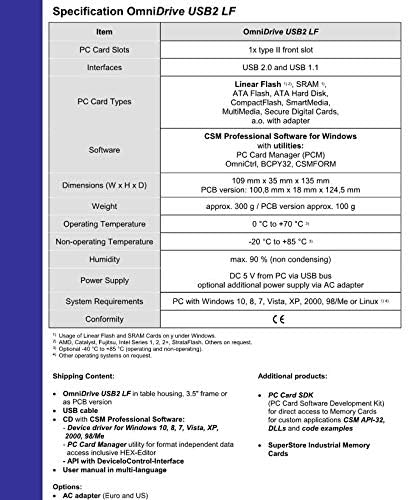
Image: A detailed specification sheet for the OmniDrive USB2 LF, highlighting supported PC Card types, software, and system requirements.
5.3 Pemindahan Data
Once the card is recognized by your operating system and the CSM software, you can transfer data to and from the card like any other removable storage device. The transfer rate is up to 1 Mbyte/s.
6. Penyelenggaraan
- Pastikan peranti bersih dan bebas daripada habuk. Gunakan kain lembut dan kering untuk pembersihan.
- Elakkan daripada mendedahkan peranti kepada suhu yang melampau, kelembapan atau cahaya matahari langsung.
- Jangan cuba membuka peranti casing, as this may void the warranty.
- Pastikan pengudaraan yang betul di sekeliling peranti semasa operasi.
7. Penyelesaian masalah
7.1 Peranti Tidak Dikenali
- Ensure the USB cable is securely connected to both the OmniDrive and your computer.
- Cuba sambungkan ke port USB lain pada komputer anda.
- Sahkan bahawa pemacu telah dipasang dengan betul. Pasang semula jika perlu.
- Mulakan semula komputer anda.
7.2 Card Not Detected
- Ensure the PC Card is fully and correctly inserted into the slot.
- Check if the card type is supported by the OmniDrive USB2 LF (Linear Flash, SRAM, ATA Flash, ATA Hard Disk).
- If using an adapter for smaller media, ensure the media is correctly seated in the adapter.
- Test with a different PC Card if available to rule out a faulty card.
8. Spesifikasi
| Ciri | Perincian |
|---|---|
| Slot Kad PC | 1x Type II front slot |
| Antara muka | USB 2.0 dan USB 1.1 |
| Supported PC Card Types | Linear Flash, SRAM, ATA Flash, ATA Hard Disk Type II |
| Supported Media (with adapter) | CompactFlash, SmartMedia, Multimedia Cards, SD Cards |
| Perisian | CSM Professional Software (PC Card Manager, OmniCtrl, SCPY32, CSMFORM) |
| Dimensi (W x H x D) | 109 mm x 35 mm x 135 mm |
| Berat badan | Approx. 300 g (table housing) |
| Suhu Operasi | 0°C hingga +70°C |
| Suhu Tidak Beroperasi | -20°C hingga +85°C |
| Kelembapan | Maks. 90% (tidak terkondensasi) |
| Bekalan Kuasa | DC 5 V from PC via USB bus; optional additional power supply via AC adapter |
| Keperluan Sistem | PC with Windows 10, 8, 7, Vista, XP, 2000, 98/Me or Linux |
9. Waranti dan Sokongan
For warranty information and technical support, please refer to the documentation included with your product or visit the SimpTronic Tech official webtapak. Simpan resit pembelian anda untuk tuntutan waranti.
Pengeluar: CSM
Jenama: SimpTronic Tech