
1. Pengenalan
This manual provides detailed instructions for the safe and effective use of your Olympus IC Recorder Voice-Trek DS-61. Please read this manual thoroughly before using the device and keep it for future reference. The Olympus Voice-Trek DS-61 is a digital voice recorder designed for high-quality audio capture and playback, featuring 2 GB of internal memory and USB connectivity.
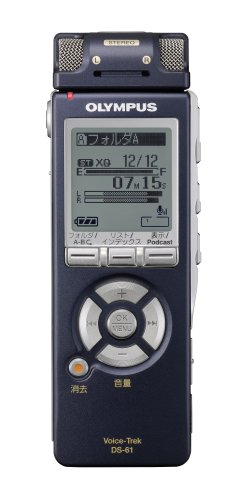
Rajah 1: Depan view of the Olympus IC Recorder Voice-Trek DS-61, showing the display and control buttons.
2. Langkah-langkah Keselamatan
To ensure safe operation and prevent damage to the device, please observe the following precautions:
- Jangan dedahkan peranti kepada suhu yang melampau, cahaya matahari langsung atau kelembapan yang tinggi.
- Elakkan daripada menjatuhkan peranti atau terkena impak yang kuat.
- Keep the device away from water and other liquids. If liquid enters the device, discontinue use immediately and consult a service professional.
- Use only the specified batteries and accessories. Incorrect battery types may cause fire or explosion.
- Do not attempt to disassemble or modify the device. This may result in electric shock or damage and will void the warranty.
- Bersihkan peranti dengan kain lembut dan kering. Jangan gunakan pembersih atau pelarut yang melelas.
3. Kandungan Pakej
Sahkan bahawa semua item terdapat dalam pakej:
- Olympus IC Recorder Voice-Trek DS-61
- Kabel USB
- Stereo Microphone (optional, may be included depending on package)
- Remote Control (optional, may be included depending on package)
- Manual Arahan (dokumen ini)
4. Nama Bahagian dan Fungsi
Familiarize yourself with the various parts of your Voice-Trek DS-61 and their functions.
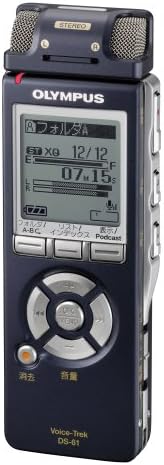
Rajah 2: Olympus IC Recorder Voice-Trek DS-61, showing the main display and control layout.
4.1 Panel Depan
- paparan: Menunjukkan status rakaman, file information, menu options, and battery level.
- Control Buttons (Play, Stop, Record, Rewind, Fast Forward): Used for recording, playback, and navigation.
- Butang OK/Menu: Confirms selections and accesses the menu.
- Folder/Index Buttons: Navigates between folders and sets index marks.
4.2 Panel Sisi
- Suis Kuasa/Tahan: Turns the device on/off and locks buttons.
- Butang Kelantangan (+/-): Melaraskan kelantangan main balik.
- Port USB: Connects the recorder to a computer.
- Jack Mikrofon: Untuk menyambungkan mikrofon luaran.
- Jack fon telinga: Untuk menyambungkan fon kepala.
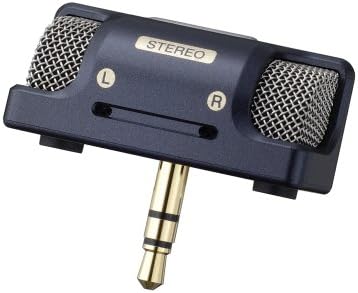
Rajah 3: An external stereo microphone accessory, which can be connected to the device for enhanced audio capture.

Rajah 4: A wired remote control accessory, allowing for convenient operation from a distance.
5. Persediaan
5.1 Pemasangan Bateri
- Buka penutup petak bateri di belakang peranti.
- Masukkan dua bateri AAA, pastikan kekutuban (+/-) betul.
- Tutup penutup petak bateri dengan selamat.
5.2 Tetapan Awal (Tarikh dan Masa)
Pada penggunaan pertama atau selepas penggantian bateri, anda mungkin perlu menetapkan tarikh dan masa.
- Turn on the device using the Power switch.
- If prompted, follow the on-screen instructions to set the year, month, day, hour, and minute.
- Use the navigation buttons to adjust values and the OK button to confirm.
5.3 Menyambung ke Komputer
The Voice-Trek DS-61 can be connected to a computer for file pemindahan.
- Pastikan perakam dihidupkan.
- Connect the smaller end of the USB cable to the USB port on the recorder.
- Sambungkan hujung kabel USB yang lebih besar ke port USB yang tersedia pada komputer anda.
- The recorder will appear as a removable disk drive on your computer, allowing you to drag and drop audio files.
6. Arahan Operasi
6.1 Rakaman Asas
- Hidupkan peranti.
- Tekan ke Rekod button. The recording indicator will light up, and recording will begin.
- Untuk menjeda rakaman, tekan butang Rekod butang lagi. Tekan sekali lagi untuk menyambung semula.
- Untuk berhenti merakam, tekan Berhenti butang. Yang direkodkan file akan disimpan secara automatik.
6.2 Main semula
- Navigasi ke yang dikehendaki file using the Folder and navigation buttons.
- Tekan ke Main butang untuk memulakan main balik.
- Gunakan Jilid +/- buttons to adjust the playback volume.
- Tekan Berhenti untuk menamatkan main balik.
6.3 File Pengurusan
The Voice-Trek DS-61 allows you to organize and manage your recorded files.
- Folder: Use the Folder buttons to switch between different recording folders (e.g., A, B, C).
- Erasing Files: Pilih file you wish to erase, then access the menu and select the 'Erase' option. Confirm your selection.
6.4 Menu Navigasi
Tekan ke Menu / OK button to access the device settings. Use the navigation buttons to scroll through options and OK untuk memilih. Tekan Menu / OK sekali lagi untuk keluar dari menu.
7. Penyelenggaraan
7.1 Pembersihan
Wipe the exterior of the recorder with a soft, dry cloth. Do not use liquid cleaners, solvents, or abrasive materials, as these can damage the finish or internal components.
7.2 Penyimpanan
Apabila tidak digunakan untuk tempoh yang lama, tanggalkan bateri untuk mengelakkan kebocoran. Simpan peranti di tempat yang sejuk dan kering, jauh daripada cahaya matahari langsung dan suhu yang melampau.
8. Penyelesaian masalah
If you encounter issues with your Voice-Trek DS-61, refer to the following common problems and solutions:
| Masalah | Kemungkinan Punca | Penyelesaian |
|---|---|---|
| Peranti tidak dihidupkan. | Bateri mati atau tidak dimasukkan dengan betul. | Gantikan bateri atau semak polariti. |
| Tiada bunyi semasa main balik. | Kelantangan terlalu rendah; fon kepala tidak disambungkan dengan betul. | Increase volume; ensure headphones are fully inserted. |
| Tidak dapat merakam. | Memory is full; device is in HOLD mode. | Padam yang lama files to free up space; slide the HOLD switch to the OFF position. |
| Komputer tidak mengenali peranti. | USB cable is faulty or not connected properly. | Try a different USB port or cable; ensure the device is powered on. |
9. Spesifikasi
| Ciri | Perincian |
|---|---|
| Jenama | Olympus |
| Nombor Model | DS-61 |
| Kapasiti Penyimpanan Memori | 2 GB |
| Antara Muka Perkakasan | USB |
| Berat Barang | 80 Gram |
| Sumber Kuasa | Bateri AAA (x2) |
| Format Rakaman | DSS, MP3 (check device for exact formats) |
| Mikrofon | Built-in stereo microphone, external microphone jack |
| Penceramah | Pembesar suara terbina dalam |
10. Waranti dan Sokongan
Olympus products are manufactured to high-quality standards. For information regarding warranty coverage, please refer to the warranty card included with your product or visit the official Olympus website. For technical support, product registration, or service inquiries, please contact Olympus customer support through their official channels.
Sokongan dalam talian: Visit the official Olympus support webtapak untuk Soalan Lazim, muat turun perisian dan maklumat hubungan.
Perkhidmatan Pelanggan: Refer to your product packaging or the Olympus weblaman web untuk butiran perhubungan khidmat pelanggan serantau.