
1. Pengenalan
The Datavideo ITC-100 is a professional 8-user wired intercom system designed for clear and reliable communication in live production environments. This rack-mountable base station facilitates seamless communication between a director and up to eight camera operators or crew members. It is compatible with Datavideo SE-500 or SE-800 Digital Video Switchers and supports a wide range of headsets, from standard cell phone headsets to high-quality professional units, offering flexibility and robust performance for various production needs.
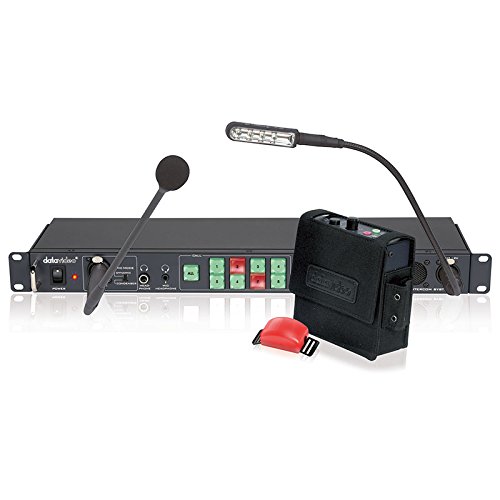
Image 1.1: The Datavideo ITC-100 Intercom System, showing the rack-mountable base station, gooseneck microphone, LED light, and a wired beltpack.
2. Kandungan Pakej
Sila sahkan bahawa semua item yang disenaraikan di bawah disertakan dalam pakej anda:
- ITC-100 Base Station (Main Unit)
- Gooseneck Microphone for Base Station
- LED Gooseneck Light for Base Station
- Remote Control (if included with your specific kit)
Nota: Beltpacks, headsets, and 5-Pin XLR cables are typically sold separately or as part of a complete kit. Refer to your purchase invoice for exact inclusions.
3. Sistem Selesaiview
3.1. ITC-100 Base Station
The ITC-100 base station is a 1U rack-mountable unit that serves as the central hub for your intercom system. Its front panel provides access to all essential controls and connections.
- Suis kuasa: Menghidupkan atau mematikan unit.
- Gooseneck Mic Input: For connecting the included microphone.
- Bicu Fon Kepala: Standard 1/4-inch (6.35mm) jacks for monitoring audio.
- Pembesar Suara Terbina dalam: Provides audible monitoring of intercom audio.
- Channel Volume Controls: Individual rotary knobs to adjust the listening volume for each of the 8 connected users.
- ALL CALL Button: Activates a broadcast to all connected users.
- Butang MUTE: Mutes the base station's microphone output.
- Tally Light Output: Connects to beltpacks for visual cues (e.g., indicating which camera is live).
3.2. Beltpack (User Unit)
Each beltpack is a portable unit designed for individual users to communicate with the base station and other users.
- 5-Pin XLR Connector: For connecting to the base station via a wired cable.
- Bicu Alat dengar: For connecting a compatible headset.
- Butang Push-To-Talk (PTT): Activates the microphone for speaking.
- Kawalan Kelantangan: Adjusts the listening volume for the user.
- Tally Light Indicator: Provides visual cues from the base station.
4. Persediaan dan Pemasangan
4.1. Pemasangan Rak
- Secure the ITC-100 base station into a standard 19-inch equipment rack using appropriate rack screws.
- Ensure there is adequate ventilation around the unit to prevent overheating.
4.2. Connecting Beltpacks
- Connect each beltpack to the corresponding 5-Pin XLR port on the rear panel of the base station.
- Use high-quality 5-Pin XLR cables. The system supports cable lengths of up to 300 meters (approximately 984 feet).
4.3. Connecting Headsets
- For each beltpack user, plug their chosen headset into the headset jack on the beltpack.
- For the base station operator (director), plug the included gooseneck microphone into its dedicated input on the front panel.
- If the base station operator wishes to use a headset, plug it into one of the headphone jacks on the front panel.
4.4. Sambungan Kuasa
- Connect the provided power adapter to the power input on the rear panel of the ITC-100 base station.
- Palamkan penyesuai kuasa ke salur keluar elektrik yang sesuai.
4.5. Connecting to Video Switcher (Optional)
If integrating with a Datavideo SE-500 or SE-800 Digital Video Switcher, refer to the switcher's instruction manual for specific intercom integration details. This typically involves connecting dedicated intercom ports or audio input/output connections between the ITC-100 and the switcher.
5. Arahan Operasi
5.1. Menghidupkan/Mematikan
- To power on the system, press the KUASA button on the front panel of the base station. The power indicator light will illuminate.
- Untuk mematikan kuasa, tekan butang KUASA butang lagi.
5.2. Using Beltpacks
- Bercakap: To speak to other users, press and hold the Push-To-Talk (PTT) button on your beltpack. Release the button to listen.
- Pelarasan Kelantangan: Adjust your listening volume using the rotary volume knob on the beltpack.
- Tally Light: Observe the tally light indicator on the beltpack for visual cues from the base station (e.g., red for 'on-air').
5.3. Base Station Controls
- Channel Volume Controls: Use the individual rotary knobs on the front panel to adjust the listening volume for each connected beltpack user.
- ALL CALL Button: Press this button to broadcast a message to all connected users simultaneously. This overrides individual channel settings and ensures all users hear the message.
- Butang MUTE: Press this button to temporarily mute the base station's microphone output. This is useful if the operator needs to speak privately or prevent unwanted audio from being transmitted.
- Pembesar Suara Terbina dalam: The integrated speaker provides monitoring of the intercom audio. Its volume can typically be adjusted via a dedicated knob or system settings.
6. Penyelenggaraan
Proper maintenance ensures the longevity and reliable performance of your Datavideo ITC-100 system.
- Pembersihan: Keep the unit clean and free from dust. Use a soft, dry cloth for cleaning. Avoid liquid cleaners directly on the unit.
- Keadaan Persekitaran: Avoid exposing the unit to moisture, extreme temperatures, or direct sunlight.
- Pemeriksaan Kabel: Regularly inspect all 5-Pin XLR cables and headset cables for any signs of damage, fraying, or loose connections. Replace damaged cables promptly to ensure consistent communication.
- Storan: When not in use, store the system in a cool, dry place, ideally in its original packaging or a protective case.
7. Penyelesaian masalah
If you encounter issues with your ITC-100 system, refer to the following common troubleshooting steps:
- No Audio from a Beltpack:
- Verify the 5-Pin XLR cable connection between the beltpack and the base station is secure.
- Ensure the headset is properly plugged into the beltpack's headset jack.
- Check the beltpack's volume control and ensure it is not set to minimum.
- Verify the corresponding channel volume knob on the base station is not set to minimum.
- No Audio from Base Station Speaker/Headphones:
- Check the base station's master volume or speaker/headphone volume control.
- Memastikan HILANGKAN button on the base station is not active.
- Verify the gooseneck microphone is properly connected and its volume is up.
- Intermittent Communication or Static:
- Inspect all 5-Pin XLR cables for damage, kinks, or loose connections. Replace any faulty cables.
- Ensure cable lengths do not exceed the maximum recommended 300 meters.
- Check headset connections for looseness.
- Audio Herot:
- Check volume levels on both the beltpack and base station to avoid overdriving the audio signal.
- Ensure headset and microphone connections are secure and free from debris.
8. Spesifikasi
| Ciri | Spesifikasi |
|---|---|
| Jenama | Datavideo |
| Model | ITC-100 |
| Nombor Model Item | 2205-2000 |
| Bilangan Saluran | 8 |
| Ketersambungan | Wired (5-Pin XLR) |
| Panjang Kabel Maksimum | 300 meter (lebih kurang 984 kaki) |
| Keserasian Alat Dengar | Low-cost cell phone headsets to professional units |
| Ciri-ciri Stesen Pangkalan | All Call, Mute, Mic Input, Built-in Speaker, Headphone Jacks |
| Rak boleh dilekap | Ya (1U) |
| Dimensi Produk | 19 x 7.87 x 1.75 inci (48.26 x 19.99 x 4.45 cm) |
| Berat Barang | 23.1 paun (10.5 kg) |
| Voltage | 12 Volt |
| Julat Kekerapan | 550-3.6kHz |
| Ciri Khas | Dust Proof, Long Range, Rackmountable, Waterproof |
9. Waranti dan Sokongan
For detailed warranty information, terms, and conditions, please refer to the warranty card or documentation included with your Datavideo ITC-100 purchase. Keep your proof of purchase, such as your receipt or invoice, as it will be required for any warranty claims.
For technical support, service, or further assistance, please visit the official Datavideo website or contact their customer support department. Contact information can typically be found on the Datavideo webtapak atau dalam dokumentasi produk anda.