
pengenalan
This manual provides comprehensive instructions for the proper setup, operation, and maintenance of your RadioShack Telephone Recording Remote Control, Model 43-228. Please read this manual thoroughly before using the device to ensure correct functionality and to prevent damage. Keep this manual for future reference.
The RadioShack Telephone Recording Remote Control is designed to facilitate the recording of telephone conversations. It can also function as an adapter for connecting telephone audio to other devices, such as hearing aid amplifiers, via a 3.5mm jack.
Maklumat Keselamatan
- Jangan dedahkan peranti kepada kelembapan atau suhu yang melampau.
- Elakkan daripada menjatuhkan atau menyebabkan peranti ini mengalami hentaman yang teruk.
- Jangan cuba membuka atau membaiki peranti sendiri. Rujuk semua servis kepada kakitangan yang berkelayakan.
- Jauhkan daripada kanak-kanak.
- Pastikan semua sambungan selamat sebelum beroperasi.
Persediaan
Follow these steps to set up your Telephone Recording Remote Control:
- Kenal pasti Komponen: Unpack the device and identify the main unit, telephone line cord, and any audio output cables.
- Sambung ke Talian Telefon: Disconnect your telephone from the wall jack. Connect one end of the provided telephone line cord to the "LINE" jack on the recording control unit. Connect the other end of this cord to the telephone wall jack.
- Connect Telephone: Connect your telephone's line cord to the "PHONE" jack on the recording control unit.
- Connect Recording Device (Optional): If you intend to record conversations, connect your recording device (e.g., tape recorder, digital voice recorder) to the "REC OUT" or "AUDIO OUT" jack on the recording control unit using an appropriate audio cable (typically 3.5mm).
- Connect External Audio Device (Optional): For use as an audio adapter, connect your external audio device (e.g., hearing aid amplifier) to the appropriate audio output jack on the recording control unit.
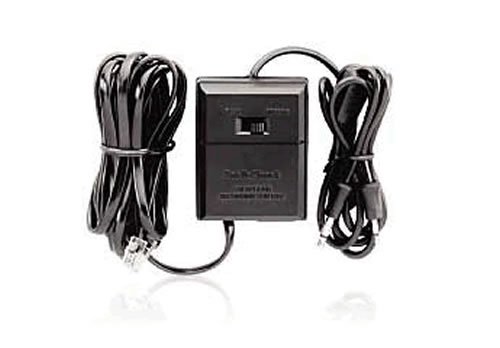
Figure 1: RadioShack Telephone Recording Remote Control showing connection ports.
Arahan Operasi
Once the device is properly connected, you can begin using it for telephone recording or audio adaptation.
Recording Telephone Conversations:
- Ensure your recording device is connected to the "REC OUT" or "AUDIO OUT" jack and is powered on.
- Initiate or answer a phone call as usual.
- To begin recording, activate the recording function on your external recording device. The audio from both sides of the conversation will be sent to your recording device.
- To stop recording, deactivate the recording function on your external recording device.
Using as an Audio Adapter:
- Ensure your external audio device (e.g., hearing aid amplifier) is connected to the appropriate audio output jack and is powered on.
- Initiate or answer a phone call.
- The telephone audio will be routed through the recording control unit to your connected audio device, allowing you to hear the conversation through your external device.
Nota: Always ensure your external recording or audio device is correctly configured and powered for optimal performance.
Penyelenggaraan
- Pembersihan: Gunakan kain lembut dan kering untuk membersihkan bahagian luar peranti. Jangan gunakan pembersih cecair atau bahan kasar.
- Storan: Simpan peranti di tempat yang sejuk dan kering jauh dari cahaya matahari langsung apabila tidak digunakan.
- Penjagaan Kabel: Avoid bending or twisting cables excessively, as this can damage internal wiring. Ensure cables are not tightly wrapped for extended periods.
Menyelesaikan masalah
| Masalah | Kemungkinan Punca | Penyelesaian |
|---|---|---|
| No audio output to recording/audio device. |
|
|
| Poor audio quality or intermittent sound. |
|
|
| Telephone not working after connection. |
|
|
Spesifikasi
- Nombor Model: 43-228
- Jenama: RadioShack
- Teknologi Ketersambungan: Frekuensi radio (Note: This specification is provided by the manufacturer and may refer to broader product category features.)
- Peranti Serasi: Telefon pintar (Note: This specification is provided by the manufacturer and may refer to broader product category features.)
- Jenis Pengawal: Kawalan Butang (Note: This specification is provided by the manufacturer and may refer to broader product category features.)
- Dimensi Pakej: 5.2 x 4.1 x 1.4 inci
- Berat Barang: 1 paun
- UPC: 040293114084
- Pengeluar: Radio Shack
- Tarikh Mula-mula Tersedia: 12 Disember 2007
Waranti dan Sokongan
For warranty information or technical support, please refer to the documentation provided at the time of purchase or contact RadioShack customer service. Keep your proof of purchase for warranty claims.
For further assistance, please visit the official RadioShack webtapak atau hubungi saluran sokongan pelanggan mereka.