
1. Pengenalan
This manual provides comprehensive instructions for the proper setup, operation, and maintenance of your Sanyo TRC-5830 Voice Activated Microcassette Slide Switch Recorder. Please read this manual thoroughly before using the device to ensure optimal performance and longevity. Keep this manual for future reference.
2. Maklumat Keselamatan
- Do not expose the unit to extreme temperatures, direct sunlight, dust, or moisture.
- Elakkan daripada menjatuhkan atau menyebabkan unit terkena hentakan yang kuat.
- Use only the specified battery type (2 AA batteries). Ensure correct polarity when inserting batteries.
- Tanggalkan bateri jika unit tidak akan digunakan untuk tempoh yang lama untuk mengelakkan kebocoran.
- Jangan cuba membuka atau mengubah suai unit. Rujuk semua servis kepada kakitangan yang berkelayakan.
- Keep the unit away from strong magnetic fields, which can erase recordings.
3. Kandungan Pakej
Sila pastikan pakej anda mengandungi item berikut:
- Sanyo TRC-5830 Microcassette Recorder
- Manual Pengguna
- Microcassette Tape (may be included depending on region/bundle)
4. Produk Lebihview
Familiarize yourself with the various parts of your Sanyo TRC-5830 recorder.
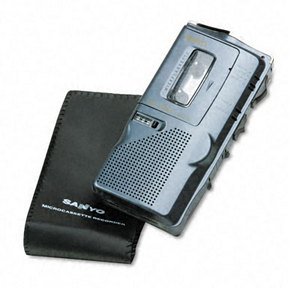
This image shows the front of the Sanyo TRC-5830 Microcassette Recorder, highlighting its compact design and control layout.
Komponen Utama:
- Suis Slaid: Controls Record, Play, Stop, Rewind, Fast Forward functions.
- Mikrofon terbina dalam: Untuk menangkap audio.
- Penceramah: Untuk main balik audio.
- Kawalan Kelantangan: Melaraskan kelantangan main balik.
- Petak Kaset: Memegang pita mikrokaset.
- Petak Bateri: Boleh memuatkan bateri AA.
- Bicu Fon Kepala (3.5mm): Untuk mendengar secara peribadi.
5. Persediaan
5.1. Pemasangan Bateri
- Locate the battery compartment cover on the back or bottom of the unit.
- Luncurkan atau angkat penutup untuk membuka petak.
- Insert two (2) AA batteries, ensuring the correct polarity (+/-) as indicated inside the compartment.
- Tutup penutup petak bateri dengan selamat.
5.2. Sisipan Mikrokaset
- Ensure the slide switch is in the 'STOP' position.
- Buka pintu petak kaset.
- Insert a microcassette tape with the exposed tape facing upwards and the full reel on the left side.
- Gently close the cassette compartment door until it clicks into place.
6. Arahan Operasi
6.1. Hidupkan/Mati Kuasa
The unit powers on automatically when the slide switch is moved from 'STOP' to 'PLAY' or 'RECORD'. To power off, move the slide switch to 'STOP'.
6.2. Rakaman
The TRC-5830 features both manual and voice-activated recording (VOR).
Rakaman Manual:
- Ensure a microcassette is inserted.
- Slide the switch to the 'RECORD' position. The recording indicator light will illuminate.
- Bercakap dengan jelas ke dalam mikrofon terbina dalam.
- To stop recording, slide the switch to 'STOP'.
Voice Activated Recording (VOR):
- Ensure a microcassette is inserted.
- Locate the VOR switch (if present, typically a small toggle or button). Activate VOR mode.
- Slide the main switch to 'RECORD'. The unit will now only record when sound is detected, pausing when there is silence.
- To stop VOR recording, slide the main switch to 'STOP'.
6.3. Main balik
- Pastikan mikrokaset yang telah dirakam dimasukkan.
- Slide the switch to the 'PLAY' position. Audio will play through the built-in speaker.
- Laraskan kelantangan menggunakan dail kawalan kelantangan.
- To stop playback, slide the switch to 'STOP'.
6.4. Fast Forward / Rewind
- While the unit is in 'STOP' or 'PLAY' mode, slide the switch to 'FF' (Fast Forward) or 'REW' (Rewind).
- Release the switch to return to 'STOP' when you reach the desired section.
6.5. Padam
To erase a recording, you typically record over it. Some models may have a dedicated erase function or require a bulk eraser.
6.6. Menggunakan Bicu Fon Kepala
Insert a 3.5mm stereo or mono headphone plug into the headphone jack for private listening. The built-in speaker will be muted automatically.
7. Penyelenggaraan
7.1. Pembersihan
- Lap bahagian luar unit dengan kain lembut dan kering.
- Do not use liquid cleaners or abrasive chemicals.
- Periodically clean the tape head and pinch roller with a cotton swab lightly dampened with isopropyl alcohol to ensure optimal recording and playback quality.
7.2. Penjagaan Bateri
- Replace batteries when the recording indicator light dims or audio quality deteriorates.
- Sentiasa ganti kedua-dua bateri pada masa yang sama.
- Buang bateri terpakai mengikut peraturan tempatan.
7.3. Penyimpanan
When not in use, store the recorder in a cool, dry place, away from direct sunlight and strong magnetic fields. Remove batteries if storing for extended periods.
8. Penyelesaian masalah
| Masalah | Kemungkinan Punca | Penyelesaian |
|---|---|---|
| Unit tidak dihidupkan. | Bateri mati atau salah dimasukkan. | Gantikan bateri dengan yang baharu, memastikan kekutuban yang betul. |
| Poor recording/playback quality. | Dirty tape head/pinch roller; Worn-out tape; Low batteries. | Clean tape head and pinch roller. Try a new microcassette. Replace batteries. |
| Pita tidak bergerak. | Tape jammed; Unit in 'STOP' mode; Batteries dead. | Open cassette compartment and check tape. Ensure slide switch is in 'PLAY' or 'RECORD'. Replace batteries. |
| Voice Activated Recording (VOR) not working. | VOR sensitivity too low; VOR mode not activated. | Check VOR switch/setting. Ensure sufficient ambient sound for activation. |
9. Spesifikasi
| Ciri | Spesifikasi |
|---|---|
| Jenama | Sanyo |
| Nombor Model Pengeluar | TRC-5830 |
| Microphone Operating Mode | Pengecaman suara |
| Faktor Bentuk Mikrofon | terbina dalam |
| Format | DAT-Cassette (Microcassette) |
| Bicu Fon Kepala | 3.5 milimeter |
| Antara Muka Perkakasan | 3.5-mm-Audio |
| Bilangan Bateri | 2 Bateri AA diperlukan |
| Hayat Bateri (Purata) | 30 Minit |
| Masa Rakaman Digital | 180 Minit |
| Peranti Serasi | Laptop, MP3-Player, Personal Computer, Smartphone, Tablet (via audio output) |
| UPC | 086483012761 |
| ASIN | B000WFW0L0 |
10. Waranti dan Sokongan
For warranty information and technical support, please refer to the documentation provided at the time of purchase or contact Sanyo customer service. Keep your proof of purchase for warranty claims.