
pengenalan
This manual provides detailed instructions for the proper use and maintenance of your Casio WV-59E-1AVEF digital watch. This timepiece features radio-controlled timekeeping, ensuring accurate time display by receiving time calibration signals. Please read this manual thoroughly to ensure optimal performance and longevity of your watch.
Key features include display illumination, world time function, 5-bar water resistance, and an automatic calendar.
Produk Selesaiview
The Casio WV-59E-1AVEF is a robust digital watch designed for daily wear. It features a square case, digital display, and a comfortable resin strap. The watch is equipped with multiple buttons for navigating its various functions.
Rajah 1: Depan view of the Casio WV-59E-1AVEF digital watch, displaying the time, date, and various mode indicators.
Kawalan dan Paparan
- paparan: Shows time, date, and function indicators.
- Butang: Typically located on the sides of the watch for mode selection, adjustment, and illumination.

Rajah 2: sebelah view of the Casio WV-59E-1AVEF watch, highlighting the control buttons on the left and right sides of the case.

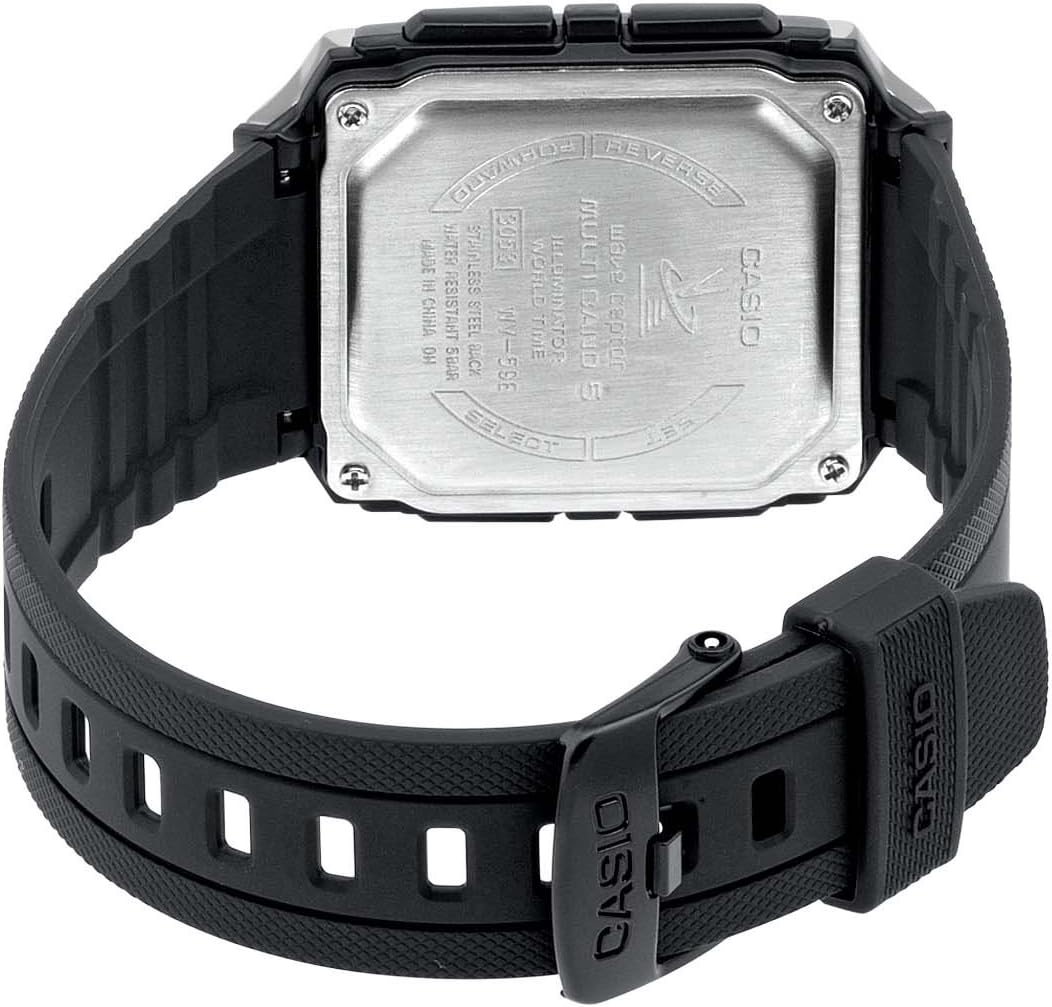
Rajah 3: belakang view of the Casio WV-59E-1AVEF watch, showing the stainless steel case back with model number WV-59E, water resistance rating, and 'Wave Ceptor' branding.
Persediaan
Initial Time Setting and Time Zone
Upon first use or after a battery change, you may need to set your home city (time zone) manually. This is crucial for the watch to receive the correct time calibration signal.
- Dalam Mod Penjagaan Masa, tekan dan tahan SESUAIKAN button (usually top-left) until the city code starts to flash.
- Gunakan KE HADAPAN dan TERBALIK buttons (usually on the right side) to select your desired home city code. Refer to the world time map for city codes corresponding to your region.
- Tekan ke MODE button (usually bottom-left) to cycle through other settings like DST (Daylight Saving Time) and 12/24-hour format. Adjust these as needed using the KE HADAPAN dan TERBALIK butang.
- Tekan ke SESUAIKAN button again to exit the setting screen.
Radio Signal Reception (Wave Ceptor)
Your watch automatically receives time calibration signals to maintain accurate time. Automatic reception typically occurs in the early hours of the morning. For best reception, place the watch near a window overnight.
To manually initiate signal reception:
- Dalam Mod Penjagaan Masa, tekan dan tahan TERIMA button (refer to watch diagram for exact button, often bottom-right) for about two seconds.
- The watch will display "RCV" or "GET" to indicate it is attempting to receive the signal.
- Keep the watch stationary and away from sources of interference (e.g., computers, televisions) during reception.
- Successful reception will be indicated by "OK" or "RCVD". If reception fails, "ERR" or "FAIL" will be displayed.

Rajah 4: The 'Wave Ceptor' logo, indicating the watch's radio-controlled timekeeping capability.
Mod Pengendalian
Tekan ke MODE button (usually bottom-left) to cycle through the different modes:
- Mod Penjagaan Masa: Memaparkan masa dan tarikh semasa.
- Mod Masa Dunia: Membolehkan anda view waktu semasa di pelbagai bandar di seluruh dunia.
- Mod Jam Randik: Measures elapsed time.
- Mod Penggera: Tetapkan penggera harian.
Mod Waktu Dunia
Dalam Mod Waktu Dunia, gunakan KE HADAPAN dan TERBALIK buttons to scroll through different city codes and view zaman mereka sekarang.
Mod Jam Randik
- Masuk ke Mod Jam Rantai.
- Tekan ke MULA/BERHENTI button (often top-right) to start and stop the stopwatch.
- Tekan ke TETAP SEMULA button (often bottom-right) to reset the stopwatch to zero.
Mod Penggera
- Masukkan Mod Penggera.
- Gunakan KE HADAPAN dan TERBALIK buttons to select an alarm number (if multiple are available).
- Tekan dan tahan butang SESUAIKAN butang sehingga waktu penggera mula berkelip.
- Gunakan KE HADAPAN dan TERBALIK buttons to set the alarm hour and minute.
- Tekan ke SESUAIKAN butang untuk menyimpan tetapan penggera.
- Tekan ke HIDUP/MATI button (often top-right) to toggle the alarm on or off.
Pencahayaan
Tekan ke CAHAYA button (usually top-right or a dedicated button) to illuminate the display for easy viewdalam keadaan cahaya rendah.
Penyelenggaraan
Penggantian Bateri
The watch is powered by a Lithium metal battery. When the display becomes dim or functions become unreliable, it is time to replace the battery. It is recommended to have battery replacement performed by a qualified watch technician to ensure proper sealing and water resistance.
Water Resistance (50 Meters / 5 Bar)
Your watch is water resistant to 50 meters (5 bar). This means it is suitable for everyday use and can withstand splashes, rain, showering, and shallow swimming. It is bukan suitable for diving, snorkeling, or high-impact water sports. Do not operate buttons while the watch is wet or submerged.
Pembersihan
Wipe the watch case and strap with a soft, dry cloth. For resin straps, you can use a mild soap solution and rinse thoroughly, then dry completely. Avoid using harsh chemicals or abrasive cleaners.
Menyelesaikan masalah
- Time is incorrect or not synchronizing:
- Ensure your home city code is set correctly for your time zone.
- Place the watch near a window overnight for automatic reception.
- Manually initiate signal reception (refer to "Radio Signal Reception" section).
- Check for strong interference sources nearby (e.g., electronic devices).
- Bateri mungkin lemah dan memerlukan penggantian.
- Paparan malap atau kosong:
- Bateri mungkin habis. Gantikan bateri.
- Ensure the watch is not in a power-saving mode (if applicable to your model).
- Butang tidak bertindak balas:
- Pastikan jam tangan tidak berada dalam mod terkunci (jika berkenaan).
- If the watch is wet, dry it thoroughly before operating buttons.
- A low battery can affect button responsiveness.
Spesifikasi

Rajah 5: Diagram illustrating the dimensions of the Casio WV-59E-1AVEF watch face, with measurements in millimeters and inches for reference.
| Jenama | Casio |
| Nama Model | WV-59E |
| Nombor Model | WV-59E-1AVEF |
| Bentuk Barang | Segi empat |
| Jenis Paparan | digital |
| Jenis Bahan Sarung | Akrilik |
| Jenis Bahan Tetingkap Dail | Akrilik |
| Jenis Bahan Band | damar |
| Warna Band | Hitam |
| Warna Dail | Hitam |
| Jenis Genggam | gesper |
| Diameter Kes | 39 Milimeter |
| Ketebalan Kes | 12.5 Milimeter |
| Lebar Jalur | 18 Milimeter |
| Berat Barang | 40 Gram |
| Jenis Pergerakan | Kuarza |
| Kedalaman Rintangan Air | 50 Meters (5 Bar) |
| Sumber Kuasa | Battery Powered (1 Lithium metal battery included) |
| Ciri Khas | Radio-controlled time, Stopwatch, Alarm, Illumination, World Time, Automatic Calendar |
| Komponen yang Disertakan | Resin strap |
| Kod Artikel Antarabangsa | 04971850882220 |
Waranti dan Sokongan
Untuk maklumat jaminan dan sokongan pelanggan, sila rujuk kad jaminan yang disertakan dengan produk anda atau lawati laman web rasmi Casio. webtapak. Simpan resit pembelian anda sebagai bukti pembelian.
For service or repairs, contact an authorized Casio service center.