
1. Pengenalan
Thank you for choosing the Casio PQ-31-1EF Digital Wake Up Timer. This manual provides detailed instructions for the proper setup, operation, and maintenance of your new digital alarm clock. Please read this manual thoroughly before using the product to ensure correct usage and to prevent damage.
2. Langkah-langkah Keselamatan
- Jangan dedahkan unit kepada suhu yang melampau, cahaya matahari langsung atau kelembapan yang tinggi.
- Elakkan daripada menjatuhkan unit atau terkena impak yang kuat.
- Jangan cuba membuka atau mengubah suai unit ini. Ini akan membatalkan jaminan.
- Jauhkan bateri daripada kanak-kanak. Jika tertelan, dapatkan rawatan perubatan dengan segera.
- Buang bateri terpakai mengikut peraturan tempatan.
3. Kandungan Pakej
Please check to ensure all items are present in your package:
- 1 x Casio PQ-31-1EF Digital Wake Up Timer
- 2 x Lithium Metal batteries (pre-installed or included separately)
- 1 x Manual Pengguna (dokumen ini)
4. Produk Lebihview
The Casio PQ-31-1EF is a compact digital alarm clock designed for reliability and ease of use. It features a clear digital display, an integrated alarm function, and a light for visibility in low-light conditions. The sturdy case provides impact resistance for daily use.
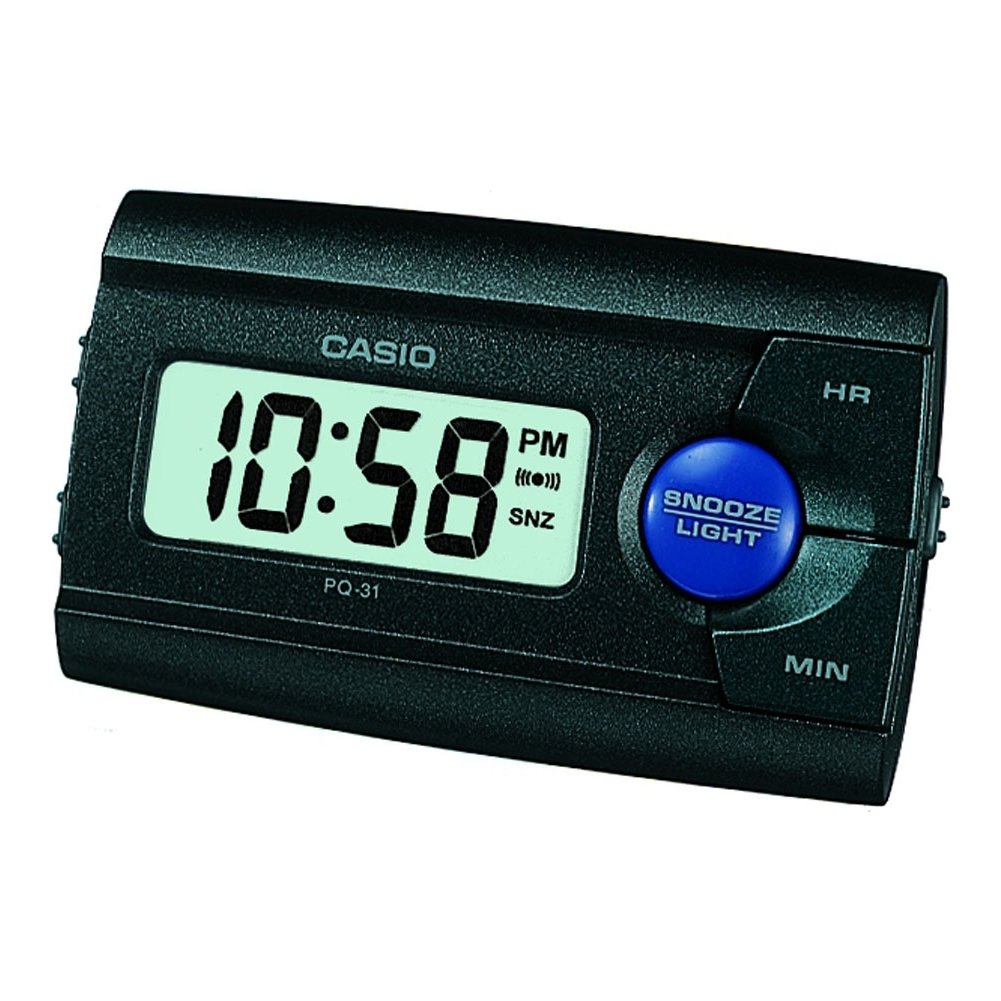
Rajah 1: Depan view of the Casio PQ-31-1EF Digital Wake Up Timer. Shows the digital display and general shape of the device.
Button Functions (Typical Layout - Refer to actual device for exact labels):
- MODE/SET Button: Used to switch between time, alarm, and timer modes, and to confirm settings.
- ADJUST/+/H Button: Used to increase values (hours) or move forward in settings.
- ADJUST/-/M Button: Used to decrease values (minutes) or move backward in settings.
- Butang CAHAYA: Activates the backlight for a few seconds.
- ALARM ON/OFF Switch: Menukar fungsi penggera.
- Butang TUNDA: Temporarily silences the alarm and activates snooze function.
5. Persediaan
5.1 Pemasangan Bateri
Your Casio PQ-31-1EF requires 2 Lithium Metal batteries. These are typically included with the product.
- Locate the battery compartment cover on the back or bottom of the unit.
- Open the cover by sliding it or unscrewing it (if applicable).
- Insert the 2 Lithium Metal batteries, ensuring the positive (+) and negative (-) terminals are aligned correctly according to the diagram inside the compartment.
- Gantikan penutup petak bateri dengan selamat.
The clock display should now activate. If not, check battery orientation or replace with fresh batteries.
5.2 Penetapan Masa Awal
- Dalam mod paparan masa biasa, tekan dan tahan butang MOD/SET button for a few seconds until the hour digits begin to flash.
- Gunakan ADJUST/+ or ADJUST/- buttons to set the correct hour. Pay attention to AM/PM indicators if your clock uses a 12-hour format.
- Tekan ke MOD/SET button again to move to the minute setting. The minute digits will flash.
- Gunakan ADJUST/+ or ADJUST/- buttons to set the correct minutes.
- Tekan ke MOD/SET button one more time to exit the time setting mode. The time will now be set.
6. Arahan Operasi
6.1 Menetapkan Penggera
The daily alarm reminds you of events that recur every day.
- Daripada paparan masa biasa, tekan butang MOD/SET button once to enter alarm setting mode. The alarm time will be displayed, and the hour digits may flash.
- Gunakan ADJUST/+ or ADJUST/- butang untuk menetapkan jam penggera yang diingini.
- Tekan ke MOD/SET button again to move to the minute setting.
- Gunakan ADJUST/+ or ADJUST/- butang untuk menetapkan minit penggera yang diingini.
- Tekan ke MOD/SET button one more time to confirm the alarm setting and return to normal time display.
6.2 Mengaktifkan/Menyahaktifkan Penggera
To turn the alarm ON or OFF, locate the ALARM ON / OFF switch (usually on the side or back of the unit) and slide it to the desired position. An alarm icon will typically appear on the display when the alarm is active.
6.3 Menggunakan Fungsi Tunda
Apabila penggera berbunyi, tekan MENGEJUTKAN button (often a large button on top of the unit). The alarm will temporarily stop and sound again after a few minutes (typically 5-10 minutes, depending on the model).
6.4 Menggunakan Lampu Latar
To illuminate the clock face in dark environments, press the CAHAYA button. The light-emitting diode (LED) will illuminate the display for a short period, then automatically turn off.
7. Penyelenggaraan
7.1 Membersihkan Unit
To clean the Casio PQ-31-1EF, wipe it gently with a soft, dry cloth. Do not use abrasive cleaners, solvents, or chemical sprays, as these can damage the casing dan paparan.
7.2 Penggantian Bateri
When the display becomes dim or the clock functions erratically, it is time to replace the batteries. Follow the steps in Section 5.1 Battery Installation to replace the 2 Lithium Metal batteries. Ensure proper disposal of old batteries.
8. Penyelesaian masalah
| Masalah | Kemungkinan Punca | Penyelesaian |
|---|---|---|
| Paparan kosong atau malap. | Bateri mati atau tidak dipasang dengan betul. | Gantikan bateri dengan yang baharu, memastikan kekutuban yang betul. |
| Penggera tidak berbunyi. | Alarm is not activated or volume is too low (if adjustable). | Ensure the ALARM ON/OFF switch is in the ON position. Check alarm settings. |
| Masa tidak betul. | Masa tidak ditetapkan dengan betul atau bateri telah ditanggalkan. | Reset the time following instructions in Section 5.2. |
| Butang tidak bertindak balas. | Gangguan perisian sementara atau bateri lemah. | Remove and reinsert batteries to reset the unit. Replace batteries if necessary. |
9. Spesifikasi
| Ciri | Perincian |
|---|---|
| Nombor Model | PQ-31-1EF |
| Jenama | Casio |
| Jenis Paparan | digital |
| warna | Black (Unit color, display is typically grey/LCD) |
| Sumber Kuasa | Dikuasakan Bateri |
| Jenis Bateri | 2 x Lithium Metal batteries |
| Dimensi Produk (W x H) | 8.6W x 5H centimetres |
| Berat Barang | 45.4 Gram |
| Ciri Khas | Alarm, Backlight (LED), Impact Resistance |
| Jenis Pemasangan | Pemasangan meja |
| Penggunaan Dalaman/Luar | Dalaman |
10. Waranti dan Sokongan
Casio products are manufactured to high-quality standards and are backed by a manufacturer's warranty. For specific warranty terms and conditions, please refer to the warranty card included with your purchase or visit the official Casio webtapak untuk wilayah anda.
If you encounter any issues or require technical assistance, please contact Casio customer support through their official website or the contact information provided in your product packaging. Please have your model number (PQ-31-1EF) and proof of purchase ready when contacting support.
Nota: Terma jaminan mungkin berbeza mengikut wilayah.