
1. Pengenalan
This manual provides detailed instructions for the setup, operation, and maintenance of your Bushnell Onix 200 Portable GPS Navigator. The Onix 200 is designed for outdoor use, offering navigation capabilities with satellite and aerial photos on a 2.7-inch sunlight-readable LCD screen. It features a rugged, waterproof design (IPX7) and 32 MB of internal memory for storing navigational data.
2. Produk Lebihview
2.1 Ciri-ciri Utama
- Navigation with satellite and aerial photos.
- Rugged rubber armor and IPX7 waterproof rating.
- Sunlight-readable 2.7-inch LCD screen.
- Pro Penggunafiles for customized activity settings.
- Night-mode screen viewpilihan ing.
- 32 MB internal memory.
- Kesambungan USB.
2.2 Komponen
The Bushnell Onix 200 package typically includes:
- Bushnell Onix 200 GPS Unit
- Lekapan Pergelangan Tangan
- Kabel USB (untuk pemindahan data dan pengecasan)
- Manual Pengguna (dokumen ini)
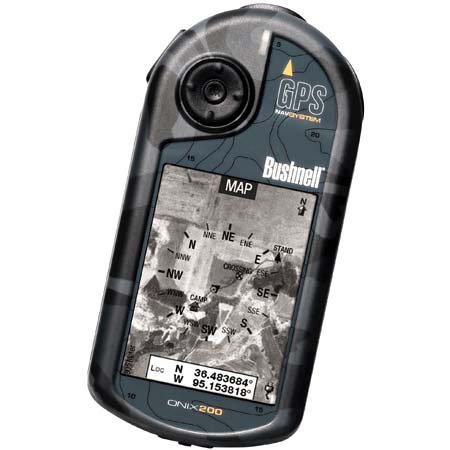
Figure 1: Bushnell Onix 200 handheld GPS unit, showing its rugged design and screen.
3. Persediaan
3.1 Pemasangan Bateri
The Bushnell Onix 200 does not include batteries. It requires standard AA batteries (not included). To install:
- Cari penutup petak bateri di bahagian belakang unit.
- Buka penutup dengan menggelongsor atau mencabutnya mengikut tanda.
- Insert the required number of AA batteries, ensuring correct polarity (+/-).
- Tutup penutup petak bateri dengan kemas untuk mengekalkan pengedap kalis air.
3.2 Kuasa Awal Hidup dan Tetapan Asas
- Tekan dan tahan butang kuasa sehingga skrin menyala.
- Upon first use, the device may prompt you to set basic preferences such as language, time zone, and measurement units. Follow the on-screen instructions.
- Allow the device to acquire a GPS signal. This may take several minutes, especially during the first use or after a long period of inactivity. Ensure you are in an open area with a clear view dari langit.
3.3 Menyambung ke Komputer
Use the provided USB cable to connect the Onix 200 to your computer for data transfer, map updates, or firmware updates. The device is compatible with Windows operating systems.
4. Arahan Operasi
4.1 Navigation with Satellite/Aerial Photos
The Onix 200 allows you to overlay navigation information directly onto satellite or aerial photographs. This feature provides enhanced situational awareness, especially in unfamiliar terrain.
- Access the map view daripada menu utama.
- Select the desired map type (e.g., satellite, aerial, USGS map) from the display options.
- Use the touch screen or voice controls to pan, zoom, and interact with the map.
- Your current position will be indicated on the map, along with any loaded waypoints or routes.
4.2 Pengguna Profiles
The "User Profiles" feature allows you to customize the device's settings and menu options based on your activity (e.g., hiking, fishing, hunting). This streamlines access to relevant functions.
- Navigasi ke "Profiles" section in the main menu.
- Pilih pro sedia adafile atau buat yang baru.
- Customize settings such as display preferences, data fields, and shortcut menus for that specific activity.
- Activate the desired profile before starting your activity.
4.3 Mod Malam
For low-light conditions, activate the night-mode screen viewing option. This adjusts the display's backlight and color scheme to reduce eye strain and improve visibility in the dark.
- Access display settings from the main menu.
- Toggle the "Night Mode" option to ON.
4.4 Kaedah Kawalan
The Onix 200 supports both touch screen and voice control for interacting with the device. Refer to the on-screen prompts and the device's internal help system for specific voice commands.
5. Penyelenggaraan
5.1 Membersihkan Peranti
- Lap skrin dan bahagian luar dengan lembut, damp, kain tidak berbulu.
- Do not use abrasive cleaners, solvents, or aerosol sprays, as these can damage the device's finish and screen.
- Ensure all ports are dry before connecting cables.
5.2 Waterproofing Care (IPX7)
The Onix 200 is waterproof to IPX7 standards, meaning it can withstand immersion in water up to 1 meter for 30 minutes. To maintain this rating:
- Ensure the battery compartment cover and any port covers are securely closed before exposure to water.
- Jangan sengaja merendam peranti melebihi kedalaman atau tempoh yang ditetapkan.
- If the device gets wet, dry it thoroughly before opening any compartments or connecting to power.
5.3 Penyimpanan
Store the device in a cool, dry place away from direct sunlight and extreme temperatures when not in use. Remove batteries if storing for extended periods to prevent leakage.
6. Penyelesaian masalah
6.1 Tiada Kuasa
- Check if batteries are correctly installed and fully charged.
- Gantikan bateri lama dengan yang baru.
- Pastikan butang kuasa ditekan dan dipegang secukupnya.
6.2 GPS Signal Loss or Inaccuracy
- Pastikan anda berada di kawasan lapang yang jelas view of the sky, away from tall buildings, dense foliage, or strong electromagnetic interference.
- Allow the device more time to acquire a signal.
- Perform a soft reset (refer to the device's internal menu for this option, if available).
6.3 Skrin Tidak Responsif
- Pastikan skrin bersih dan kering.
- If the touch screen is resistive, apply firm but gentle pressure.
- Mulakan semula peranti.
6.4 Device Not Connecting to Computer
- Sahkan kabel USB disambungkan dengan selamat ke kedua-dua peranti dan komputer.
- Cuba port USB lain pada komputer anda.
- Ensure necessary drivers are installed on your Windows operating system.
For further assistance, please refer to the official Bushnell support resources.
7. Spesifikasi
| Ciri | Spesifikasi |
|---|---|
| Jenama | Bushnell |
| Nama Model | Onix 200 |
| Nombor Model | 36-2000 |
| Saiz Skrin | 2.7 Inci |
| Resolusi | 160 x 240 |
| Jenis Paparan | LCD |
| Jenis Skrin Sentuh | Resistif |
| Kapasiti Penyimpanan Memori | 32 MB |
| Teknologi Ketersambungan | USB |
| Jenis Peta | Satelit |
| Sistem Navigasi Satelit yang Disokong | GPS |
| Ciri Khas | Kalis Air (IPX7) |
| Kaedah Kawalan | Sentuh, Suara |
| Sistem Operasi | Windows (for PC connection) |
| Dimensi (W x H x D) | 1.1 x 8.0 x 2.2 inci |
| Berat Barang | 15.2 auns |
| Bateri Termasuk | No (Requires AA) |
| UPC | 029757362001 |
8. Waranti dan Sokongan
For detailed warranty information, product registration, and technical support, please visit the official Bushnell webtapak atau hubungi bahagian perkhidmatan pelanggan mereka.
Anda boleh mendapatkan lebih banyak maklumat dan sumber sokongan di Kedai Bushnell di Amazon.