
1. Pengenalan
The Sigma SD14 is a 14-megapixel Digital Single-Lens Reflex (DSLR) camera designed for advanced photographers. It features the Foveon X3 direct-image sensor, which captures full RGB color information at each pixel layer, aiming for high-definition images with rich gradation. This manual provides essential information for setting up, operating, and maintaining your SD14 camera.
Key features include a 2.5-inch LCD monitor, a durable shutter mechanism rated for over 100,000 cycles, a 5-point autofocus system, and continuous shooting capabilities. The camera supports both RAW and JPEG image recording formats and includes Sigma Photo Pro 3.0 software for RAW image processing.

Rajah 1.1: Depan view of the Sigma SD14 Digital SLR Camera, showing the lens mount and body design.
2. Apa yang ada di dalam Kotak
Verify that all the following items are included in your Sigma SD14 package:
- Sigma SD14 Digital SLR Camera Body
- Lithium-ion Power Battery BP-21
- Battery Charger BC-21
- Kabel USB
- Kabel video
- Tali Leher
- Eye Cap
- Tudung Badan
- Cap Mata
- SIGMA Photo Pro 3.0 CD-ROM
- SD14 Instruction Manual (this document)
3. Persediaan
3.1. Mengecas dan Memasang Bateri
- Insert the Lithium-ion Battery BP-21 into the Battery Charger BC-21.
- Sambungkan pengecas ke salur keluar kuasa. Penunjuk pengecasan akan menyala.
- Pengecasan biasanya mengambil masa kira-kira 120 minit untuk pengecasan penuh.
- Setelah dicas sepenuhnya, keluarkan bateri daripada pengecas.
- Open the battery compartment cover on the camera body.
- Insert the charged battery into the compartment, ensuring correct orientation.
- Tutup penutup petak bateri dengan selamat.
A fully charged BP-21 battery can capture approximately 500 images.
3.2. Memasukkan Kad Memori
The SD14 uses CompactFlash (CF) Type I/II cards. Ensure the card is formatted in the camera before first use.
- Open the CF card slot cover on the side of the camera.
- Insert the CF card with the correct orientation until it clicks into place.
- Close the CF card slot cover securely.
3.3. Memasang Lensa
The Sigma SD14 uses the Sigma SA Bayonet mount. Only Sigma SA mount lenses are directly compatible.
- Tanggalkan penutup badan dari kamera dan penutup lensa belakang dari lensa.
- Align the red index mark on the lens with the red index mark on the camera body's lens mount.
- Attach the lens by rotating it clockwise until it locks into place with a click.
- Untuk mengeluarkan kanta, tekan butang pelepas lensa pada badan kamera dan putar kanta mengikut arah jam.
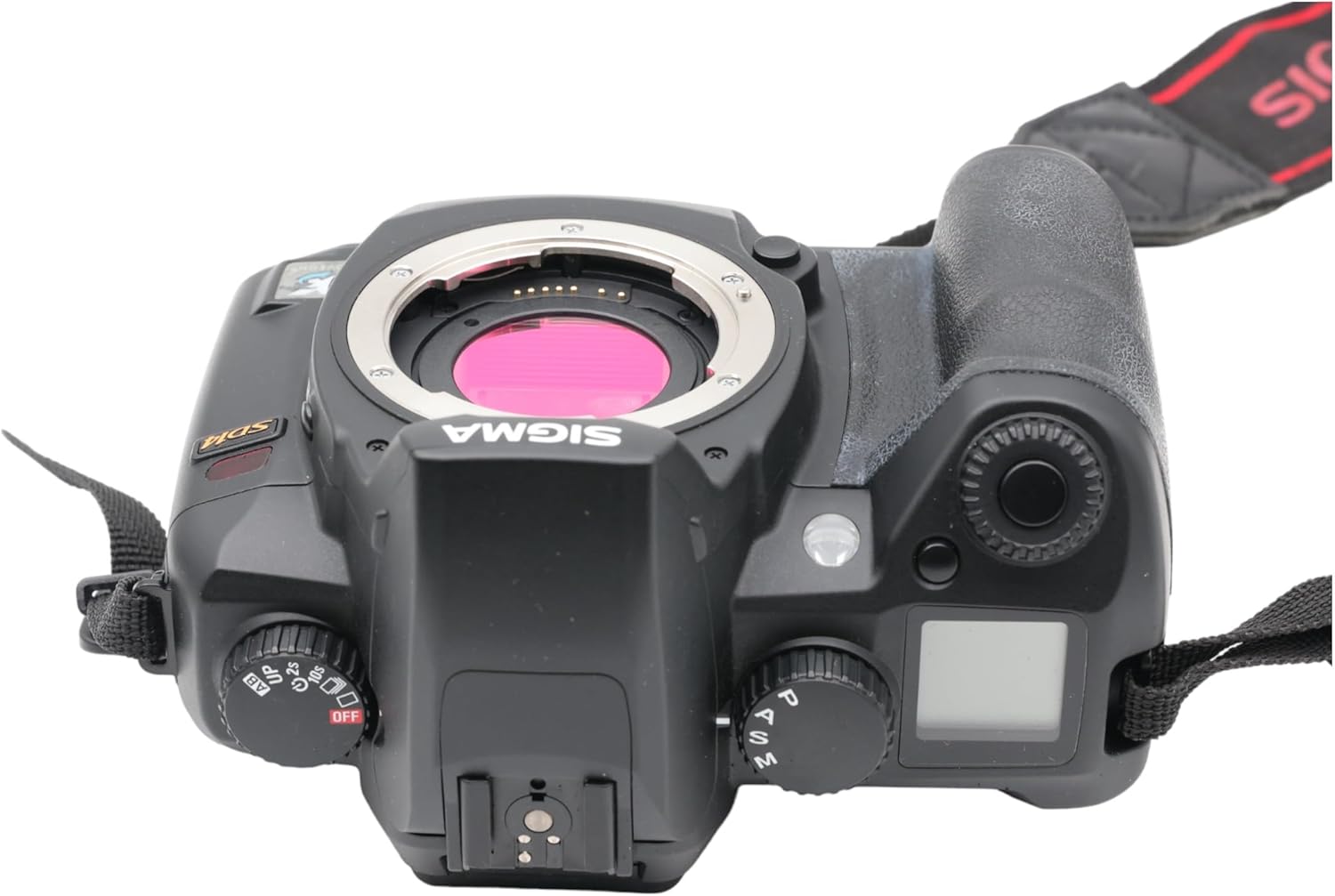
Rajah 3.1: Atas view of the Sigma SD14, illustrating the lens mount and mode dials.
4. Operasi
4.1. Menghidupkan/Mematikan
Rotate the power switch to the ON position to turn on the camera. Rotate it to OFF to power down.
4.2. Kawalan Asas dan Paparan
The SD14 features a 2.5-inch LCD monitor for reviewing images and navigating menus, and a pentaprism viewfinder for composing shots. The top LCD panel displays key settings such as resolution, metering mode, battery status, and remaining shots.

Rajah 4.1: Belakang view of the Sigma SD14, showing the LCD monitor, viewpencari, dan butang kawalan.
Key buttons include MENU, ISO, WB (White Balance), and a 4-way controller with an OK button for navigation. The INFO button displays shutter speed, aperture, and other settings on the LCD.
4.3. Memberi tumpuan
The camera utilizes a 5-point autofocus (AF) system (center, left, right, up, and down). The center AF point features a cross-type sensor for enhanced precision. AF point selection can be automatic or manual.
4.4. Metering Modes
The SD14 offers three metering modes:
- 8-segment Evaluative Metering: Analyzes the entire scene for balanced exposure.
- Center Area Metering: Prioritizes the central area of the frame.
- Center Weighted Average Metering: Measures the entire frame but gives more weight to the central area.
Exposure compensation and auto bracketing functions are available for fine-tuning exposure.
4.5. Rakaman Imej
The camera supports both RAW (X3F) and JPEG formats. JPEG recording offers four sizes (Super High, High, Medium, Low) and three quality settings (Fine, Normal, Basic).
- Super High (4608 x 3072 pixels): Suitable for A3 or larger prints.
- High (2640 x 1760 pixels): Suitable for A4 prints.
- Medium (1776 x 1184 pixels): Suitable for regular size prints.
- Low (1296 x 864 pixels): Sesuai untuk web pages and email.
4.6. Tangkapan Berterusan
The SD14 can shoot continuously at 3 frames per second. The number of frames captured in a burst depends on the resolution setting:
- Tinggi: 6 bingkai
- Sederhana: 12 bingkai
- Rendah: 24 bingkai
These figures apply to both RAW and JPEG modes.
4.7. Built-in Flash
The built-in flash has a guide number of 11 (ISO 100) and covers a 17mm lens angle (28mm equivalent on 35mm format). It supports S-TTL automatic flash metering and can synchronize with shutter speeds up to 1/180 second.
4.8. Mirror Lock-up
Activate the mirror lock-up mechanism to prevent camera shake caused by mirror movement during exposure. This is particularly useful for macro photography, long telephoto shots, or scientific applications. For best results, use with a remote controller or cable release (sold separately).
4.9. Sigma Photo Pro 3.0 Software
The included Sigma Photo Pro 3.0 software is a RAW image developer. It allows for quick conversion of RAW data and offers three adjustment modes: X3F Mode (original settings), Auto Adjustment Mode, and Custom Mode for manual adjustments (exposure, contrast, shadow, highlight, saturation, sharpness, fill-light). The software supports 8-bit TIFF, 16-bit TIFF, and JPEG file formats, and sRGB, Apple RGB, Adobe RGB, and ColorMatch RGB color spaces.
5. Penyelenggaraan
5.1. Image Sensor Dust Protector
The SD14 features a dust protector positioned in front of the image sensor. This design prevents dust from adhering directly to the sensor, minimizing its impact on image quality. If dust accumulates on the protector, it will be out of focus and generally not visible in images.
5.2. Membersihkan Badan dan Lensa Kamera
- Gunakan kain lembut dan tidak berbulu untuk mengelap badan kamera. Untuk kotoran degil, sedikitampen kain dengan air atau larutan pembersih lembut.
- For lenses, use a lens brush to remove loose dust, then a lens cleaning solution and a microfiber cloth. Avoid touching the lens surface with your fingers.
- Never use organic solvents like paint thinner or benzene to clean the camera or lens.
5.3. Penjagaan Bateri
- Simpan bateri di tempat yang sejuk dan kering apabila tidak digunakan.
- Elakkan menyahcas sepenuhnya bateri dengan kerap untuk memanjangkan jangka hayatnya.
- Jika kamera tidak akan digunakan untuk tempoh yang lama, keluarkan bateri.
6. Penyelesaian masalah
| Masalah | Kemungkinan Punca | Penyelesaian |
|---|---|---|
| Kamera tidak dihidupkan. | Bateri habis atau salah dimasukkan. | Cas bateri sepenuhnya dan pastikan ia dimasukkan dengan betul. |
| Imej adalah kabur. | Fokus yang salah, goncangan kamera atau kanta kotor. | Ensure proper focus. Use a faster shutter speed or tripod. Clean the lens. |
| Images are too dark or too bright. | Incorrect exposure settings or metering mode. | Adjust exposure compensation. Select an appropriate metering mode for the scene. |
| Color blotching in underexposed areas. | Characteristic of the Foveon sensor when severely underexposed. | Aim to slightly overexpose images (e.g., +.7 EV) to retain shadow detail and avoid this effect. |
| Cannot record images. | Kad memori penuh, terkunci atau tidak dimasukkan dengan betul. | Insert an empty card, unlock the card, or reinsert it correctly. Format the card if necessary (this will erase all data). |
| Kamera membeku atau menjadi tidak bertindak balas. | Gangguan perisian sementara. | Tanggalkan dan masukkan semula bateri untuk menetapkan semula kamera. |
For more detailed troubleshooting or error codes, please refer to the comprehensive instruction manual included with your camera or visit the Sigma support webtapak.
7. Spesifikasi
| Ciri | Perincian |
|---|---|
| Nama Model | SD14 |
| Resolusi Penderia Foto | 14 MP (Foveon X3 direct-image sensor) |
| Saiz Penderia Foto | APS-C |
| Pemasangan yang Serasi | Sigma SA Bayonet |
| Disokong File Format | JPEG, RAW (X3F), TIFF |
| Saiz Skrin | 2.5 Inches (150,000 pixels) |
| Viewpencari | Optical Pentaprism (98% coverage, 0.9x magnification) |
| Mata Autofokus | 5-point (Phase Detection) |
| Kelajuan Tangkapan Berterusan | 3 bingkai sesaat |
| Kelajuan Pengatup Maksimum | 1/4000 Saat |
| Kelajuan Pengatup Minimum | 30 saat |
| Julat ISO Dikembangkan | 100 - 1600 |
| Mod Pemeteran | 8-segment Evaluative, Center Area, Center Weighted Average |
| Built-in Flash Guide Number | 11 (ISO 100) |
| Media Storan | Compact Flash (CF) Type I/II |
| Sumber Kuasa | Lithium-ion Battery BP-21 |
| Ketersambungan | USB, Video Keluar |
| Berat Barang | 1.65 Paun (lebih kurang 748g) |
| Nombor Model | C23900 |
| UPC | 085126924416 |
7.1. Aksesori Pilihan (Dijual Secara Berasingan)
- Sigma Lenses (over 40 compatible models)
- Flashguns: EF-500 DG SUPER, EF-500 DG ST, EM-140 DG
- Power Grip PG-21
- Cable Release CR-21
- Remote Controller RS-31
- AC Adapter SAC-21
8. Waranti & Sokongan
8.1. Maklumat Waranti
For detailed warranty terms and conditions, please refer to the warranty card included with your product or visit the official Sigma webtapak. Perlindungan jaminan biasanya merangkumi kecacatan bahan dan mutu kerja untuk tempoh tertentu dari tarikh pembelian.
8.2. Sokongan Pelanggan
If you encounter any issues or have questions not covered in this manual, please contact Sigma customer support. Contact information can usually be found on the official Sigma webtapak atau dalam dokumentasi jaminan.
Sumber Dalam Talian: Visit the official Sigma website for product registration, firmware updates, FAQs, and additional support resources.