
1. Pengenalan
This manual provides instructions for the safe and efficient use of your Targus TG-LCS Universal Sony Rapid Li-ion Battery Charger. This device is designed to rapidly charge most Sony Li-ion batteries, offering convenience with its universal voltage compatibility and included car charging adapter.
Ciri-ciri utama termasuk:
- Rapidly charges most Sony batteries in a standard wall outlet or in a car within 1-2 hours.
- Universal 100-240V input for worldwide usage.
- Advanced technology prevents overcharging, protecting your batteries.
- Indicator light clearly shows charging status (red for charging, green for complete).
- Includes a 12-24V DC car charging plug for on-the-go power.
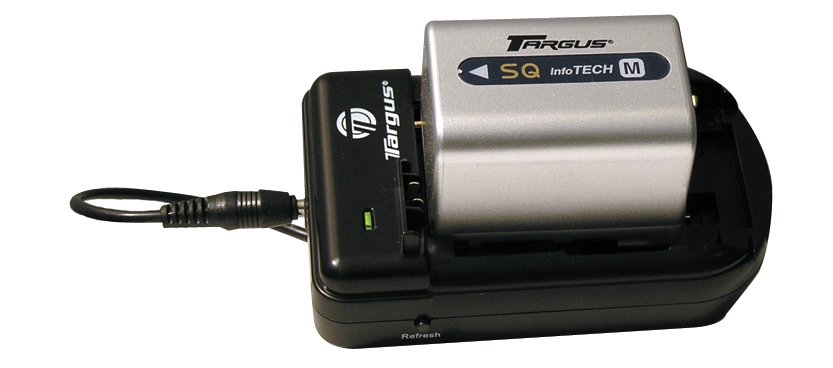
Figure 1: Targus TG-LCS Universal Sony Rapid Li-ion Battery Charger. This image shows the compact design of the charger, suitable for both home and travel use.
2. Maklumat Keselamatan Penting
Sila baca semua arahan keselamatan sebelum menggunakan produk ini. Kegagalan mematuhi arahan ini boleh mengakibatkan renjatan elektrik, kebakaran atau kecederaan serius.
- jangan expose the charger to rain or moisture.
- jangan kendalikan pengecas jika ia telah menerima pukulan tajam, terjatuh atau rosak.
- jangan disassemble the charger. Incorrect reassembly may result in electric shock or fire.
- jangan use an extension cord or attachment not recommended by the manufacturer, as this may result in a risk of fire or electric shock.
- jangan mengecas bateri yang tidak boleh dicas semula.
- Ensure the battery type is compatible with the charger before inserting.
- Cabut palam pengecas daripada salur keluar kuasa apabila tidak digunakan.
- Jauhkan daripada kanak-kanak.
3. Kandungan Pakej
Sahkan bahawa semua item terdapat dalam pakej anda:
- Targus TG-LCS Universal Sony Rapid Li-ion Battery Charger
- AC Power Cord (for wall outlet charging)
- 12-24V DC Car Charging Plug
- Manual Pengguna (dokumen ini)
4. Persediaan
4.1 Menyambung ke Kuasa
The charger can be powered via a standard wall outlet or a vehicle's DC power socket.
- For Wall Outlet Use: Connect the AC power cord to the charger and then plug the other end into a standard 100-240V AC wall outlet.
- Untuk Kegunaan Kereta: Connect the 12-24V DC car charging plug to the charger and then plug the other end into your vehicle's DC power socket (cigarette lighter socket).
4.2 Memasukkan Bateri
Carefully insert your compatible Sony Li-ion battery into the designated slot on the charger. Ensure the battery is seated correctly and makes proper contact with the charging terminals.
Nota: The charger is designed to accommodate various Sony Li-ion battery sizes. Ensure a secure fit for optimal charging. If the fit is loose, ensure the battery is still making proper contact with the charging pins.
5. Operasi
5.1 Proses Pengecasan
Once the battery is correctly inserted and the charger is connected to a power source, the charging process will begin automatically.
5.2 Lampu Penunjuk
The charger features an indicator light to communicate the charging status:
- Lampu Merah: Menunjukkan bahawa bateri sedang dicas.
- Lampu Hijau: Indicates that the battery is fully charged and ready for use. The charger's advanced technology prevents overcharging, so you can leave the battery connected even after the light turns green.
Typical charging time for most Sony batteries is 1-2 hours, depending on the battery's capacity and discharge level.
6. Penyelenggaraan
To ensure the longevity and optimal performance of your charger:
- Pastikan pengecas bersih dan kering. Lap dengan kain lembut dan kering.
- Elakkan daripada mendedahkan pengecas kepada suhu yang melampau atau cahaya matahari langsung.
- Simpan pengecas di tempat yang sejuk dan kering apabila tidak digunakan.
- Regularly check the power cords for any signs of damage. If damaged, discontinue use and replace.
7. Penyelesaian masalah
If you encounter issues with your Targus TG-LCS charger, refer to the following common problems and solutions:
| Masalah | Kemungkinan Punca | Penyelesaian |
|---|---|---|
| Charger indicator light does not turn on. | Tiada kuasa pada pengecas. |
|
| Battery is not charging (light remains off or flashes erratically). | Battery not properly seated or incompatible battery. |
|
| Pengecasan mengambil masa lebih lama daripada yang dijangkakan. | Battery capacity is very high or deeply discharged. | This is normal for high-capacity or deeply discharged batteries. Allow more time. Ensure the charger is in a well-ventilated area. |
8. Spesifikasi
| Nombor Model | TG-LCS |
| Jenama | Targus |
| Input Voltage | 100-240V AC (Wall Outlet), 12-24V DC (Car) |
| Jenis Bateri yang Serasi | Sony Li-ion batteries |
| Masa Mengecas | Approximately 1-2 hours (depending on battery capacity) |
| Dimensi Produk | 2 x 2 x 5 inci |
| Berat Barang | 5.6 auns |
| Pengeluar | Targus |
| UPC | 871436005453 |
9. Sokongan Pelanggan dan Waranti
For technical assistance, warranty information, or to inquire about replacement parts, please contact Targus customer support.
Please visit the official Targus website for the most up-to-date contact information and warranty details: www.targus.com/us/support
Simpan resit pembelian anda sebagai bukti pembelian untuk tuntutan waranti.