
1. Pengenalan
This manual provides instructions for the safe and efficient use of your Ergotron Neo-Flex Single Monitor Stand (Model 33-310-060). This desktop stand is designed to support a single monitor up to 27 inches and 16 pounds, compatible with VESA patterns 75x75mm and 100x100mm. It offers ergonomic adjustments including height, pan, tilt, and rotation to enhance your computing experience.
2. Kandungan Pakej
Sila sahkan bahawa semua komponen hadir sebelum memulakan pemasangan:
- Pangkalan Stand Monitor
- Adjustable Column with Pivot
- Plat Pemasangan VESA
- Attachment Hardware (screws, washers, Allen wrench)

Image: All components included with the Neo-Flex Single Monitor Stand.
3. Maklumat Keselamatan
- Ensure the monitor weight and size are within the specified limits (up to 27 inches, 16 lbs).
- Jangan ketatkan skru semasa pemasangan.
- Letakkan pendirian pada permukaan yang stabil dan rata.
- Jauhkan kanak-kanak dan haiwan peliharaan dari kawasan perhimpunan.
4. Pemasangan dan Persediaan
4.1 Attaching the Column to the Base
- Place the monitor stand base on a flat, stable surface.
- Align the adjustable column with the designated holes on the base.
- Secure the column to the base using the provided screws and Allen wrench. Ensure it is tightened firmly but do not overtighten.
4.2 Memasang Plat VESA pada Monitor Anda
- Carefully lay your monitor face down on a soft, clean surface to prevent scratches.
- Align the VESA mounting plate with the VESA holes on the back of your monitor (75x75mm or 100x100mm).
- Use the appropriate screws from the hardware kit to attach the VESA plate securely to the monitor.
4.3 Mounting the Monitor to the Stand
- With the VESA plate attached to your monitor, carefully lift the monitor.
- Slide the VESA plate (with monitor) onto the pivot on the adjustable column. Ensure it clicks securely into place.
- Tighten any hand screws or locking mechanisms on the pivot to secure the monitor.

Imej: Belakang view of the stand's VESA mounting plate, ready for monitor attachment.
5. Arahan Operasi
The Neo-Flex stand allows for easy, fingertip adjustments to optimize your viewkeselesaan.
5.1 Pelarasan Ketinggian
- To raise or lower the monitor, gently lift or push down on the monitor. The stand allows for 5 inches (13 cm) of vertical travel without levers or knobs.
5.2 Tilt and Pan Adjustment
- Condongkan monitor ke hadapan atau ke belakang perlahan-lahan untuk mencapai keinginan anda viewing angle (up to 30 degrees tilt).
- Swivel the monitor left or right up to 270 degrees for easy screen sharing or collaboration.
5.3 Putaran
- Rotate the monitor 360 degrees to switch between landscape and portrait viewdalam mod.
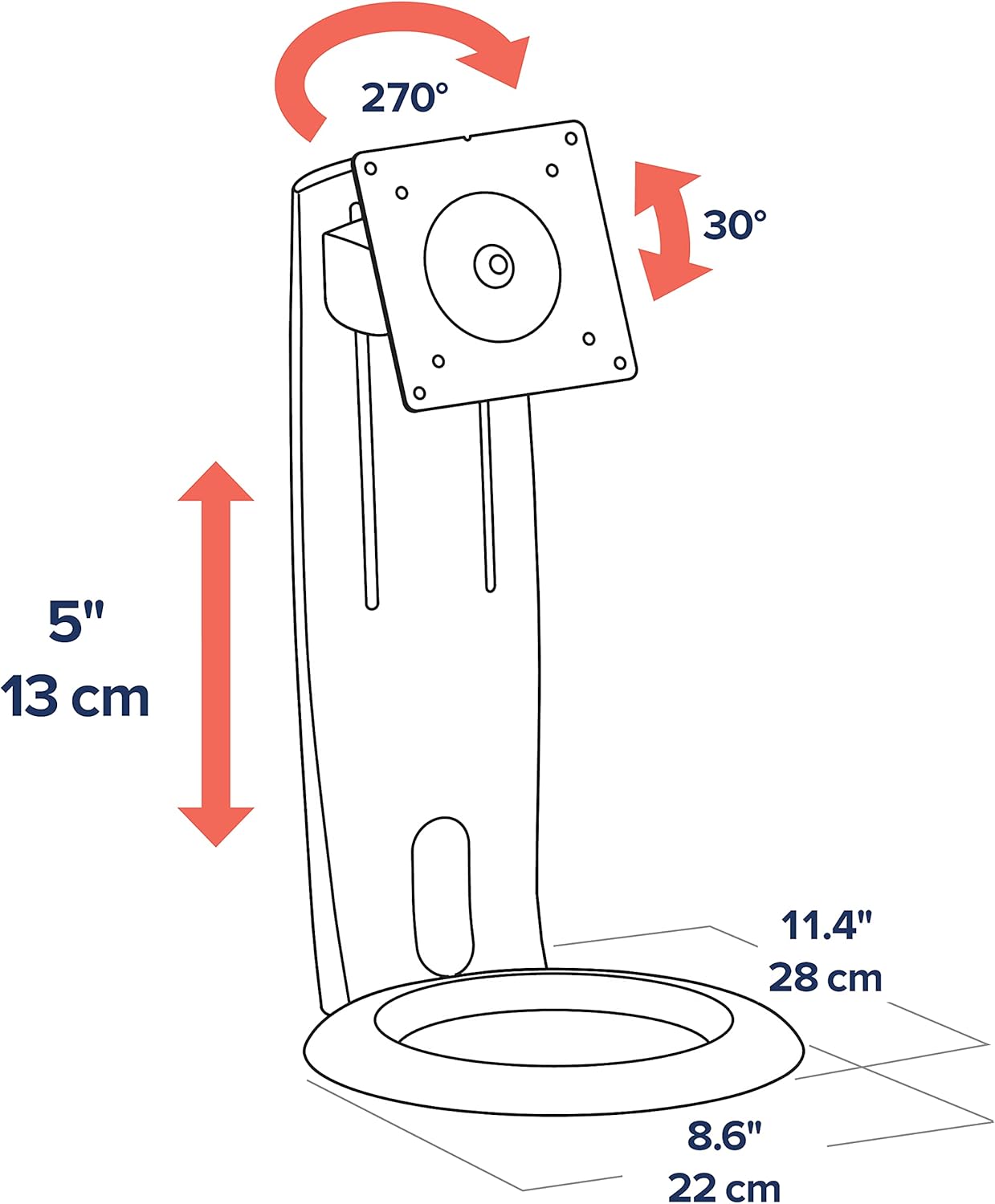
Image: Diagram showing the adjustable height (5 inches/13 cm), tilt (30 degrees), and pan (270 degrees) capabilities.

Imej: Depan view of the Ergotron Neo-Flex stand with a monitor, demonstrating its compact design.
6. Pengurusan Kabel
The stand features integrated cable routing to keep your workspace tidy. Route monitor cables through the designated channels on the column to keep them out of sight and prevent clutter.
7. Penyelenggaraan
- Periksa semua skru dan sambungan secara berkala untuk memastikan ia kekal ketat.
- Bersihkan dirian dengan lembut, damp kain. Elakkan pembersih yang kasar.
- Do not apply lubricants to the moving parts unless specifically instructed by Ergotron support.
8. Penyelesaian masalah
8.1 Monitor is not stable or wobbles
- Ensure all assembly screws, especially those connecting the column to the base and the VESA plate to the monitor, are securely tightened.
- Verify that the monitor's weight is within the specified load capacity (6 to 16 lbs).
- Ensure the stand is placed on a flat, stable, and sturdy surface.
8.2 Adjustments are too stiff or too loose
- The stand is designed for fingertip adjustments. If movements are too stiff, check for any overtightened screws. If too loose, ensure all connections are firm.
- Refer to the original product documentation or contact Ergotron support for specific adjustment mechanisms if needed.
9. Spesifikasi
| Ciri | Perincian |
|---|---|
| Nombor Model | 33-310-060 |
| Saiz Skrin yang Disokong | Sehingga 27 inci |
| Kapasiti Muatan | 6 hingga 16 paun |
| Keserasian VESA | 75x75mm, 100x100mm |
| Pelarasan Ketinggian | 5 inci (13 cm) |
| Condongkan | Forward/Back (approx. 30 degrees) |
| kuali | 270 degrees (left/right) |
| Putaran | 360 degrees (portrait/landscape) |
| bahan | Plastic (with metal components) |
| warna | Hitam |
| Dimensi Produk | 18.25 x 9.13 x 5.88 inci |
| Berat Barang | 4.4 paun |
10. Waranti dan Sokongan
Ergotron products are built to last and come with a 3-year warranty. For technical support, troubleshooting assistance, or warranty claims, please visit the official Ergotron webtapak atau hubungi perkhidmatan pelanggan mereka secara langsung. Simpan resit pembelian anda untuk pengesahan waranti.