
1. Pengenalan
Terima kasih kerana membeliasing the GPX CDP6806DT Personal CD Player. This manual provides important safety instructions, operational guidelines, and maintenance procedures to ensure optimal performance and longevity of your device. Please read this manual thoroughly before using the product and retain it for future reference.
2. Maklumat Keselamatan
Arahan Keselamatan Penting
- Jangan dedahkan unit kepada air atau lembapan.
- Elakkan meletakkan unit berhampiran sumber haba seperti radiator, daftar haba, dapur, atau radas lain (termasuk amppenghidup) yang menghasilkan haba.
- Jangan cuba membuka atau mengubah suai unit ini. Rujuk semua servis kepada kakitangan servis yang berkelayakan.
- Use only the specified batteries (2 x AA batteries). Ensure correct polarity when inserting batteries.
- Tanggalkan bateri jika unit tidak akan digunakan untuk tempoh yang lama.
- Elakkan mendengar pada tahap kelantangan yang tinggi untuk tempoh yang lama bagi mengelakkan kerosakan pendengaran.
- Bersihkan unit hanya dengan kain kering.
3. Kandungan Pakej
Carefully unpack your GPX CDP6806DT Personal CD Player and ensure all items are present:
- GPX CDP6806DT Personal CD Player
- Manual Pengguna (dokumen ini)
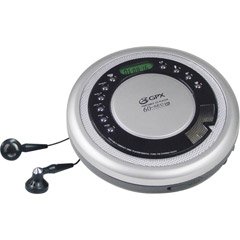
Figure 1: GPX CDP6806DT Personal CD Player. This image illustrates the compact design and general appearance of the device.
4. Kawalan dan Ciri
Familiarize yourself with the controls and features of your GPX CDP6806DT for optimal use.
- Paparan LCD: 6-digit display for track number, time, and FM frequency.
- MAIN/JEDA (►/−): Press to start or pause CD playback.
- BERHENTI (■): Press to stop CD playback.
- SKIP/SEARCH (◀◀/▶▶): Press to skip tracks. Hold to search within a track.
- JILID (+/-): Melaraskan tahap output audio.
- MODE/PROG: Selects playback mode (Repeat, Random) or programs CD tracks.
- FM TUNER (ON/OFF/BAND): Switches to FM radio mode, turns FM on/off, or changes FM band.
- PRESET (+/-): Navigates saved FM radio presets.
- Ruang CD: Area for inserting audio CDs.
- Petak Bateri: Located on the bottom, holds 2 AA batteries.
- Bicu Fon Kepala (3.5mm): Connects headphones for private listening.
Figure 2: GPX CDP6806DT Controls Layout. This image provides a visual reference for the location of various buttons and ports on the device.
5. Persediaan
5.1 Pemasangan Bateri
The GPX CDP6806DT requires two (2) AA batteries (not included) for portable operation.
- Cari petak bateri di bahagian bawah unit.
- Luncurkan penutup petak bateri terbuka.
- Insert two AA batteries, ensuring the correct polarity (+ and -) as indicated inside the compartment.
- Tutup penutup petak bateri dengan selamat.
5.2 Menyambung Fon Kepala
For private listening, connect your 3.5mm stereo headphones (not included) to the headphone jack located on the side of the unit.
6. Arahan Operasi
6.1 Main Semula CD
The unit supports CD and CD-R/RW disc formats.
- Open the CD compartment lid by gently pressing the OPEN button (if present, or lifting the lid).
- Letakkan CD dengan bahagian label menghadap ke atas pada gelendong tengah.
- Tutup penutup petak CD dengan kuat sehingga ia berbunyi.
- Tekan ke MAIN/JEDA (►/−) button to begin playback. The track number and elapsed time will appear on the LCD display.
- Untuk menjeda main balik, tekan MAIN/JEDA (►/−). Tekan sekali lagi untuk menyambung semula.
- Untuk menghentikan main balik, tekan BERHENTI (■) butang.
- Untuk melangkau ke trek seterusnya, tekan SKIP/SEARCH (▶▶).
- To go back to the beginning of the current track, press SKIP/SEARCH (◀◀) once. Press twice to go to the previous track.
- To search rapidly forward or backward within a track, hold down SKIP/SEARCH (▶▶) or (◀◀) masing-masing.
- Laraskan kelantangan menggunakan JILID (+/-) kawalan.
6.2 Operasi Radio FM
The unit features a digital FM tuner with station presets.
- Luncurkan TUNER FM switch to the ON position or press the BAND butang untuk memasuki mod FM.
- Tekan ke SKIP/SEARCH (▶▶) or (◀◀) butang untuk menala secara manual kepada frekuensi yang dikehendaki.
- To auto-scan and save stations, hold down the MAIN/JEDA (►/−) button (or refer to specific instructions for auto-scan if available on the device).
- To recall saved presets, use the PRATETAP (+/-) butang.
6.3 CD Programming (24-Track)
You can program up to 24 tracks to play in a specific order.
- Dengan CD dihentikan, tekan butang MODE/PROG butang. "PROG" akan berkelip pada paparan.
- Gunakan SKIP/SEARCH (▶▶) or (◀◀) buttons to select the first track you wish to program.
- Tekan MODE/PROG again to confirm the selection. The display will show the program number and the next available program slot.
- Ulangi langkah 2 dan 3 untuk menambah sehingga 24 trek pada program anda.
- Selepas memprogramkan semua trek yang diingini, tekan MAIN/JEDA (►/−) untuk memulakan main balik yang diprogramkan.
- Untuk mengosongkan program, tekan butang BERHENTI (■) butang dua kali.
6.4 Anti-Skip Protection (ASP)
The GPX CDP6806DT features a 60-second Anti-Skip Protection system. This system buffers audio data to minimize interruptions caused by minor shocks or vibrations during CD playback. The ASP activates automatically when a CD is playing.
7. Penyelenggaraan
7.1 Membersihkan Unit
- Lap bahagian luar unit dengan kain lembut dan kering.
- Jangan gunakan pembersih yang melelas, lilin atau pelarut.
- If the CD lens needs cleaning, use a specialized CD lens cleaner disc or a soft, lint-free cloth designed for optical lenses.
7.2 Penjagaan Bateri
- Tanggalkan bateri jika unit tidak digunakan untuk tempoh yang lama untuk mengelakkan kebocoran.
- Jangan campurkan bateri lama dan baharu, atau jenis bateri yang berlainan.
- Buang bateri terpakai secara bertanggungjawab mengikut peraturan tempatan.
8. Penyelesaian masalah
If you experience issues with your GPX CDP6806DT, please consult the following table for common problems and solutions.
| Masalah | Kemungkinan Punca / Penyelesaian |
|---|---|
| Unit tidak dihidupkan. | Check if batteries are inserted correctly with proper polarity. Ensure batteries are fresh and not depleted. |
| Tiada bunyi dari fon kepala. | Ensure headphones are fully plugged into the headphone jack. Increase the volume level. Test with another pair of headphones. |
| CD melangkau atau main balik terganggu. | Ensure the CD is clean and free of scratches or smudges. Clean the CD with a soft, lint-free cloth. Ensure the unit is on a stable surface or held steadily during use. |
| CD tidak dimainkan. | Ensure the CD is inserted correctly with the label side up. Close the CD compartment lid completely. Check if the CD is a supported format (CD, CD-R/RW). |
| Penerimaan radio FM kurang baik. | Extend the headphone cable as it acts as the antenna. Try moving to a different location. |
9. Spesifikasi
- Jenama: GPX
- model: CDP6806DT
- Format Cakera yang Disokong: CD, CD-R / RW
- Perlindungan Anti-Skip: 60 saat
- paparan: LCD 6 digit
- Radio: Digital FM Tuner with Presets
- CD Programming: 24-trek
- Sumber Kuasa: 2 x Bateri AA (tidak termasuk)
- Ketersambungan: 3.5mm Headphone Jack (Auxiliary)
10. Waranti dan Sokongan
For detailed warranty information, please refer to the warranty card included with your original product packaging. For technical support, service inquiries, or to purchase replacement parts, please visit the official GPX website or contact their customer service department using the contact information provided in your product documentation.
Sila simpan bukti pembelian anda untuk tuntutan waranti.