
1. Pengenalan
This manual provides comprehensive instructions for the safe and efficient use of your Logisys PS480D 480W ATX Power Supply. Please read this manual thoroughly before installation and operation to ensure proper functionality and to prevent damage to the unit or other components.

Figure 1: Logisys PS480D 480W ATX Power Supply, front view with cables bundled.
2. Maklumat Keselamatan
AMARAN: Bekalan kuasa mengandungi vol tinggitage komponen. Jangan buka bekalan kuasa casing. Tiada bahagian yang boleh diservis pengguna di dalamnya.
- Pastikan bekalan kuasa diputuskan dari alur keluar AC sebelum pemasangan atau penyelenggaraan.
- Always ground yourself to prevent electrostatic discharge (ESD) when handling internal computer components.
- Do not operate the power supply in wet or damp syarat.
- Pastikan pengudaraan yang betul di sekeliling bekalan kuasa untuk mengelakkan terlalu panas.
- Use only the provided power cables and connectors.
3. Ciri-ciri Produk
The Logisys PS480D is a 480W ATX power supply designed for personal computers. Key features include:
- Kecekapan Tinggi
- Low Noise & Ripple
- Lebih Voltage Perlindungan
- Perlindungan Litar pintas
- Built-in EMI Filter
- Insulation Resistance 100MΩ min.
- Complies with FCC part 15J class B 115VAC operation and CISPR 22 230 VAC operation.
- Meets UL 1950, CSA 22.2 LEVEL 3 Requirement.
- 100% Burn-in test / Vibration test / Hi-pot test / Leakage current test.
- MTBF above 100,000 hours at 25 °C.

Figure 2: Rear panel of the power supply with fan, AC inlet, and power switch.
4. Persediaan dan Pemasangan
Follow these steps to install the Logisys PS480D power supply into your computer system.
- Penyediaan: Ensure your computer is completely powered off and unplugged from the wall outlet. Open your computer case according to its manufacturer's instructions.
- Keluarkan Bekalan Kuasa Lama (jika berkenaan): Disconnect all cables from the old power supply to the motherboard, drives, and other components. Unscrew and remove the old power supply from the case.
- Install New Power Supply: Carefully place the Logisys PS480D into the power supply bay of your computer case. Secure it with screws.
- Sambungkan Kuasa Utama: Connect the 20+4 pin ATX mainboard connector to your motherboard. If your motherboard uses a 20-pin connector, detach the 4-pin section. If it uses a 24-pin connector, connect both sections.
- Sambungkan Kuasa CPU: Connect the 4-pin +12V power connector to the corresponding port on your motherboard.
- Connect Peripheral Power:
- Use the 4-pin standard drive connectors for HDDs and CD/DVD-ROM drives.
- Use the 4-pin 3.5" FDD or ZIP connectors for floppy disk drives or similar devices.
- Use the Serial ATA (SATA) connectors for SATA hard drives and SSDs.
- Pengurusan Kabel: Route cables neatly to ensure proper airflow within the case.
- Tutup Kes: Setelah semua sambungan selamat, tutup bekas komputer anda.
- Sambungkan Kuasa AC: Plug the AC power cord into the power supply's AC inlet and then into a wall outlet.
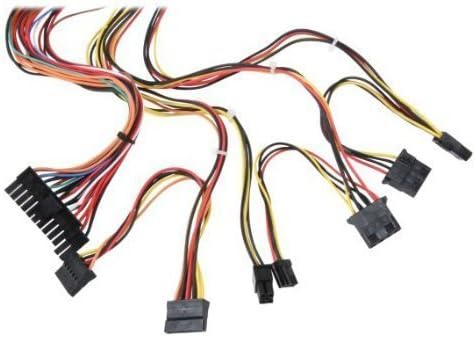
Gambar 3: Lebihview of power supply connectors.

Figure 4: Power supply dimensions and included AC power cord.
5. Arahan Operasi
After successful installation, you can power on your computer.
- Ensure the power switch on the rear of the power supply (Figure 2) is in the "ON" (I) position.
- Tekan butang kuasa pada sarung komputer anda.
- The power supply will provide stable power to your system components.
- To power off, shut down your operating system normally. For complete power disconnection, switch the power supply to the "OFF" (O) position and unplug the AC cord.
6. Penyelenggaraan
Penyelenggaraan tetap membantu memastikan jangka hayat dan prestasi optimum bekalan kuasa anda.
- Pembersihan: Periodically clean dust from the power supply's fan and vents using compressed air. Ensure the power supply is unplugged before cleaning.
- Aliran udara: Ensure that the computer case has adequate airflow and that the power supply's fan is not obstructed.
- Integriti Kabel: Periodically check all power cables for secure connections and signs of wear or damage.
7. Penyelesaian masalah
Jika anda menghadapi masalah dengan bekalan kuasa anda, rujuk langkah penyelesaian masalah biasa berikut:
- Tiada Kuasa:
- Check if the AC power cord is securely plugged into both the power supply and the wall outlet.
- Ensure the power switch on the rear of the power supply is in the "ON" (I) position.
- Sahkan bahawa soket dinding berfungsi dengan memasang peranti lain.
- Check all internal power connections (20/24-pin ATX, 4-pin +12V, peripheral connectors) are firmly seated.
- Ketidakstabilan Sistem/Penutupan Rawak:
- This could indicate an overloaded or failing power supply. Ensure your system's power requirements do not exceed the PS480D's 480W capacity.
- Periksa pengudaraan yang betul dan pastikan kipas bekalan kuasa berputar. Kepanasan berlebihan boleh menyebabkan ketidakstabilan.
- Bunyi Luar Biasa:
- A loud fan noise might indicate dust buildup or a failing fan bearing. Clean the fan as described in the Maintenance section.
If problems persist after attempting these steps, contact Logisys customer support or a qualified technician.
8. Spesifikasi
| Ciri | Spesifikasi |
|---|---|
| Jenama | Logisys |
| Nombor Model | PS480D |
| Output Wattage | 480 Watt |
| Faktor Bentuk | ATX |
| Dimensi (LxWxH) | 6" L x 5.5" W x 3.25" H (15.24 x 13.97 x 8.25 cm) |
| Berat Barang | 2.06 paun (0.93 kg) |
| Penyambung Papan Utama | 1x 20+4 Pin ATX |
| Penyambung Kuasa CPU | 1x 4 Pin +12V |
| Standard Drive Connectors | 4x 4 Pin (Molex) |
| FDD/ZIP Connectors | 1x 4 Pin 3.5" |
| Penyambung ATA Bersiri | 1x SATA |
| Kaedah Penyejukan | Udara |
| Perlindungan | Lebih Voltage Perlindungan, Perlindungan Litar pintas |
| Pensijilan | FCC part 15J class B, CISPR 22, UL 1950, CSA 22.2 LEVEL 3 |
9. Waranti dan Sokongan
For warranty information, technical support, or service inquiries, please refer to the official Logisys webtapak atau hubungi bahagian perkhidmatan pelanggan mereka. Simpan resit pembelian anda sebagai bukti pembelian.