
1. Pengenalan
This manual provides essential instructions for the safe and efficient operation, setup, and maintenance of your Ohaus ES50R ES Industrial Bench Scale. The Ohaus ES50R is designed for industrial weighing applications, offering a capacity of 50 kg (110 lb) with a readability of 20 g (0.05 lb). Please read this manual thoroughly before using the scale to ensure proper functionality and to prevent damage.
2. Maklumat Keselamatan
Sentiasa patuhi langkah keselamatan berikut:
- Jangan bebankan penimbang melebihi kapasiti maksimumnya iaitu 50 kg (110 lb).
- Ensure the scale is placed on a stable, level surface to achieve accurate readings.
- Operate the scale only with the specified 120 V power supply.
- Elakkan mendedahkan penimbang kepada suhu, kelembapan atau cahaya matahari langsung yang melampau.
- Jangan rendam penimbang dalam air atau cecair lain.
- Keep the scale clean and free from dust and debris.
- Only qualified personnel should perform repairs or maintenance beyond routine cleaning.
3. Kandungan Pakej
Sahkan bahawa semua komponen hadir semasa membongkar:
- Ohaus ES50R ES Industrial Bench Scale unit
- Power Adapter (for 120 V operation)
- Manual Pengguna (dokumen ini)
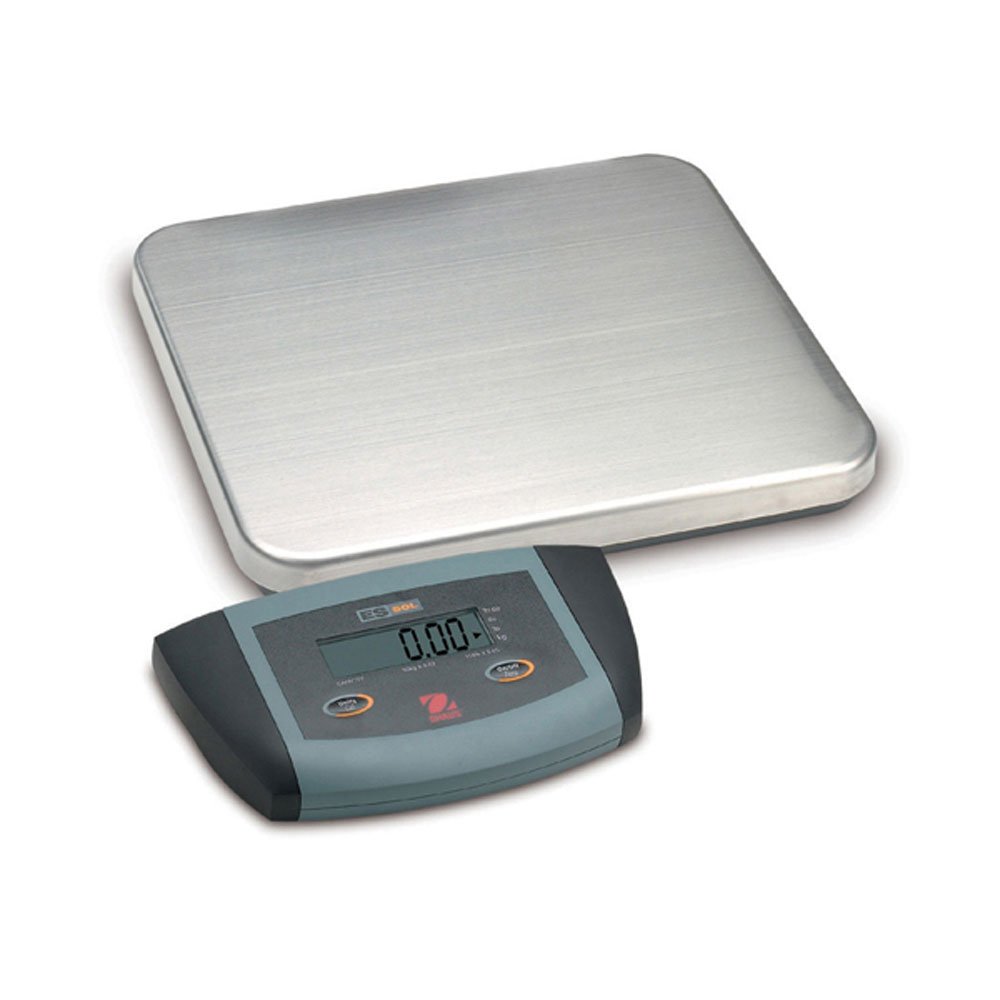
Rajah 1: Ohaus ES50R ES Industrial Bench Scale. This image shows the complete bench scale unit, including the weighing platform and the display unit.
4. Persediaan
- Membongkar: Keluarkan semua komponen dari pembungkusan dengan berhati-hati. Simpan pembungkusan untuk pengangkutan atau penyimpanan masa hadapan.
- penempatan: Place the scale on a firm, level, and stable surface, free from vibrations, drafts, and rapid temperature changes. Ensure adequate space around the scale for safe operation.
- Sambungan Kuasa: Connect the power adapter to the scale's power input port. Plug the adapter into a standard 120 V AC power outlet.
- Kuasa Awal Hidup: Tekan ke HIDUP/MATI button to power on the scale. The display will perform a self-test and then show "0.00" or "0.0".
- meratakan: If your scale includes adjustable feet, rotate them until the bubble in the spirit level (if present) is centered.
5. Arahan Operasi
5.1 Penimbangan Asas
- Ensure the scale is powered on and the display shows "0.00" or "0.0".
- Place the item to be weighed gently in the center of the weighing platform.
- Wait for the display to stabilize. The stable weight reading will be shown on the large LCD display.
- Remove the item from the platform. The display should return to zero.
5.2 Fungsi Tara
The tare function allows you to subtract the weight of a container, so only the net weight of the contents is displayed.
- Letakkan bekas kosong di atas platform penimbang.
- Tekan ke SASARAN button. The display will reset to "0.00" or "0.0", indicating the container's weight has been tared.
- Add the material to be weighed into the container. The display will show the net weight of the material.
- Untuk membersihkan tayar, keluarkan bekas dari platform dan tekan butang SASARAN butang lagi.
5.3 Ciri Istimewa
- Automatikan: The scale is equipped with an auto shut-off feature to conserve power. If no activity is detected for a set period, the scale will automatically turn off.
- Paparan Besar: The LCD display provides clear and easy-to-read weight indications.
- Penutupan Manual: Untuk mematikan penimbang secara manual, tekan dan tahan HIDUP/MATI butang sehingga paparan dimatikan.
6. Penyelenggaraan
6.1 Pembersihan
To maintain accuracy and prolong the life of your scale:
- Putuskan sambungan penimbang daripada bekalan kuasa sebelum membersihkan.
- Lap permukaan penimbang dengan iklanamp kain dan detergen lembut.
- Jangan gunakan pembersih yang melelas, pelarut atau bahan kimia yang keras.
- Ensure no liquid enters the scale's internal components.
- Keringkan penimbang dengan teliti selepas dibersihkan.
6.2 Penentukuran
Regular calibration ensures the accuracy of your scale. Refer to the full technical manual or contact Ohaus customer support for detailed calibration procedures. Calibration typically requires certified weights.
7. Penyelesaian masalah
| Masalah | Kemungkinan Punca | Penyelesaian |
|---|---|---|
| Skala tidak dihidupkan. | No power supply; faulty power adapter. | Check power connection and outlet. Ensure power adapter is functioning correctly. |
| Bacaan yang tidak tepat. | Scale not level; unstable surface; overload; calibration required. | Ensure scale is level and on a stable surface. Do not exceed capacity. Perform calibration if necessary. |
| Paparan menunjukkan "Err" atau kod ralat. | Lebihan beban; kerosakan dalaman. | Remove weight from platform. If error persists, power cycle the scale. If still present, contact customer support. |
| Auto shut-off too soon/not at all. | Auto shut-off settings. | Refer to the full technical manual for adjusting auto shut-off settings, if available. |
8. Spesifikasi
| Ciri | Perincian |
|---|---|
| Model | ES50R |
| Jenama | Ohaus |
| Kapasiti | 50 kg / 110 lb |
| Kebolehbacaan | 20 g / 0.05 lb |
| Jenis Paparan | LCD (Large Display) |
| Ciri Khas | Auto Shut Off, Manual Shutdown |
| Faktor Bentuk | Skala Bangku |
| Bekalan Kuasa | 120 V AC (via adapter) |
| Dimensi Produk | 15 x 13 x 5.5 inci |
| Berat Barang | 9.64 paun |
| Pengeluar | COLE-PARMER |
9. Waranti
The Ohaus ES50R ES Industrial Bench Scale comes with a Waranti 1 tahun from the date of purchase. This warranty covers defects in materials and workmanship under normal use. It does not cover damage resulting from misuse, accident, unauthorized modification, or operation outside the specified environmental and electrical limits. For warranty claims, please retain your proof of purchase and contact Ohaus customer support.
10. Sokongan Pelanggan
For technical assistance, service, or to inquire about replacement parts, please contact Ohaus customer support. Visit the official Ohaus weblaman web untuk maklumat hubungan terkini dan sumber tambahan.
Nota: Always provide your product model number (ES50R) and serial number (if applicable) when contacting support.


