
1. Pengenalan
Terima kasih kerana membeliasing the GPX BCD2004 Boombox. This portable audio system features a top-loading CD player and an AM/FM tuner, designed for versatile audio playback. This manual provides essential information for setting up, operating, and maintaining your device to ensure optimal performance and longevity.
2. Maklumat Keselamatan
- Baca Arahan: Carefully read all operating instructions before using the unit.
- Kekalkan Arahan: Simpan manual ini untuk rujukan masa hadapan.
- Air dan Kelembapan: Do not expose this appliance to dripping or splashing water. Do not place objects filled with liquids, such as vases, on the appliance.
- Pengudaraan: Pastikan pengudaraan yang betul. Jangan sekat sebarang bukaan pengudaraan.
- haba: Jangan letak berhampiran sumber haba seperti radiator, daftar haba, dapur atau radas lain (termasuk amppenghidup) yang menghasilkan haba.
- Sumber Kuasa: Use only the power source indicated on the appliance.
- Bateri: Follow battery safety guidelines. Do not mix old and new batteries, or different types of batteries. Remove batteries if the unit is not used for extended periods.
- Servis: Rujuk semua servis kepada kakitangan perkhidmatan yang berkelayakan.
3. Kandungan Pakej
Sila pastikan item berikut disertakan dalam pakej anda:
- GPX BCD2004 Boombox Unit
- Kord Kuasa AC
- Manual Pengguna
4. Kawalan dan Ciri Berakhirview
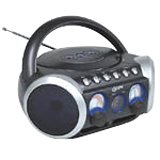
Rajah 1: Depan view of the GPX BCD2004 Boombox. This image shows the overall design of the boombox, including the speaker grilles and the general layout of the front panel.
Familiarize yourself with the main controls and features of your boombox:
- Ruang CD: Top-loading bay for inserting CDs.
- Suis Fungsi: Selects between CD, AM, FM, and OFF modes.
- Kawalan Kelantangan: Dail putar untuk melaraskan tahap output audio.
- Dail Penalaan: Rotary dial for selecting AM or FM radio frequencies.
- Butang Main/Jeda: Starts or temporarily stops CD playback.
- Butang Berhenti: Menghentikan main balik CD.
- Butang Langkau/Carian (◀◀ / ▶▶): Skips to the previous/next track or searches within a track.
- Butang Program: Used to program a sequence of tracks for CD playback.
- Butang Ulang: Repeats the current track or the entire CD.
- AM/FM Antenna: Telescopic antenna for FM reception, internal antenna for AM.
- Input Kuasa AC: Jack for connecting the AC power cord.
- Petak Bateri: Located on the bottom or rear for 'C' batteries.
- Fold-down Carrying Handle: Untuk mudah dibawa.
5. Persediaan
5.1 Mengkuasakan Unit
Your GPX BCD2004 Boombox can be powered by either AC power or batteries.
Operasi Kuasa AC
- Ensure the Function Switch is in the OFF position.
- Insert the small end of the AC power cord into the AC power input jack on the back of the unit.
- Pasangkan hujung kord kuasa AC yang satu lagi ke soket dinding AC standard (120V ~ 60Hz).
Operasi Kuasa Bateri
For portable use, the boombox requires 8 'C' size batteries (not included).
- Ensure the Function Switch is in the OFF position.
- Open the battery compartment cover located on the bottom or rear of the unit.
- Masukkan 8 bateri bersaiz 'C', dengan memerhatikan kekutuban (+ dan -) yang betul seperti yang ditunjukkan di dalam petak.
- Tutup penutup petak bateri dengan selamat.
- Nota: When operating on battery power, disconnect the AC power cord from the unit.
6. Operating the CD Player
The GPX BCD2004 is compatible with standard audio CDs, CD-R, and CD-RW discs.
6.1 Memuatkan CD
- Lift the CD compartment door located on the top of the unit.
- Place a CD onto the center spindle with the label side facing up.
- Gently close the CD compartment door until it clicks shut.
6.2 Main Semula CD Asas
- Tetapkan Suis Fungsi kepada kedudukan CD.
- The CD player will begin to read the disc. The track number will typically display.
- Press the PLAY/PAUSE (▶/██) button to start playback.
- Adjust the Volume Control to your desired listening level.
- To pause playback, press the PLAY/PAUSE (▶/██) button. Press it again to resume.
- To stop playback, press the STOP (■) button.
6.3 Skipping and Searching Tracks
- Langkau Laluan: During playback, press the SKIP/SEARCH FORWARD (▶▶) button to go to the next track. Press the SKIP/SEARCH BACKWARD (◀◀) button to go to the beginning of the current track, or press it twice to go to the previous track.
- Search Within Track: During playback, press and hold the SKIP/SEARCH FORWARD (▶▶) or SKIP/SEARCH BACKWARD (◀◀) button to fast forward or rewind through the current track. Release the button to resume normal playback.
6.4 Program Play
You can program up to 16 tracks to play in a specific order.
- In STOP mode, press the PROGRAM button. The program indicator will flash.
- Use the SKIP/SEARCH buttons (◀◀ / ▶▶) to select your desired first track.
- Press the PROGRAM button again to confirm the selection.
- Repeat steps 2 and 3 to add up to 16 tracks to your program list.
- After programming all desired tracks, press the PLAY/PAUSE (▶/██) button to start programmed playback.
- To clear the program, press the STOP (■) button twice.
6.5 Repeat Play
During CD playback, press the REPEAT button:
- Tekan sekali untuk Ulang 1 (repeats the current track).
- Tekan dua kali untuk Ulang Semua (repeats the entire CD or programmed tracks).
- Press a third time to cancel repeat function.
7. Operating the AM/FM Radio
7.1 Tuning to Radio Stations
- Set the Function Switch to either the AM or FM position.
- Adjust the Tuning Dial to select your desired radio station.
- Adjust the Volume Control to your desired listening level.
7.2 Improving Radio Reception
- Penerimaan FM: Extend the telescopic antenna fully and adjust its position for the best reception.
- Sambutan AM: The unit has a built-in AM antenna. Rotate the entire boombox for optimal AM reception.
8. Penyelenggaraan
8.1 Membersihkan Unit
- Lap bahagian luar unit dengan lembut, damp kain. Jangan gunakan pembersih atau pelarut yang melelas.
- For the CD lens, use a specialized CD lens cleaner disc or a soft, lint-free cloth specifically designed for optical lenses.
8.2 Penjagaan Bateri
- Tanggalkan bateri jika unit tidak akan digunakan untuk tempoh yang lama untuk mengelakkan kebocoran.
- Buang bateri terpakai secara bertanggungjawab mengikut peraturan tempatan.
9. Penyelesaian masalah
If you experience issues with your boombox, please refer to the following common problems and solutions:
| Masalah | Kemungkinan Punca | Penyelesaian |
|---|---|---|
| Tiada kuasa | AC cord not connected; Batteries dead or incorrectly inserted; Function switch OFF. | Check AC cord connection; Replace batteries or check polarity; Set Function switch to CD, AM, or FM. |
| CD tidak dimainkan | CD inserted incorrectly; CD dirty or scratched; CD compartment door open; Function switch not on CD. | Insert CD with label side up; Clean or replace CD; Close CD door securely; Set Function switch to CD. |
| Penerimaan radio yang lemah | Antena tidak dipanjangkan/dilaraskan; Isyarat lemah. | Extend and adjust FM antenna; Rotate unit for AM reception; Try a different location. |
| Tiada suara atau kelantangan rendah | Volume too low; Unit in pause mode. | Increase volume; Press Play/Pause button to resume playback. |
10. Spesifikasi
- model: BCD2004
- Jenama: GPX
- Keserasian CD: CD, CD-R, CD-RW
- Penala Radio: AM/FM
- Sumber Kuasa: AC 120V ~ 60Hz or 8 x 'C' Batteries (not included)
- Penceramah: 2 Full-range speakers
- Dimensi (lebih kurang): 33.02 x 27.94 x 17.02 cm (L x W x T)
- Berat (lebih kurang): 2.18 kg
- ciri-ciri: 16-track programming, Repeat play, Song skip/search, Fold-down carrying handle
11. Waranti dan Sokongan
This GPX BCD2004 Boombox comes with a Waranti 90 hari from the date of original purchase. This warranty covers defects in materials and workmanship under normal use.
For warranty service or technical support, please refer to the contact information provided with your purchase documentation or visit the official GPX website. Please have your model number (BCD2004) and proof of purchase ready when contacting support.