
Philips Lighting 7388
Manual Pengguna Mentol Halogen Philips 7388 20 Watt 6 Volt
Model: 7388
pengenalan
This manual provides essential information for the safe and effective use of your Philips 7388 20 Watt 6 Volt Halogen Bulb. Please read these instructions carefully before installation and operation to ensure optimal performance and longevity of the product.
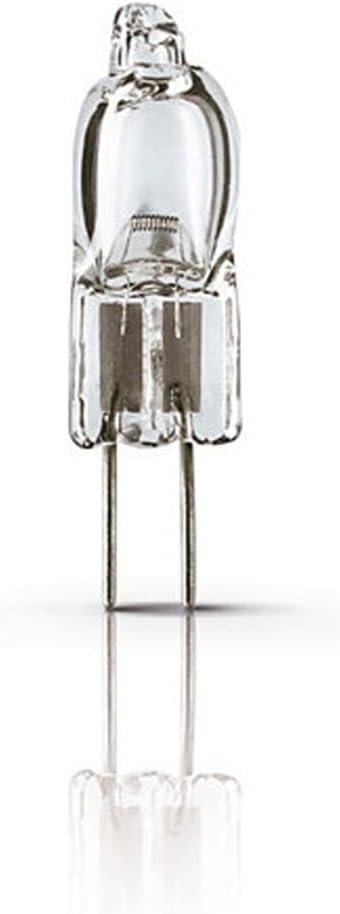
The Philips 7388 halogen bulb is designed to produce a comfortable, warm white light, maintaining its luminous efficiency throughout its operational life. It features a G4 socket and is suitable for various lighting applications.
Maklumat Keselamatan
Sentiasa patuhi langkah keselamatan berikut:
- Matikan: Sentiasa putuskan bekalan kuasa pada lekapan sebelum memasang, menanggalkan atau membersihkan mentol.
- Tangani dengan Berhati-hati: Halogen bulbs can become very hot. Allow the bulb to cool completely before handling.
- Elakkan Hubungan: Do not touch the glass part of the bulb with bare hands. Oils from your skin can create hot spots, leading to premature failure. Use a clean cloth or gloves if necessary.
- Betul Voltage: Pastikan voltan lekapantage matches the bulb's voltage (6 Volts). Using an incorrect voltage can damage the bulb or the fixture.
- Perlawanan yang betul: Use only in fixtures designed for halogen bulbs and with appropriate wattage penilaian.
- Pelupusan: Buang mentol terpakai mengikut peraturan tempatan.
Persediaan dan Pemasangan
Ikuti langkah ini untuk pemasangan yang betul:
- Step 1: Power Disconnection
Ensure the power supply to the lighting fixture is turned off at the circuit breaker or by unplugging the fixture. - Step 2: Remove Old Bulb (if applicable)
If replacing an existing bulb, allow it to cool completely. Gently pull the old G4 bulb straight out from its socket. - Step 3: Prepare New Bulb
Carefully remove the new Philips 7388 bulb from its packaging. Avoid touching the glass envelope with bare hands. If you accidentally touch it, wipe it clean with a lint-free cloth moistened with rubbing alcohol. - Step 4: Insert New Bulb
Align the two pins of the G4 bulb with the holes in the socket. Gently push the bulb straight into the socket until it is fully seated. Do not force it. - Langkah 5: Pulihkan Kuasa
Setelah mentol dipasang dengan selamat, pulihkan kuasa pada lekapan. - Langkah 6: Ujian
Hidupkan suis lampu untuk mengesahkan operasi yang betul.
Arahan Operasi
The Philips 7388 halogen bulb operates immediately upon receiving power. No special operating procedures are required beyond turning the fixture's power switch on or off.
- Peredupan: If used with a compatible dimmer switch, the brightness of the bulb can be adjusted. Ensure the dimmer is rated for halogen or incandescent loads and matches the bulb's voltage dan wattage.
- Keluaran Haba: Halogen bulbs produce heat. Ensure adequate ventilation around the fixture to prevent overheating.
Penyelenggaraan
Minimal maintenance is required for the Philips 7388 halogen bulb.
- Pembersihan: If the bulb becomes dusty, ensure the power is off and the bulb is cool. Gently wipe the glass with a soft, dry, lint-free cloth. Do not use liquid cleaners directly on the bulb.
- Penggantian: When the bulb reaches the end of its life, replace it following the "Setup and Installation" steps. Always use a bulb with the same specifications (20W, 6V, G4 base) to ensure compatibility and safety.
Menyelesaikan masalah
If your Philips 7388 bulb is not functioning as expected, consider the following:
- Mentol Tidak Menyala:
- Periksa sama ada bekalan kuasa ke lekapan dihidupkan.
- Ensure the bulb is correctly seated in the G4 socket.
- Inspect the bulb for any visible damage or a broken filament. If damaged, replace the bulb.
- Test the fixture with a known working bulb to rule out a fixture issue.
- Mentol berkelip:
- Ensure the bulb is fully inserted into the socket.
- Periksa sambungan longgar pada lekapan atau pendawaian.
- If using a dimmer, ensure it is compatible with halogen bulbs and not overloaded.
- Short Bulb Life:
- Sahkan voltage (6V) is being supplied to the bulb. Overvoltage boleh mengurangkan jangka hayat mentol dengan ketara.
- Ensure the bulb is not being touched with bare hands during installation, as skin oils can cause premature failure.
- Check for excessive vibration or heat in the fixture, which can shorten bulb life.
Spesifikasi
Key technical specifications for the Philips 7388 Halogen Bulb:
| Ciri | Spesifikasi |
|---|---|
| Jenama | Pencahayaan Philips |
| Nombor Model | 7388 |
| Jenis Cahaya | Halogen |
| Wattage | 20 Watt |
| Voltage | 6 Volt |
| Fluks Bercahaya | 460 - 475 lm (typical) |
| Socket/Base | G4 |
| Suhu Warna | 3200 - 3350 Kelvin (Warm White) |
| Saiz Bentuk Mentol | JC |
| Indeks Paparan Warna (CRI) | 100 |
| bahan | Copper (pins) |
| Dimensi Produk | 0.35"W x 1.21"H (approx.) |
| Penggunaan Dalaman/Luar | Dalaman |

Waranti dan Sokongan
For warranty information or technical support regarding your Philips 7388 Halogen Bulb, please refer to the official Philips Lighting webtapak atau hubungi perkhidmatan pelanggan mereka secara langsung. Simpan resit pembelian anda sebagai bukti pembelian.
You can visit the Philips Store for more information: Kedai Philips di Amazon
Ask a question about this manual
Ask about setup, troubleshooting, compatibility, parts, safety, or missing instructions. Manuals+ will review the question and use this page’s manual context to help answer it.