
pengenalan
The Westinghouse Saf-T-Brace 0110000 is an all-metal support system designed for securely installing ceiling fans and lighting fixtures. This brace allows for installation from below the ceiling, eliminating the need for attic access. It provides a sturdy foundation for your fixtures, meeting safety standards for various weight capacities.
Maklumat Keselamatan
- Sentiasa matikan kuasa pada pemutus litar sebelum memulakan pemasangan.
- Ensure the brace is securely fastened to ceiling joists according to instructions.
- This brace is UL listed for fixture support up to 150 lbs on 16-inch centers and 50 lbs on 24-inch centers. It is acceptable for fan support up to 70 lbs. Do not exceed these weight limits.
- Consult a qualified electrician if you are unsure about wiring connections.
- Pakai peralatan keselamatan yang sesuai, termasuk pelindung mata, semasa pemasangan.
Kandungan Pakej
Sahkan bahawa semua komponen hadir sebelum memulakan pemasangan:
- Saf-T-Brace (Adjustable metal bar)
- Dual-mount electrical box (15.5 cu. in.)
- Saf-T-Cap (Protective cover)
- Mounting hardware (screws, locknuts, bracket)
- One Romex connector
- Bushing wayar
- Lembaran arahan
Persediaan dan Pemasangan
The Westinghouse Saf-T-Brace is designed for easy installation from below the ceiling. Follow these steps carefully:
Langkah 1: Sediakan Siling
Locate the desired installation spot. Cut a hole in the ceiling large enough to fit the electrical box, typically around 4 inches in diameter. Ensure the hole is positioned between two ceiling joists.

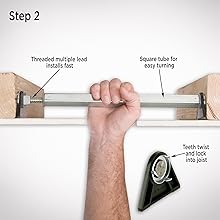
Step 2: Install the Brace Bar
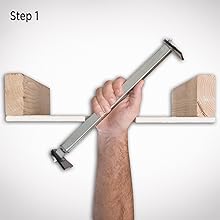
Insert the Saf-T-Brace bar through the hole. Position it so that the ends rest against the ceiling joists. Rotate the bar until the teeth on both ends are fully embedded into the joists, securing the brace firmly in place. The square tube design allows for easy turning and adjustment.
Step 3: Attach Electrical Box and Fixture
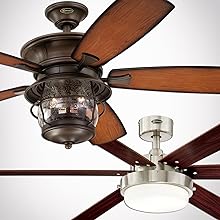
Pull the electrical wires through the appropriate knockout in the electrical box. Secure the electrical box to the brace using the provided mounting hardware. The box features a strong magnet for hands-free installation. Once the box is secure, install your ceiling fan or lighting fixture according to its manufacturer's instructions. Use the 10-24 threads for heavier fans and fixtures, and 8-32 threads for cover plates or lightweight lighting fixtures.
Panduan Video Pemasangan
This video provides a visual guide to installing the Westinghouse Saf-T-Brace for ceiling fans and lighting fixtures. It demonstrates the process of inserting the brace, securing it to joists, and attaching the electrical box.
Spesifikasi
| Jenama | Westinghouse |
| Nombor Model | 0110000 |
| bahan | logam |
| warna | Perak |
| Dimensi Item (L x W x H) | 4 x 15 x 3 inci |
| Berat Barang | 1.9 paun |
| Electrical Box Capacity | 15.5 inci padu |
| Fixture Support (16-inch centers) | Sehingga 150 lbs |
| Fixture Support (24-inch centers) | Sehingga 50 lbs |
| Sokongan Peminat | Sehingga 70 lbs |
| Jenis Pemasangan | Pemasangan Siling |
| UL Tersenarai | ya |
Penyelenggaraan
The Westinghouse Saf-T-Brace is designed for long-term durability and requires minimal maintenance. Periodically inspect the installation for any signs of loosening or damage. Ensure all connections remain secure. No lubrication or specific cleaning is required for the brace itself.
Menyelesaikan masalah
Jika anda menghadapi masalah semasa atau selepas pemasangan, pertimbangkan perkara berikut:
- Brace not securing: Ensure the joists are within the 16-24 inch range and that the teeth are fully engaged by twisting the bar.
- Kipas bergoyang: A slight wobble can sometimes occur with ceiling fans. Ensure the brace is installed level and securely. Refer to your fan's instruction manual for balancing procedures.
- Isu elektrik: If the fan or light fixture does not operate, recheck all electrical connections. Ensure power is restored at the circuit breaker. If problems persist, consult a qualified electrician.
Maklumat Waranti
Westinghouse offers an ultimate lifetime warranty for this product. If the Saf-T-Brace is found to be defective due to faulty materials or workmanship, Westinghouse will repair or replace the product for its lifetime.
Sokongan
For further assistance or inquiries, please visit the official Westinghouse website or contact their customer support. Refer to the packaging or official webtapak untuk maklumat hubungan terkini.
rasmi Webtapak: www.westinghouselighting.com