
Casio HR100TEPLUS
Casio HR-100TEPlus Printing Calculator User Manual
Model: HR100TEPLUS
pengenalan
This manual provides comprehensive instructions for the operation and maintenance of your Casio HR-100TEPlus Printing Calculator. Designed for efficiency, this calculator features a 12-digit display, two-color printing at 1.3 lines per second, and specialized functions for tax and currency exchange. Please read this manual thoroughly to ensure proper use and to maximize the lifespan of your device.
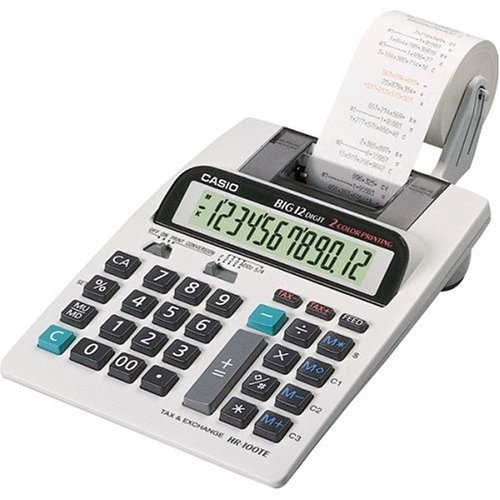
Image: The Casio HR-100TEPlus Printing Calculator, showcasing its full keypad, 12-digit LCD display, and integrated paper roll for printing calculations. The device is white with black and teal buttons.
Persediaan
1. Bekalan Kuasa
- Penyesuai AC: Connect the included AC adapter to the calculator's power input jack and then to a standard electrical outlet.
- Kuasa Bateri (Pilihan): For portable use, insert four AA batteries into the battery compartment located on the underside of the calculator. Ensure correct polarity (+/-).
2. Pemasangan Gulungan Kertas
- Open the printer cover by gently lifting it.
- Place a new paper roll onto the paper roll holder, ensuring the paper feeds from the bottom of the roll.
- Feed the leading edge of the paper into the printer slot until it emerges from the top.
- Tutup penutup pencetak dengan selamat.
- Tekan ke MAKAN button to advance the paper and ensure it is properly loaded.
3. Ink Roller/Ribbon Installation (If applicable)
The HR-100TEPlus uses a two-color printing system, which typically involves an ink roller or ribbon. Refer to the diagram inside the printer compartment for specific instructions on replacing the ink roller/ribbon. Ensure the ink roller is correctly seated for clear, two-color printing.
Arahan Operasi
Operasi Asas
- Hidupkan/Mati Kuasa: Gunakan HIDUP/MATI switch (if present) or press AC (All Clear) to turn on. The calculator may automatically power off after a period of inactivity.
- Entri Nombor: Masukkan nombor menggunakan papan kekunci angka.
- Operasi Aritmetik: guna +, -, x, ÷ untuk penambahan, penolakan, pendaraban dan pembahagian. Tekan = untuk mendapatkan hasilnya.
- Kosongkan Entri (C): Mengosongkan nombor atau operasi terakhir yang dimasukkan.
- Semua Jelas (CA): Clears all entries and calculations, resetting the calculator.
- Pemilih Perpuluhan: Adjust the decimal point setting (floating or fixed 0-3 places) using the slide switch.
- Rounding Selector: Set rounding up, down, or off using the slide switch.
Fungsi Memori
- Memori Plus (M+): Menambah nilai yang dipaparkan ke memori.
- Tolak Memori (M-): Menolak nilai yang dipaparkan daripada ingatan.
- Ingatan Ingatan (MR): Mengingat semula nilai yang disimpan dalam memori ke paparan.
- Kosongkan Memori (MC): Clears the memory content.
Fungsi Khusus
- Markup/Markdown (MU/MD): Used for calculating selling prices based on cost and desired profit margin, or for markdown calculations.
- Pengiraan Cukai (CUKAI+/CUKAI-): Allows for easy addition or subtraction of a pre-set tax rate. To set the tax rate, refer to the full instruction manual or manufacturer's webtapak.
- Currency Exchange: The calculator includes a currency exchange function. To use this, you will need to set the exchange rate. Consult the full manual for detailed steps on setting and using exchange rates.
- Percent (%): Digunakan untuk peratusantage pengiraan.
Penyelenggaraan
Pembersihan
To clean the calculator, wipe the exterior with a soft, dry cloth. For stubborn dirt, a slightly damp kain dengan detergen lembut boleh digunakan, memastikan tiada cecair memasuki peranti. Jangan gunakan pembersih atau pelarut yang kasar.
Penggantian Gulungan Kertas
When the paper roll runs out or the print becomes faint, replace it following the steps outlined in the "Paper Roll Installation" section under Setup. Use thermal paper rolls compatible with the Casio HR-100TEPlus.
Ink Roller/Ribbon Replacement
If the two-color printing becomes faded or inconsistent, the ink roller/ribbon may need replacement. Specific replacement instructions are usually found within the printer compartment or in the detailed manual provided by Casio. Ensure you use genuine Casio replacement parts for optimal performance.
Menyelesaikan masalah
| Masalah | Kemungkinan Punca | Penyelesaian |
|---|---|---|
| No display or calculator does not turn on. | No power, low batteries, or AC adapter not connected. | Periksa sambungan penyesuai AC. Gantikan bateri jika menggunakan kuasa bateri. Pastikan bateri dimasukkan dengan kekutuban yang betul. |
| Printer not printing or print is faint. | Paper roll empty, paper not loaded correctly, or ink roller/ribbon needs replacement. | Replace paper roll. Re-load paper correctly. Replace ink roller/ribbon. |
| Keputusan pengiraan yang salah. | Incorrect decimal or rounding settings, or previous calculation not cleared. | Check decimal and rounding slide switches. Press CA to clear all previous operations. |
| Kertas tersekat. | Paper not inserted straight, or wrong paper size/type. | Remove jammed paper carefully. Ensure paper is inserted straight and is the correct size for the printer. |
Spesifikasi
- Nama Model: Casio HR-100TEPlus
- Nombor Model Item: HR100TEPLUS
- Jenama: Casio
- Jenis Kalkulator: Mencetak
- Jenis Paparan: LCD, 12 digit
- Kelajuan Mencetak: 1.3 baris sesaat
- Warna Percetakan: Two-color
- Sumber Kuasa: AC Adapter (included), 4 x AA Batteries (optional)
- Berat Barang: 1 paun
- Dimensi Produk: 12.3 x 7.5 x 2.6 inci
- ASIN: B00006IF9X
- Tarikh Mula-mula Tersedia: 2 Jun 2007
Waranti dan Sokongan
For warranty information and technical support, please refer to the official Casio weblaman web atau kad jaminan yang disertakan dengan produk anda. Anda juga boleh melayari Kedai Casio di Amazon untuk sumber tambahan dan maklumat produk.
Ask a question about this manual
Ask about setup, troubleshooting, compatibility, parts, safety, or missing instructions. Manuals+ will review the question and use this page’s manual context to help answer it.