
pengenalan
Terima kasih kerana membeliasing the AIWA CS-P700 Portable Stereo Cassette and Radio. This manual provides essential information for the safe and efficient operation of your device. Please read it thoroughly before use and retain it for future reference.
Maklumat Keselamatan Penting
- Jangan dedahkan unit kepada hujan atau lembapan.
- Elakkan suhu yang melampau.
- Jangan buka casing; rujuk servis kepada kakitangan yang berkelayakan.
- Gunakan hanya sumber kuasa yang ditentukan.
- Jauhkan daripada medan magnet yang kuat.
Kandungan Pakej
Pastikan semua barang ada:
- AIWA CS-P700 Portable Stereo Cassette and Radio unit
- AC Power Cord (if applicable)
- Manual Pengguna (dokumen ini)
Produk Selesaiview
The AIWA CS-P700 is a portable stereo system featuring an AM/FM radio tuner and a cassette recorder/player. It offers full-range stereo sound through two built-in speakers and includes a headphone jack for private listening.
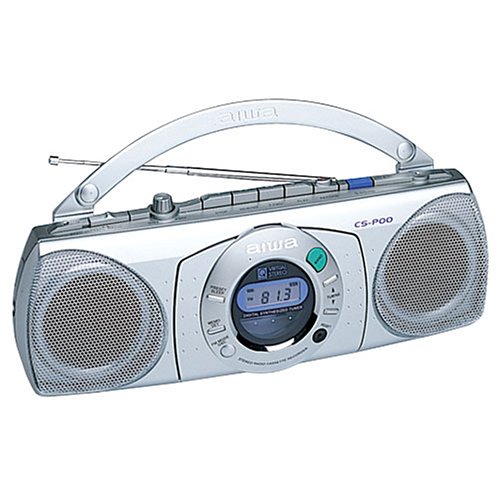
Rajah 1: Depan view of the AIWA CS-P700 Portable Stereo Cassette and Radio. This image shows the main unit with its controls, cassette deck, and speaker grilles.
Persediaan
Menguasai Unit
The CS-P700 can be powered by AC power or batteries.
- Kuasa AC: Connect the AC power cord to the AC inlet on the unit and then to a standard wall outlet.
- Kuasa Bateri: Open the battery compartment and insert the required number of batteries, ensuring correct polarity.
Menyambung Fon Kepala
For private listening, plug a standard 3.5mm stereo headphone jack into the headphone port located on the unit.
Arahan Operasi
Operasi Radio
The unit features a digitally synthesized AM/FM radio tuner with up to 20 programmable stations.
- Hidupkan: Tekan butang Kuasa.
- Pilih Band: Press the AM/FM button to switch between AM and FM bands.
- Stesen-stesen Tala: Use the Tuning Up/Down buttons to manually tune to a station. For automatic scanning, press and hold the Tuning Up/Down button.
- Program Presets: To store a station, tune to the desired frequency, then press the "Memory" or "Program" button followed by a preset number button (1-20).
- Ingat Pratetap: Press the desired preset number button to recall a stored station.
- Laraskan Kelantangan: Use the Volume control knob or buttons.
Cassette Player/Recorder Operation
The CS-P700 includes a cassette deck with recording and auto-stop functions.
- Masukkan Kaset: Press the "Eject" button to open the cassette compartment. Insert a cassette tape with the open edge facing upwards and the tape side facing the heads. Close the compartment firmly.
- Main balik: Press the "Play" button.
- Maju Pantas/Putar Balik: Press the "FF" (Fast Forward) or "REW" (Rewind) buttons. Press "Stop" to halt.
- Berhenti: Press the "Stop" button. The auto-stop feature will automatically stop playback or recording at the end of the tape.
- Rakaman:
- Ensure a blank or recordable cassette is inserted.
- Select the desired audio source (e.g., radio, built-in microphone).
- Press the "Record" button (usually red) simultaneously with the "Play" button.
- To record from the built-in microphone, ensure the microphone is facing the sound source.
- Press "Stop" to end recording.
Penyelenggaraan
Membersihkan Unit
- Lap bahagian luar dengan kain lembut dan kering.
- Jangan gunakan pembersih atau pelarut yang melelas.
Cassette Deck Maintenance
- Bersihkan kepala pita, penggelek picit dan kapstan secara berkala dengan kapas yang dilap perlahan-lahanampditambah dengan isopropil alkohol.
- Demagnetize the tape heads regularly to ensure optimal sound quality.
Menyelesaikan masalah
| Masalah | Kemungkinan Punca | Penyelesaian |
|---|---|---|
| Tiada kuasa | Kord AC tidak disambungkan; Bateri habis atau salah dimasukkan. | Periksa sambungan AC; Gantikan bateri atau pastikan polariti yang betul. |
| Tiada suara dari pembesar suara | Kelantangan terlalu rendah; Fon kepala disambungkan; Fungsi redam aktif. | Increase volume; Disconnect headphones; Check for mute button. |
| Penerimaan radio yang lemah | Antena tidak dilanjutkan; Isyarat lemah; Gangguan. | Extend and adjust the telescopic antenna; Move unit to a better location; Avoid sources of interference. |
| Pita kaset tidak dimainkan/rakam | Tape incorrectly inserted; Tape jammed; Heads dirty. | Re-insert tape correctly; Check for tape damage; Clean tape heads. |
Spesifikasi
| Jenama | Tidak |
| Nombor Model | CSP700 |
| Jenis Pembesar Suara | Stereo |
| warna | Perak |
| Berat Barang | 1.36 kg |
| Dimensi Pakej | 25.4 x 25.4 x 12.7 cm |
| Penala | Digitally synthesized AM/FM |
| Dek Kaset | Recorder and Player with Built-in Microphone and Auto-stop |
| Bicu Fon Kepala | ya |
Waranti dan Sokongan
Untuk maklumat jaminan dan sokongan teknikal, sila rujuk kad jaminan yang disertakan dengan produk anda atau lawati laman web rasmi Aiwa. webtapak. Simpan resit pembelian anda sebagai bukti pembelian.