
1. Pengenalan
This manual provides essential information for the safe and efficient operation of your Crosley WR18 Mini Bubbler Jukebox. Please read these instructions thoroughly before using the unit and retain them for future reference.
The Crosley WR18 is a reproduction of a 1946-style jukebox, featuring percolating bubble tubes, neon lights, a front-loading compact disc player, FM radio, and stereo speakers. It is operated primarily via a 12-button remote control.
2. Arahan Keselamatan
- Jangan dedahkan unit kepada hujan atau lembapan.
- Jangan sekat sebarang bukaan pengudaraan.
- Pastikan unit diletakkan pada permukaan yang stabil dan rata.
- Cabut palam unit semasa ribut petir atau apabila tidak digunakan untuk tempoh yang lama.
- Rujuk semua servis kepada kakitangan perkhidmatan yang berkelayakan.
3. Persediaan
3.1 Membongkar dan Meletakkan
Carefully remove the jukebox from its packaging. Place the unit on a flat, stable surface away from direct sunlight, heat sources, and excessive dust or moisture. Ensure there is adequate space around the unit for ventilation.
3.2 Sambungan Kuasa
Connect the AC power cord to the power input on the back of the unit, then plug it into a standard wall outlet. The unit is designed for 120V AC, 60Hz power supply.
3.3 Persediaan Kawalan Jauh
Insert two AAA batteries (not included) into the remote control, observing the correct polarity. The remote control is essential for operating most functions of the jukebox.
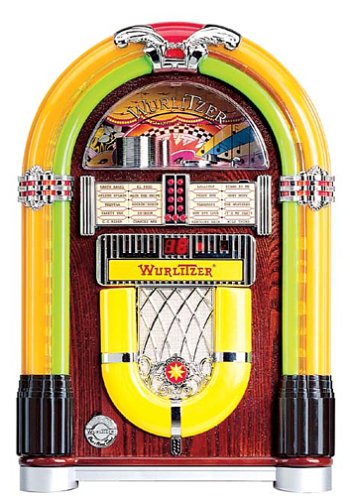
Rajah 1: Depan view of the Crosley WR18 Mini Bubbler Jukebox. This image shows the main unit with its distinctive bubble tubes, neon lights, and speaker grilles. The CD player slot is visible below the main display area.
4. Arahan Operasi
4.1 Hidupkan/Mati Kuasa
Tekan ke KUASA butang pada alat kawalan jauh untuk menghidupkan atau mematikan unit.
4.2 Operasi Pemain CD
- Tekan ke CD button on the remote to select CD mode.
- Tekan ke BUKA/TUTUP button on the remote to open the CD tray.
- Place a compact disc, label side up, into the tray.
- Tekan BUKA/TUTUP again to close the tray. The unit will begin reading the disc.
- Gunakan MAIN/JEDA butang untuk memulakan atau menjeda main semula.
- Gunakan Langkau ke Hadapan (|>>) atau SKIP KE BELAKANG (<<|) butang untuk menavigasi antara trek.
- The PROGRAM function allows you to create a custom playback order for tracks. Refer to the remote control diagram for specific programming steps.
- The ULIKAN function allows you to repeat the current track or the entire disc.
4.3 Operasi Radio FM
- Tekan ke FM button on the remote to select FM radio mode.
- Extend the external FM antenna located at the back of the unit for optimal reception. Adjust its position for clearer sound.
- Gunakan TUNE UP (+) atau TUNE BAWAH (-) buttons on the remote to manually tune to desired radio stations.
4.4 Kawalan Kelantangan
Laraskan kelantangan menggunakan VOLUME NAIK (+) dan JILID TURUN (-) buttons on the remote control. Note that all volume adjustments are made via the remote.
4.5 Neon Lights and Bubble Tubes
The genuine multicolored neon lights and percolating bubble tubes activate automatically when the unit is powered on, enhancing the retro aesthetic. There are no separate controls for these features.
5. Penyelenggaraan
5.1 Membersihkan Kabinet
Wipe the handcrafted hardwood cabinet with a soft, dry cloth. For stubborn marks, a slightly damp kain boleh digunakan, diikuti dengan pengeringan segera. Elakkan pembersih atau pelarut yang melelas.
5.2 Penjagaan Pemain CD
To ensure optimal performance, keep the CD tray and lens clean. Use a specialized CD lens cleaner disc periodically. Avoid touching the CD lens directly.
5.3 Bubble Tubes and Neon Lights
The bubble tubes and neon lights are sealed units and require no user maintenance. If any issues arise with these components, contact customer support.
6. Penyelesaian masalah
| Masalah | Kemungkinan Punca | Penyelesaian |
|---|---|---|
| Tiada kuasa | Kord kuasa tidak disambungkan; soket tidak aktif | Pastikan kord kuasa dipasang dengan kukuh; uji soket dengan peranti lain. |
| Tiada bunyi | Volume too low; incorrect mode selected | Increase volume using remote; ensure correct mode (CD/FM) is selected. |
| CD tidak dimainkan | Disc inserted incorrectly; disc dirty/scratched; CD mode not selected | Reinsert disc correctly; clean disc; select CD mode. |
| Penerimaan FM yang lemah | Antenna not extended/positioned correctly | Fully extend and adjust the external FM antenna. |
| Alat kawalan jauh tidak berfungsi | Batteries depleted; line of sight blocked; remote malfunction | Replace batteries; ensure no obstructions between remote and unit; if remote remains unresponsive, contact customer support as many functions are remote-only. |
7. Spesifikasi
- Nombor Model: WR18
- Dimensi Produk: 12 x 22 x 16 inches (Width x Height x Depth)
- Berat Barang: 16.8 paun
- Pengeluar: Radio Crosley
- Ciri-ciri audio: Stereo sound with two 4-inch speakers and built-in amplebih hidup
- Main balik Media: CD player with program and repeat functions, FM radio with external antenna
- Ciri-ciri estetik: Handcrafted hardwood cabinet, genuine multicolored neon lights, bubble tube accents
- Kawalan: 12-button mini jukebox remote control
8. Waranti dan Sokongan
The Crosley WR18 Mini Bubbler Jukebox typically comes with a manufacturer's warranty. Based on user reports, the Crosley warranty period is 90 days. Please note that for warranty service, you may be responsible for shipping the unit back to the manufacturer and an additional fee for return shipping and handling after repair.
For technical support, warranty claims, or service inquiries, please contact Crosley Radio customer service directly. Refer to the contact information provided with your product packaging or visit the official Crosley webtapak untuk mendapatkan butiran sokongan terkini.